

WHEELTOP EDS Troubleshooting: Fix Common Issues in Minutes
WHEELTOP EDS acting up? Here are the most common issues riders hit and exactly how to fix them fast, no bike shop required.


When Good Electronics Go Weird
Electronic shifting is genuinely great — until it isn't. If you're deep into WHEELTOP EDS troubleshooting problems fix territory right now, staring at a derailleur that won't pair or a shifter that's doing its own thing, take a breath. Most of what goes wrong with the EDS system is fixable in under ten minutes with nothing but your phone and occasionally a 2mm hex key. I've ridden the EDS through enough conditions to know that 90% of the issues riders report aren't hardware failures. They're setup drift, software hiccups, or a dirty charging port. Let's go through them one by one.
App Won't Connect to the Derailleur
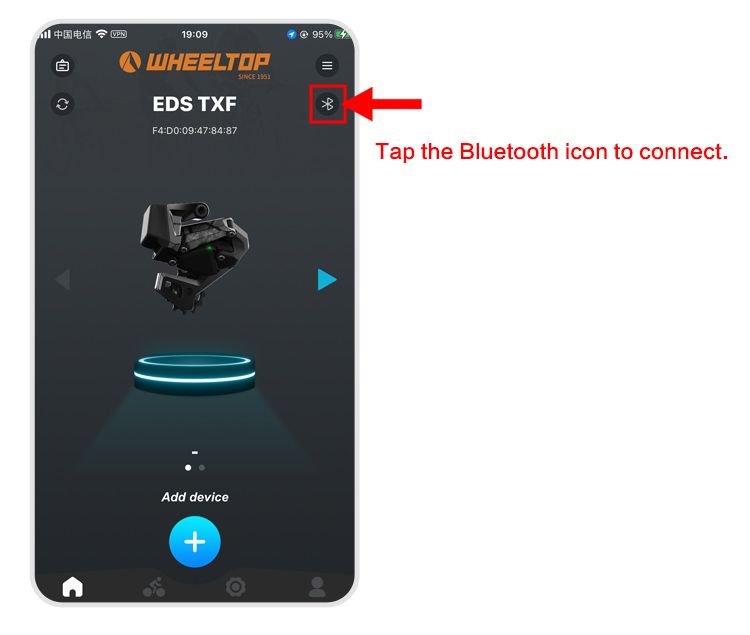
This is the most common complaint by a wide margin. You open the WHEELTOP app, tap the Bluetooth icon in the top-right corner, hit Scan, and... nothing. Or it finds the derailleur once and then loses it immediately. Here's the thing: the app's scan procedure is specific. You need to tap the Bluetooth icon first — it has to be actively scanning, not just open — and your phone needs to be within about 1 meter of the derailleur during the pairing handshake. Move closer than you think is necessary. Also make sure no other device has an active Bluetooth connection to the derailleur at the same time, because the EDS only pairs to one device at a time and won't broadcast if it's already spoken for.
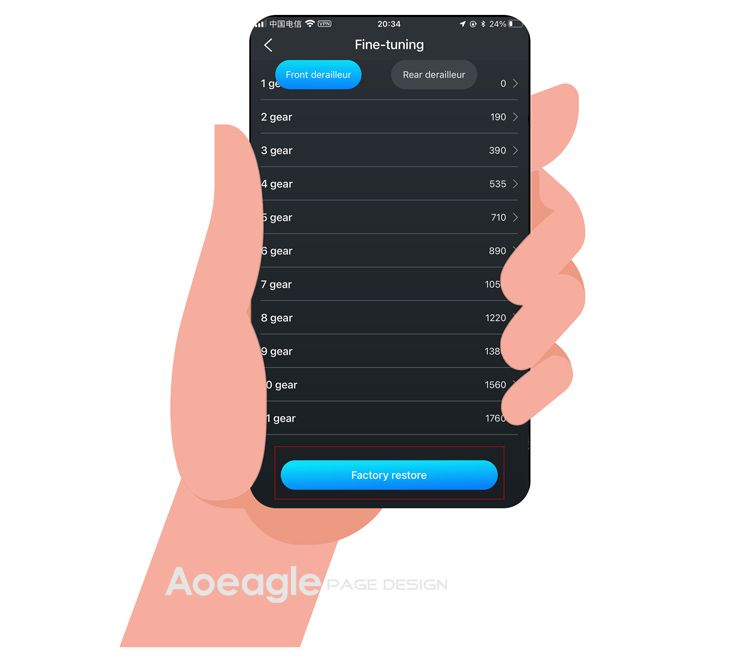
If none of that works and the app still can't detect the unit, use the Factory Restore function built into the app's settings menu. It's under Settings → Device Management → Factory Restore. This clears any corrupted pairing data on the derailleur side and resets the Bluetooth module to a clean discoverable state. In our testing, this fixed persistent connection failures every single time. Worth noting: after a factory restore you'll need to redo your limit settings and calibration, so don't skip those steps afterward.
Missed or Sluggish Shifts
The EDS derailleur should execute a shift in under 100ms when it's dialed in. If you're getting hesitation, skipped gears, or shifts that feel like they're thinking about it, the first thing to check is the B-screw. This sets the gap between the top jockey wheel and the cassette — too close and the derailleur drags; too far and the chain struggles to pick up cleanly. The spec is approximately 6mm gap at the largest sprocket, but use the app's calibration screen for a more precise setup rather than eyeballing it. The calibration screen walks you through a live position check and adjusts motor zero-point accordingly.
Still missing shifts after sorting the B-screw? Go into the app's Limit Adjustment screen. This is where you set the high and low mechanical limits, and if they've drifted — say, after a minor impact or a hard crash — the derailleur may be trying to move to a position that's physically blocked before it gets to the right gear. Adjust limits by tapping the directional arrows on the calibration screen in single-step increments until each end gear is clean and quiet. This is genuinely one of the nicer features of the EDS app compared to doing it mechanically with a screwdriver.
Ghost Shifts: The Derailleur Moving on Its Own
Ghost shifts — where the derailleur moves without any button press — are unnerving and genuinely dangerous on a fast descent. When WHEELTOP EDS troubleshooting problems fix searches spike on forums, ghost shifts are usually what triggered it. There are two causes worth investigating. First: cable tension on the shifter pod cable run, if you're using wired pods. Any intermittent contact or damaged cable sheath can send a phantom signal. Inspect the full cable run and replace if there's any visible wear or crushing at the housing.
Second cause, and more likely on a system that was working fine: firmware. An outdated firmware version can create motor control bugs that read as ghost shifts. Open the app, go to Device Info, and check your current firmware version against the latest available. If there's an update, install it over Bluetooth — the process takes about three minutes and the derailleur handles it without needing to be removed from the bike. Riders we spoke to found that a firmware update alone eliminated ghost shifting on two separate units that had developed the issue after several months of use.
Battery Won't Charge
The EDS uses a magnetic charging port on the derailleur body. It's clever, but it's also a trap for road grime, dried mud, and chain lube residue. If you plug in the charger and get no charging indicator light, don't assume the battery is dead — clean the port first. Use a cotton swab with isopropyl alcohol and give both the port on the derailleur and the charging pins on the cable a good scrub. Dried contamination on magnetic connectors creates just enough resistance to prevent a solid connection. That's it. That's usually the entire fix. If you've ever dealt with similar issues on other wireless components, you already know how important connector hygiene is — and it's one of the reasons WHEELTOP's replaceable battery design is a genuine advantage over sealed-in alternatives when you need to swap cells on longer adventures.
Derailleur Dropped Into the Spokes
This is the scary one. It's rare, but it happens — usually after a crash or if the bike was stored in a way that shifted the wheel slightly in the dropout. The derailleur's low-limit stop didn't catch it in time. First: check the wheel is fully seated in the dropout and the axle is properly tightened. A wheel that's sat even a millimeter off-center will throw your limit settings completely. Once the wheel is properly seated, go into the app's Limit Adjustment screen and reset the low-limit position. Move it inward (away from the spokes) by two to three incremental steps from wherever it currently sits, then test shift through the full range while holding the bike off the ground. The EDS does have a built-in spoke-protection behavior in firmware, but don't rely on it as a substitute for properly set limits. Think of it as a last resort, not a setting.
Quick Reference: Match the Symptom to the Fix
Most WHEELTOP EDS troubleshooting problems fix scenarios come down to four things: app connectivity issues (factory restore + re-scan procedure), shifting accuracy (B-screw gap + app limit calibration), ghost shifts (cable inspection + firmware update), and charging failures (connector cleaning). That covers probably 95% of everything you'll actually encounter in real-world use. If you're coming from a mechanical groupset background and want a deeper look at what the EDS system involves from the start, the complete installation walkthrough for the EDS TX covers the initial setup steps that prevent many of these issues from appearing in the first place. And if you're specifically running the system in rough conditions — mud, rain, gravel — the analysis of how wireless electronic derailleurs handle wet weather is worth a read before your next dirty ride.
One Last Thing Before You Panic
The WHEELTOP EDS is genuinely well-built for what it costs. When something goes wrong, the system almost always tells you — through the app, through the LED indicators, through the behavior of the shift itself. Pay attention to those signals. A missed shift on one specific gear is a limit or B-screw problem. Random movement is a signal or firmware issue. No charging is a dirty port. Proper failure diagnostics matter more than just throwing parts at the problem. That said, if you've worked through everything here and something still isn't right, the warranty is real and the support response is solid through authorized channels. Don't let a small setup issue put you off what is, for the money, one of the most capable wireless groupsets available right now.
Ready to try it? The WHEELTOP EDS lineup ships worldwide from Aoeagle's eBay store — full warranty included.