Skip to content
Free chain with selected WHEELTOP kits · Ends Dec 1

WHEELTOP EDS GeX Wireless Electronic Gravel Groupset, 1x, Hydraulic Disc Brake

Free chain included — choose your speed

Added at $0 when you add this kit to cart. One per order, ships with your kit. Ends Dec 1.

Free chain speed

Brake Type
Derailleur Cage Length
$419.00
In Stock

Questions before you buy? Email us · We reply within 24 hours.
WHEELTOP EDS GeX

A fully wireless electronic groupset engineered specifically for gravel and mixed-terrain riding. 800mAh rechargeable derailleur battery, IP67 weather sealing, 3–14 speed compatibility — purpose-built for adventure beyond the pavement. Ships with integrated hydraulic brake-shifter levers and RA7800 disc calipers.

Before you order, please check

Cassette

Up to 52T largest cog.

Brakes

Flat mount frame and fork only, not post mount. 160mm rotors only.

UDH frames

The derailleur mounts on a UDH hanger, not as a direct mount. A small number of frames may have clearance issues at the smallest cog.

Shipping

Duties Prepaid (DDP) to Listed Countries

Orders to the United States, the United Kingdom, EU countries, Australia, New Zealand, Switzerland and Norway ship DDP (Delivered Duty Paid): we prepay import duties and taxes, so nothing extra is collected at delivery. Canada: duties included; GST/HST is added at checkout. For any other destination, import duties and taxes are paid by the buyer on delivery.

The complete shift kit

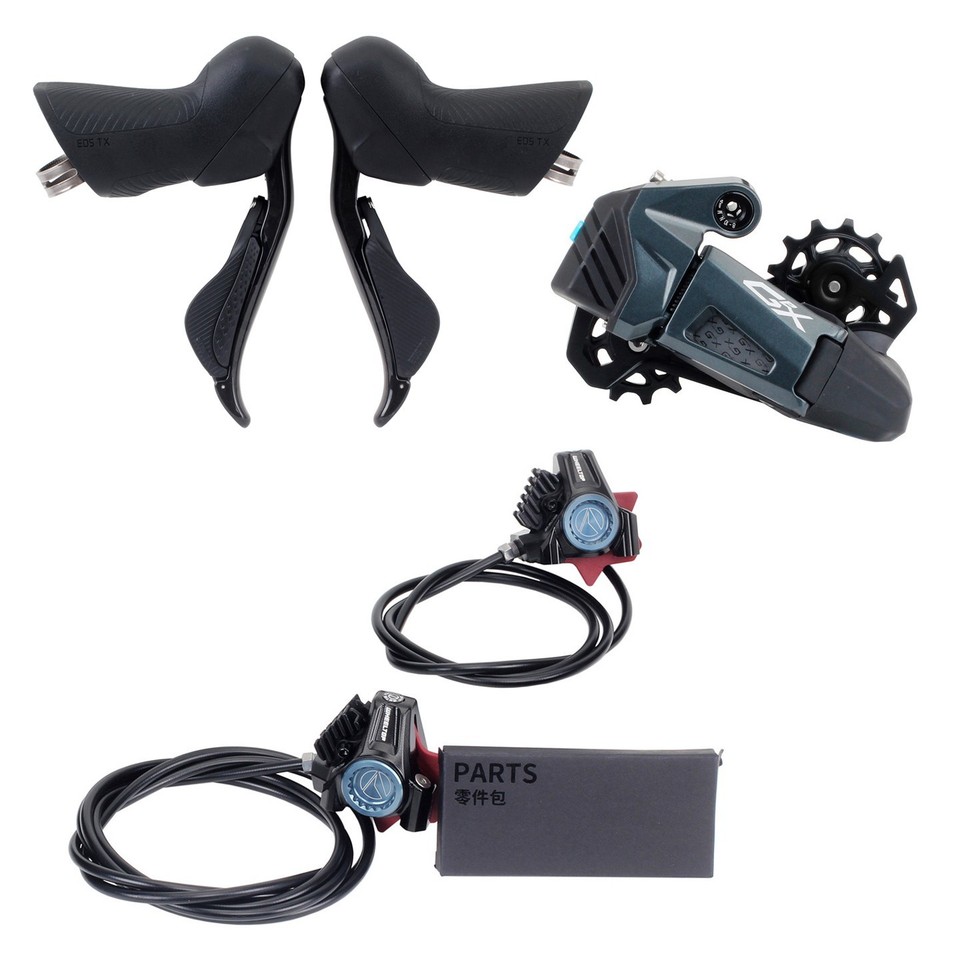
WHEELTOP EDS GeX wireless electronic gravel groupset — rear derailleur, hydraulic brake-shifter levers and RA7800 disc calipers

In the box

EDS GeX Electronic Rear Derailleur

Hydraulic Brake-Shifter Lever — Left

Hydraulic Brake-Shifter Lever — Right

RA7800 Disc Calipers — Front + Rear

Rear Derailleur & Hydraulic Brake-Shifter — Built for Gravel

Wheeltop EDS GeX rear derailleur

EDS GeX Electronic Rear Derailleur

Powered by an 800mAh built-in rechargeable battery, the GeX delivers approximately 20,000 shifts per charge — months of riding between top-ups for most gravel cyclists. The magnetic snap-on charging connector makes top-ups effortless — no exposed port, no cover to lose. The IP67-rated sealed housing keeps mud, water, and grit out at all times. Available in two cage lengths: 75mm Medium Cage (up to 42T) or 93mm Long Cage (up to 52T).

Internal Chain Damper

A precision-engineered damping system suppresses chain slap and prevents dropped chains on rough gravel, washboard roads, and mixed-terrain surfaces — keeping your drivetrain quiet and controlled when the going gets rough.

Major upgrade — now standard

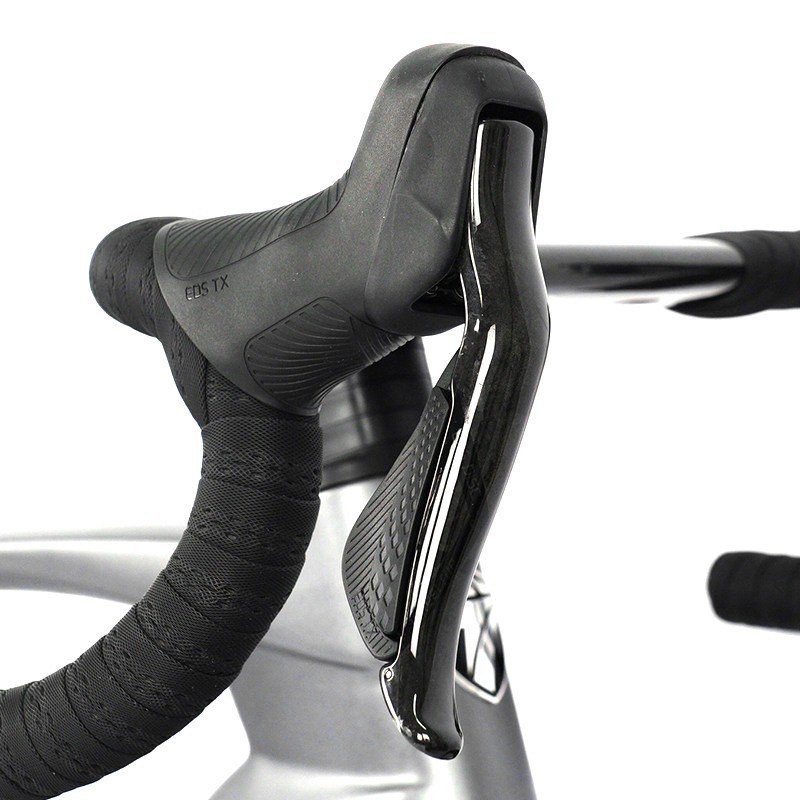
The brake-shifter lever body is now carbon fiber — lighter and stiffer than the previous aluminum alloy version — a major upgrade.

Wheeltop EDS GeX carbon fiber hydraulic brake-shifter lever

Integrated Hydraulic Brake-Shifter

The GeX shifter unifies electronic gear control and hydraulic braking in one ergonomic lever body. Shift up or down with a button press — the derailleur responds with zero cable lag. The hydraulic circuit delivers powerful, modulated stopping power running on mineral oil. Lever reach is adjustable up to 8mm. IP65 rated against water jets and dust.

Shifting

Wireless Electronic

No cables, instant actuation

Braking

Hydraulic Disc

Mineral oil

Weather

IP65 Sealed

Water jet & dust resistant

Battery

CR2032

Tool-free coin cell swap

EDS GeX carbon fiber lever body detail close-up

Carbon Fiber Body — Light, Stiff, Precise.

The carbon fiber lever body is high-grade cold-laminated carbon fiber. The woven surface texture holds grip through wet descents without repositioning. The shift button sits exactly at thumb reach: index finger pulls the brake lever, thumb taps the shift button — no hand movement required.

One Lever, Two Functions.

Brake and shift from the same contact point. The lever body handles the brake pull, the button handles the gear command — both without taking your fingers off the bar.

Left Lever

223.2g

Right Lever

223.6g

Material

Carbon Fiber

Upgrade

Major — was Aluminum

RA7800 Hydraulic Disc Brake Calipers

CNC-machined unibody calipers with 21mm dual ceramic pistons — consistent, powerful braking in all conditions.

Wheeltop RA7800 hydraulic disc brake caliper

Ceramic Pistons. Unibody CNC Body.

The RA7800 caliper body is machined from a single aluminum block — no seams, no flex under hard braking. Twin 21mm ceramic pistons deliver excellent heat resistance and a consistent bite point across long descents. A unidirectional oil circuit ensures smooth, progressive lever feel from light modulation through to full stop.

Shimano Pad Compatible

Compatible with Shimano L04C, L05A, L04A, BR-RX810, and IIPRO-GLYS brake pads — widely available worldwide and easy to source at any bike shop.

RA7800 caliper detail — ceramic pistons and flat mount

Pre-Bled. Ready to Ride.

Hoses are pre-cut and pre-bled from the factory: 900mm for the front, 1,550mm for the rear. Unbox, install, ride. The mineral oil system is non-corrosive and easy to maintain at home.

Front Weight

135 ± 10g

CNC unibody aluminum

Rear Weight

170 ± 10g

CNC unibody aluminum

Fluid

Mineral Oil

Non-corrosive, stable feel

WHEELTOP RA7800 mineral oil hydraulic brake fluid

Full Control from Your Phone

Download the WHEELTOP app to pair, tune, and monitor your groupset — all from your handlebars.

WHEELTOP app searching for and adding the EDS GeX device
WHEELTOP app connecting and showing rear derailleur, left shifter and right shifter with battery levels

Step 1

Pair Your Components

Open the WHEELTOP app and tap + Start Using. It searches for nearby EDS GeX components over Bluetooth, showing a Searching for devices screen. Once your derailleur turns up, select EDS GeX and tap Finish — the app connects automatically, showing an Accessing data… prompt while it pairs — just keep the derailleur powered on and within range. When it's done, the home screen lists all three components — rear derailleur, left brake-shifter, and right brake-shifter — each showing its live battery reading, with the derailleur card also listing firmware version and MAC address.

Three Components, One Clean View

Rear derailleur, left brake-shifter, and right brake-shifter — all three show live charge level on the same home screen before every ride.

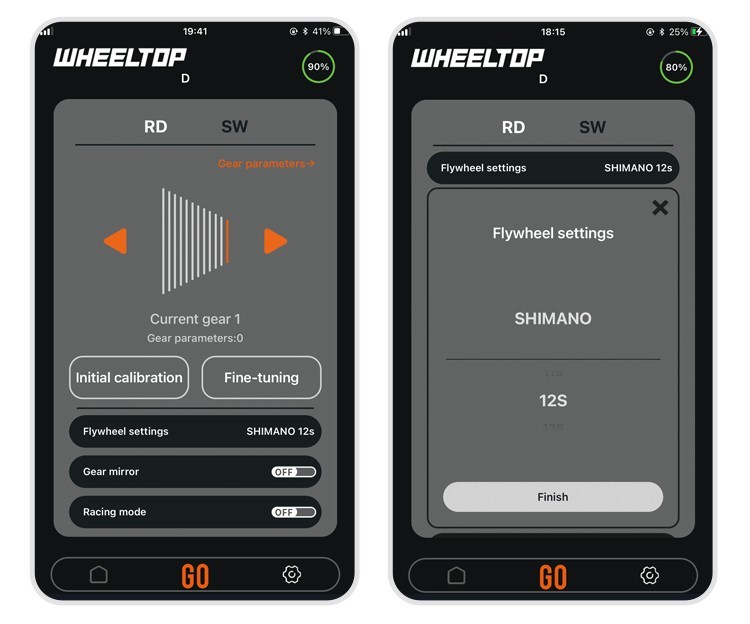
WHEELTOP app rear derailleur control screen and flywheel settings

Step 2

Set Your Cassette Speed

Open the RD tab to view current gear position, then tap Flywheel settings and select your cassette's brand and speed count so the derailleur knows exactly how many gears to index across.

Not Locked to One Speed Count

Unlike a mechanical derailleur built for one fixed speed, EDS GeX is fully configurable — set whatever speed count you're running, from 3-speed to 14-speed, directly in the app.

WHEELTOP app initial calibration screen

Step 3

Run Initial Calibration

Shift the rear derailleur onto the smallest freewheel position, tap Next step, then use the on-screen controls to fine-align the guide pulley under the smallest sprocket.

Guided On-Screen Alignment

No guesswork — use the on-screen +R / −L controls to nudge the guide pulley until it sits precisely under the smallest sprocket, then tap Finish.

WHEELTOP app fine-tuning screen and manual gear position parameters

Step 4

Fine-Tune Every Gear

If you notice any unevenness in the upshift or downshift, dial in the fine-tuning distance on the RD tab.

Need to Go Further?

Open Rear Derailleur Gear Parameters to view or manually edit the exact position value for any gear, then save — a level of precision cable systems simply can't match.

Other Settings

WHEELTOP app right and left shifter button customization screens

Customize Your Shift Buttons

Switch to the SW tab, then flip between the right and left lever to assign what each button does — the right lever has two buttons, the left has one. No two riders shift the same way.

Set It Once, Ride Your Way

Reassign either lever's buttons to trigger whichever shift function feels natural, or tap Factory restore to reset instantly.

WHEELTOP app ride screen and cycling record history

Ride Data and Turn-by-Turn Navigation

Switch to the ride screen for distance tracking and a full history of past rides — each entry logged with duration, average speed, and calories burned.

Live Stats While You Ride

Tap GO in the bottom bar to switch into the ride screen, where elapsed time, calories, pace, average heart rate, cumulative shifts, and climb update in real time alongside turn-by-turn map navigation.

WHEELTOP app firmware update screens for shifter and rear derailleur

One-Tap Firmware Updates

When a new firmware version is available, the app flags it on the home screen for the affected component — rear derailleur, left lever, or right lever — with the version jump and what changed.

Stay Current, Wirelessly

Tap Update now, then watch the transfer progress on screen — just make sure the component has enough charge before you start.

Two Riding Modes. One Tap to Switch.

WHEELTOP app Racing mode toggle screen

Switch between Standard and Racing mode directly in the app. Each mode is tuned for a different riding style — no tools, no hassle.

Standard Mode

Auto-sleep when idle

Lower power draw, longer battery life. Perfect for long gravel days.

Racing Mode

Always-on

Maximum responsiveness. Boosted signal for noise-resistant shifting under pressure.

3–14

Speed compatibility

IP67

Derailleur · 1m submersion

20,000

Shifts per full charge

800mAh

Built-in lithium battery

Specifications

Brand
WHEELTOP
Model
EDS GeX Gravel Bike Wireless Electronic Groupset
Application
Gravel Bikes, Road Bikes, Mixed-Terrain Bikes — flat mount disc brake frames only
Speed Range
3–14 Speed (1x only)
Cassette Compatibility
75mm Medium Cage (GS): 10-42T · 93mm Long Cage (SGS): 10-52T
Hanger Mount
Standard RD Hanger / UDH (Universal Derailleur Hanger)
Wireless Protocol
Bluetooth + ANT+ — pairs with cycling computers, displays gear and battery level
Derailleur Battery
800mAh built-in lithium · Magnetic snap-on charging · ~20,000 shifts/charge · up to 800 charge cycles
Charging Light
Red light = charging, light turns off when fully charged
Shifter Battery
CR2032 coin cell (tool-free replacement)
Riding Modes
Standard Mode / Racing Mode (switchable via app)
Protection Rating
Derailleur IP67 — dust-tight, 1m submersion up to 30 min · Shifters IP65
Operating Temp
-10°C to 50°C
Brake Type
Hydraulic · Mineral oil · Flat mount · 160mm rotor only
Caliper Pistons
21mm dual ceramic pistons · CNC unibody aluminum
Pad Compatibility
Shimano L04C / L05A / L04A / BR-RX810 / IIPRO-GLYS
Hose Length
Front 900mm · Rear 1,550mm
Lever Reach
8mm adjustment range · Carbon Fiber Brake Lever (major upgrade from aluminum alloy)
Weight
RD 75mm: 368 ± 2g · RD 93mm: 400 ± 5g · Caliper front: 135 ± 10g · Caliper rear: 170 ± 10g · Shifter L: 223.2g · Shifter R: 223.6g
Warranty
1-Year Warranty

What's in the Box

×1EDS GeX Electronic Rear Derailleur
×2Hydraulic Brake-Shifter Levers (Left + Right)
×2RA7800 Brake Calipers (Front + Rear)
×2Hydraulic Oil Hoses (900mm front / 1,550mm rear)
×1Magnetic Charging Cable
×1Spare Parts Kit + Quick-Start Guide (scan QR code for installation video & instructions)

Quality Check & Return Inspection

Every order is checked, photographed, filmed and weighed before it ships, and every return is checked against those records.

Inspected and Tested Before Dispatch

Every groupset is brand new, and each one is inspected, paired and tested before it leaves us. That's why it reaches you new, fully working and free of marks, ready to fit.

Photographed, Filmed and Weighed

Each order is photographed and filmed when packed, and the parcel weight is recorded at dispatch.

Gift Box and Wooden Box

Ships in a printed "HELLO!" gift box with a zip tear strip. Inside, the electronics and calipers are bubble-wrapped and sealed in white frosted bags; the electronics go in a wooden box: a free upgrade for 360° protection against crush damage in transit.

Returns Checked on Arrival

Every return is photographed and filmed when it's opened, and compared with our dispatch photos and video. It must be the item we sent, complete. Please return it in the original wooden box. Missing or different items are handled under our returns policy.

Having trouble with setup? Email us at support@aoeagle.com first. Most issues are fixed in a few minutes.

Check Your Derailleur Hanger

Please complete these two checks before fitting the WHEELTOP rear derailleur. Only install it once both are confirmed.

Check 1

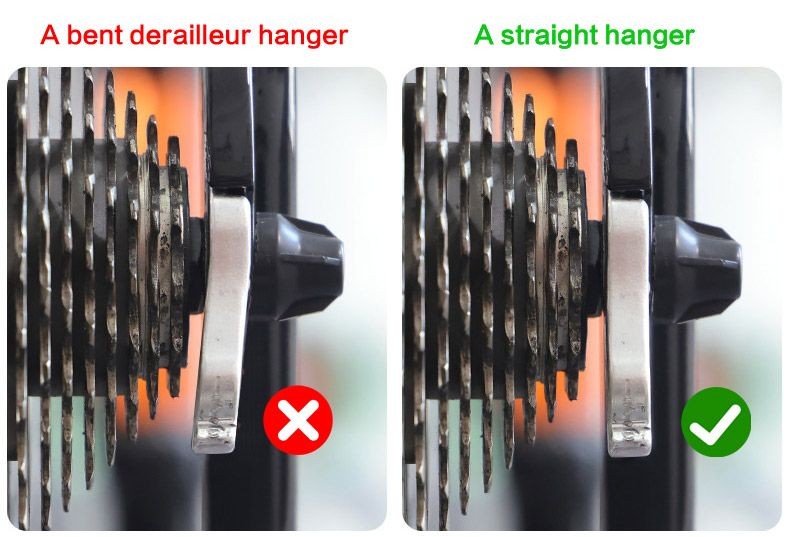
Is the Hanger Straight?

Bent derailleur hanger compared with a straight hanger

A bent hanger tilts the rear derailleur, which causes poor shifting, chain noise and difficult calibration, no matter how carefully it is set up.

How to check: look from behind the bike. The hanger should hang straight down, parallel to the cassette cogs. If it is bent, straighten it with a hanger alignment tool or fit a new hanger.

Check 2

Does the Hanger Have a Step?

Derailleur hanger with a clear step: compatible

Compatible

Clear step at the bottom

Derailleur hanger with a very small step: not compatible

Not compatible

Very small step

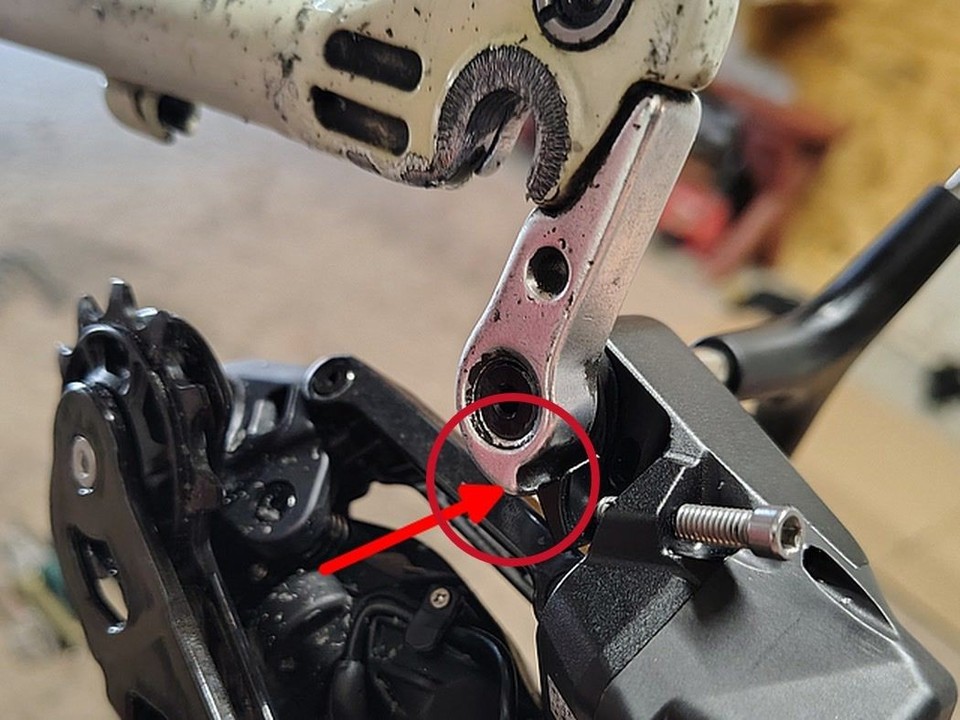
The small tab next to the mounting bolt must rest on the step at the bottom of the hanger, so the derailleur can swing forward and back.

Small step? Fit a hanger with a larger step, or a derailleur hanger extender. Otherwise the derailleur stays rigid and cannot be set up.

Not sure?

Send us a close-up photo of your hanger by email to support@aoeagle.com before ordering, and we will check it for you.

Compatibility & Buyer Notes

Please review the following before purchasing to ensure correct fitment.

1x Drivetrain Only

Designed for single-chainring setups only. Not compatible with double or triple chainring systems.

Choose the Right Cage Length

Verify your cassette max sprocket before selecting: 75mm Medium Cage (GS) — up to 42T · 93mm Long Cage (SGS) — up to 52T. Using the wrong cage causes poor shifting or chain derailment.

App-Based Setup Required

Initial calibration must be performed via the WHEELTOP app (free on iOS and Android) after installation.

eBay seller feedback (store-wide)

eBay seller feedback from buyers in our eBay store. It covers our whole store; the tabs show feedback for this item or for all items.

  • Positive feedbackw***d (227)Verified purchasePast 3 months

    Very easy transaction, quick shipping, great product. I used the GeX set to create a monster gravel bike from an old Cannondale Flash frame, with Zrace flat mount to post mount adapters. Very pleased with the result. The set came in a nice branded wooden box: nice touch. I didn't even need to bleed the brakes or calibrate the mech, just selected Shimano 11sp. All good.

  • Positive feedbackl***x (199)Verified purchasePast 3 months

    Ero scettico riguardo questo gruppo, ma una volta regolato bene funziona alla perfezione

  • Positive feedbackm***4 (30)Verified purchasePast month

    Perfect, thanks!

  • Positive feedbackg***G (689)Verified purchasePast month

    #1 seller

  • Positive feedbackd***8 (17)Verified purchasePast 3 months

    Really pleased so far with the product and service. The guys Aoeagle are very responsive and helpful. It arrived ahead of the forecast time. I'd say the product is better than expected. Previous snags with the hood covers are fixed - and the app was easy too use (obvously been improved). Only slight snag was I struggled to get a standard bleed valve onto the shifter - so I bleed from the caliper instead and seems ok. Shifting is great, and brakes are sharp. Feels a robust quality product.

  • Positive feedbackc***7 (1352)Verified purchasePast 3 months

    Very good

Prices, discounts or availability mentioned in creator videos may be out of date. The current price is the one shown on the product page at aoeagle.com.

Which brand of cassette does it support?

The app lets you set the speed count and gear spacing: the TX supports 7–14 speed cassettes, Shimano and SRAM alike — just pick the matching speed in the app.

How to pair the app?

On the home page, click the [Add Device] button. The APP will automatically navigate to the nearby devices list page. Locate your device's MAC address, then click to add and bind it. After successful binding, you will need to name the device.

Step 1: Click the Add button on the home page Step 2: Turn on your phone’s Bluetooth to search for nearby devices
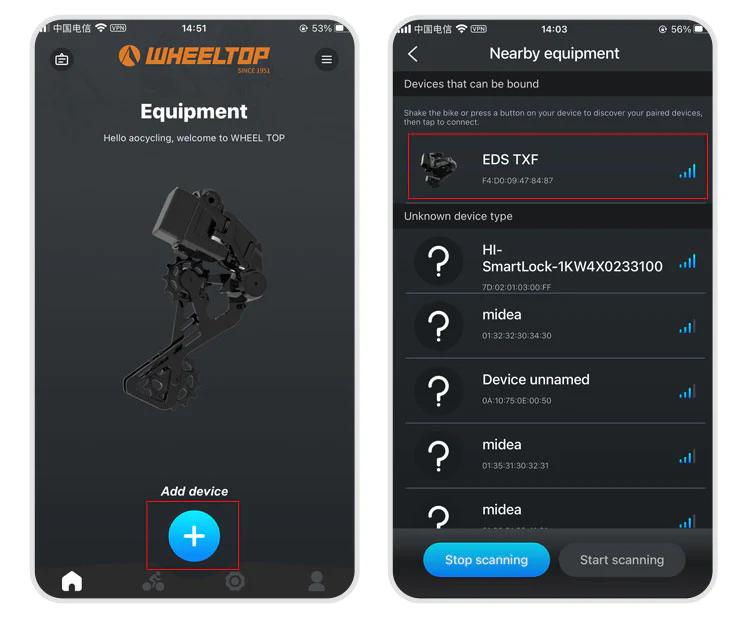
How to pair the app? illustration

Step 3: Select nearby bindable devices to add Step 4: Name the device
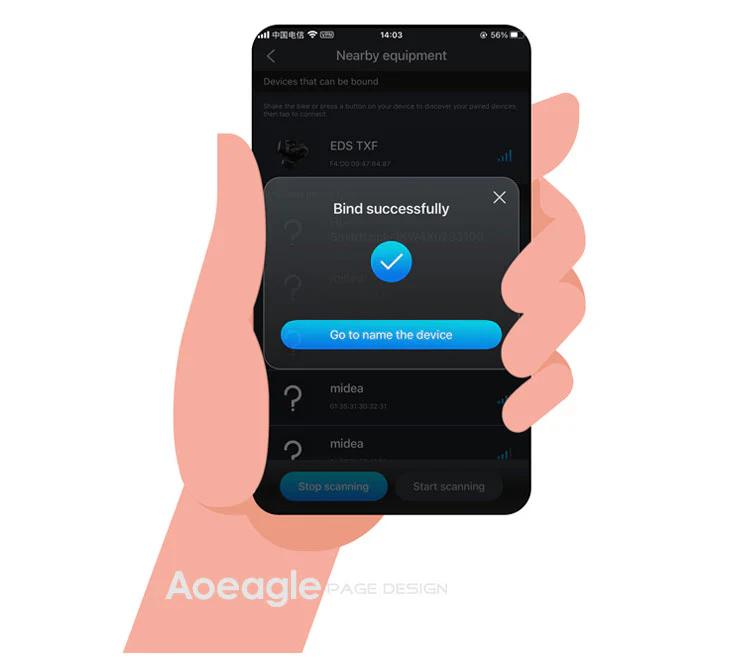
How to pair the app? illustration

One last thing — and this is where a lot of users get stuck.

To connect, you need to tap the Bluetooth icon in the app. Before doing so, make sure the derailleur hasn't gone into sleep mode. If it has, just give the derailleur a tap or shake the bike to wake it up. Once the connection is successful, the Bluetooth icon will light up — and you're all set to start adjusting your derailleur.
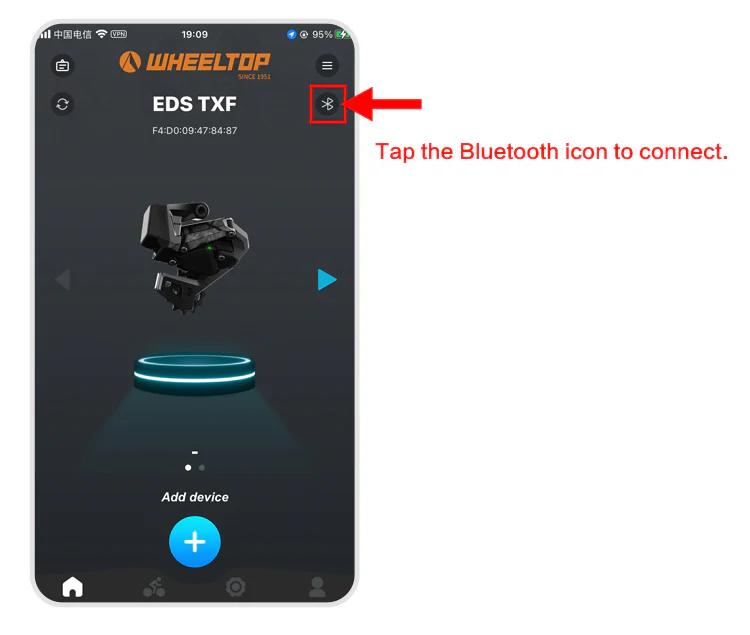
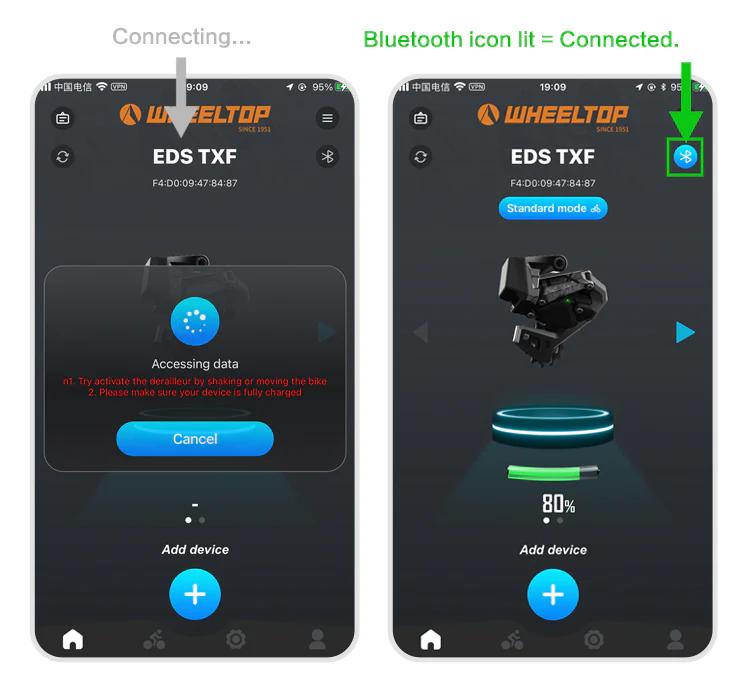
How to pair the app? illustration How to pair the app? illustration
How to do the initial calibration?

For EDS TX series:

  1. Set the front derailleur to the largest sprocket
  2. Set the rear derailleur to the smallest cog position
  3. Open the WHEELTOP App → Initial Calibration
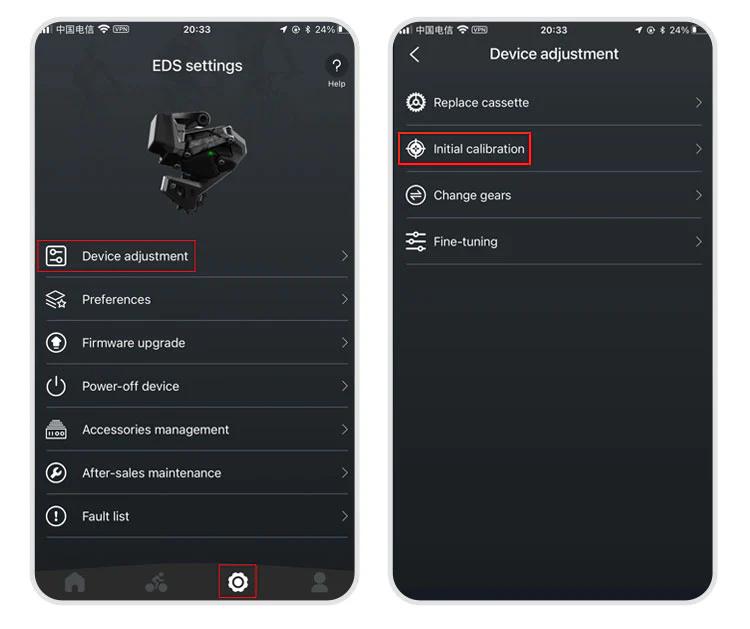
How to do the initial calibration? illustration

Use "<" or ">" buttons to align the RD pulley with the smallest cog
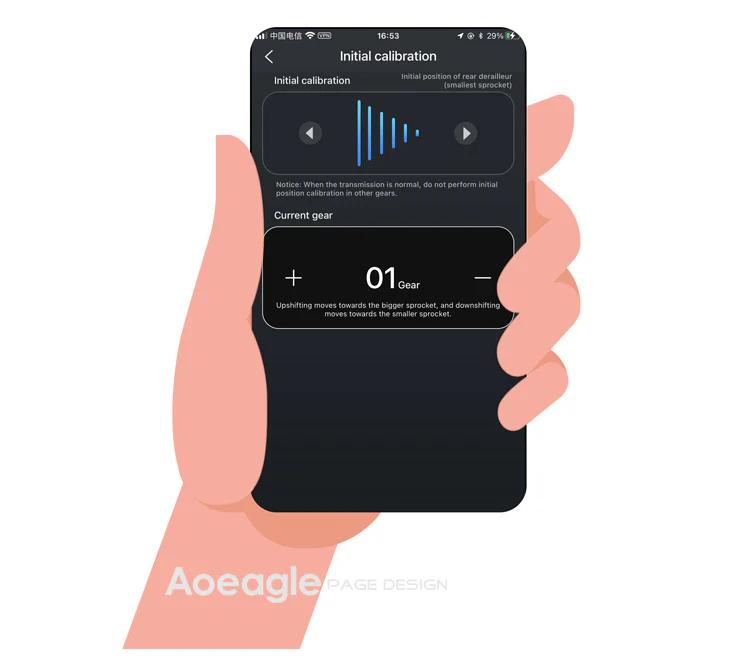
How to do the initial calibration? illustration

Exit the initial calibration page

For EDS GeX and OX series: Same steps but skip step 1 (no FD adjustment required).

How to download and register the WHEELTOP app?

WHEELTOP APP download:

How to download and register the WHEELTOP app? illustration

app Store

How to download and register the WHEELTOP app? illustration

Google Play

After successful registration, log in to the app.

You can also download the APK file directly: APK Download Link

For first-time use, please register with your email.

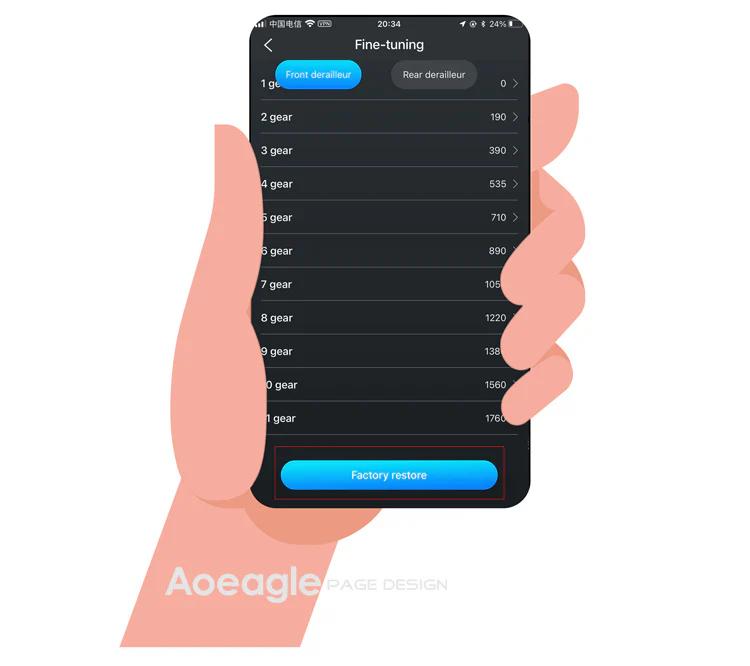
How to perform a factory restore?

It works like a factory reset for gear values. Use it when gear values have been misadjusted to restore the preset values.

Path: APP → Settings → Device-adjustment → Fine-tuning → "Factory-restore" button at the bottom.
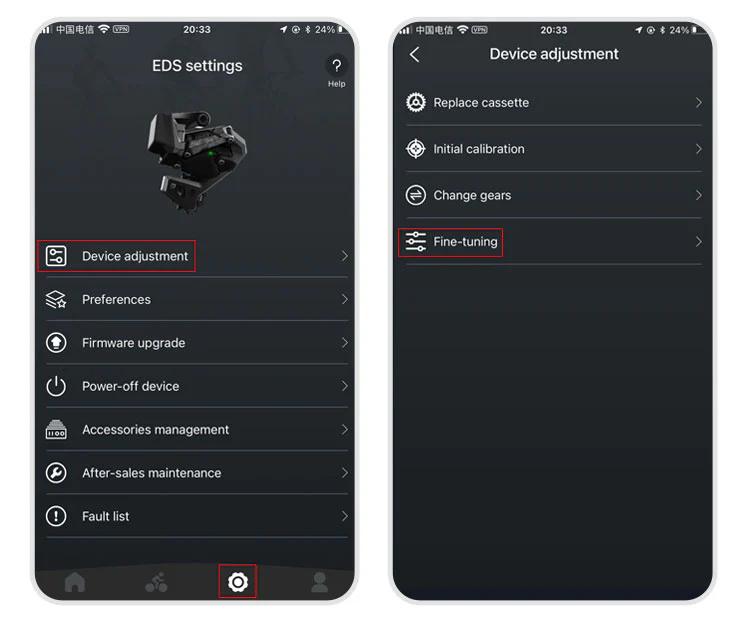
How to perform a factory restore? illustration How to perform a factory restore? illustration
The rear derailleur position is inconsistent with the APP display

1.Go to the initial calibration page in the APP 2.Select the rear derailleur (upper section) 3.Press the right arrow (▶) and hold until the RD moves back to the smallest cassette

More questions (8)
The device cannot shift immediately after not riding for a long time

1.Charge the system — a low battery can delay activation 2.Gently shake the frame — this helps wake up the rear derailleur more quickly

Can EDS be paired with bike computers?

Yes!EDS TX, OX2.0, and GeX can all be paired with bike computers.

How do I power off and power back on my WHEELTOP EDS device?

In the latest version of the WHEELTOP app, swipe left on the rear derailleur's device card to bring up the **Disconnect / Power Off** menu, then tap **Power Off**. This is useful for shutting the system down during shipping or storage. To power the device back on, plug in the magnetic charging cable for **2-3 seconds** — once the charging indicator light turns **red**, the device powers on and reactivates.

WHEELTOP app screen showing the swipe-left Disconnect / Power Off menu
Is it equipped with a rear derailleur clutch function?

OX2.0 and GeX are equipped with a rear derailleur clutch function.

How long does the battery last on a single charge?

A fully charged WHEELTOP EDS battery delivers 20,000+ shifts per charge, which translates to 60+ hours of typical riding before needing to recharge. This exceptional range means most cyclists can ride several days between charges, making the EDS derailleurs ideal for long tours and multi-day events.

After pressing the shifter lever, the rear derailleur does not shift normally

1.Check the button indicator light: If there is no light, replace the battery and test again. 2.Check the light color: If the button is lit but not green (e.g. red or yellow), the device is not paired correctly. Re-pair following the manual.

Is the bleeding process for EDS TX/GEX oil disc brakes the same as Shimano?

Yes, the bleeding process is similar to Shimano's. Follow the standard Shimano hydraulic disc brake bleeding procedure.

Note: Certain components like pins and olives are unique to WHEELTOP. The Hydraulic Disc Brake Groupset includes an accessories package with the necessary olives and pins. The bleeding kit is not included — we recommend EZMTB.

What type of hose, needle, and olive are compatible with the EDS system?

We recommend Shimano's BH-90 type.