

WHEELTOP EDS Shifting Calibration: How to Fine-Tune Your Derailleur
Ghost shifts driving you mad? This practical WHEELTOP EDS calibration guide walks you through every adjustment — from B-screw basics to app micro-tuning.


Why Calibration Matters More Than You'd Think
Electronic shifting is supposed to just work. And most of the time, WHEELTOP EDS does exactly that — precise, repeatable gear changes in under 100ms without you thinking twice. But if you've ever chased a ghost shift mid-climb or watched your chain hesitate on the cassette, you already know that 'electronic' doesn't mean 'set it and forget it.' This WHEELTOP EDS calibration adjustment guide exists because the system is only as accurate as its initial setup. Spend 20 minutes getting calibration right and you'll likely never touch it again. Skip it, and you'll be fiddling with micro-adjustments every other ride.
The Three Adjustment Types — and What Each One Actually Does
A lot of riders conflate these and end up turning the wrong screw entirely. Here's the thing: B-screw, limit screws, and app micro-adjustment are not interchangeable. They solve completely different problems.
B-Screw: Setting Derailleur Gap
The B-screw controls how far the derailleur body sits from the cassette — specifically, the gap between the top pulley and the largest sprocket. Too close and you get chain noise and sluggish shifts into the big cog. Too far and you lose precision across the whole cassette. For most 11-speed setups, aim for 6–8mm of clearance at the largest sprocket. Put the chain there, eyeball the gap, and adjust the B-screw until it looks right. It's mechanical, tactile, and takes about 90 seconds.
Limit Screws: Hard Stops, Not Fine-Tuning
Limit screws define the physical outer boundaries of derailleur travel — the H screw prevents the chain from dropping off the small sprocket; the L screw stops it from launching into your spokes. They are not tuning tools. If you're adjusting limit screws to fix shifting in the middle of the cassette, you're solving the wrong problem. Set them once during initial setup, verify they're holding, and leave them alone.
App Micro-Adjustment: The Real Fine-Tuning
This is where WHEELTOP EDS earns its reputation. The app lets you nudge derailleur position in ±8 steps of roughly 0.1mm each, applied from your phone while the bike is stationary or even mid-ride via a support rider. In our testing, most shifting complaints disappeared within two or three steps of adjustment. If you haven't used this yet, the WHEELTOP App Setup Guide: Configure Your Electronic Derailleur in Minutes is worth reading before you go further — it covers pairing, firmware checks, and interface navigation.
The Initial Calibration Screen: Walk Through It Once, Properly
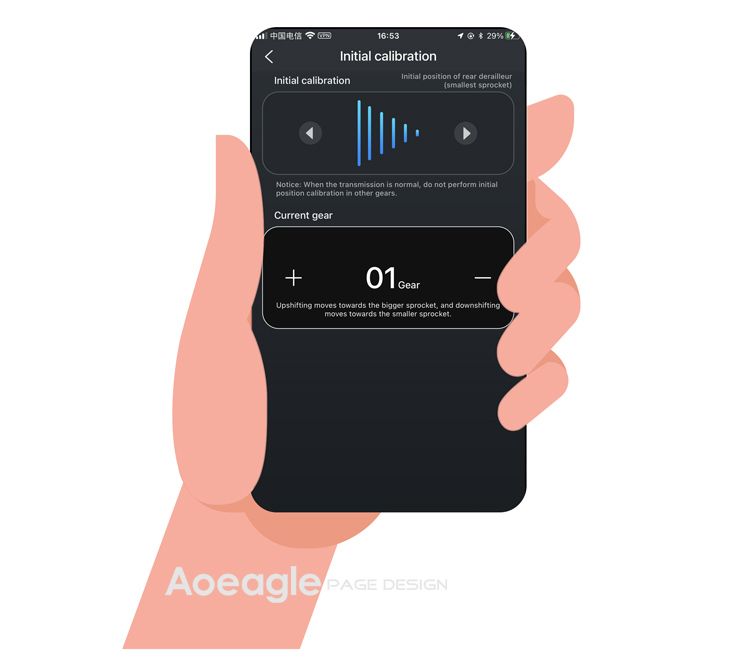
When you first connect the derailleur in the app, you'll hit the Initial Calibration screen. Don't skip it. It's a two-step positioning process — the app prompts you to manually move the derailleur to the small sprocket position (high gear), confirm it, then move to the large sprocket position (low gear) and confirm again. The system uses those endpoints to calculate the motor's full travel range. Think of it like zeroing a torque wrench. If your endpoint positions are sloppy, every gear in between will be slightly off. Take your time here. Make sure the chain is actually seated cleanly in both positions before you confirm, not just close.
Diagnosing Ghost Shifts vs. Missed Shifts
These two symptoms feel similar but point to very different causes. Ghost shifts — where the chain moves without you pressing anything — usually mean the derailleur hanger is bent, the B-screw gap is too tight, or there's cable tension inconsistency if you're running EDS TX wired. Missed shifts — where you press the button and nothing happens or the chain grinds without engaging — almost always come down to micro-adjustment being off, or occasionally a low battery. Worth noting: a battery below 20% on the EDS system can cause inconsistent motor response that mimics calibration issues. Check battery first, always. For those running the MTB variant, the WHEELTOP EDS OX 2.0 Review: Wireless MTB Electronic Shifting covers how trail vibration and mud affect these symptoms differently than road use.
Recommended Cassette Alignment Procedure
Do this in order — every time you set up a new wheel or swap cassettes. First, set your B-screw gap with the chain on the largest sprocket. Second, run the Initial Calibration in the app. Third, shift through all gears manually and listen. You're listening for chain rub, hesitation, or any gear that sounds slightly different from its neighbors. Fourth, identify the worst-offending gear and use app micro-adjustment to center it. Usually one or two gears need nudging; if you're adjusting five or more, go back and recheck your hanger alignment and B-screw. That cascade of problems almost always has a single mechanical root cause upstream. The How to Install WHEELTOP EDS TX Electronic Derailleur: Complete Guide covers hanger alignment and initial hardware setup if you're starting from scratch.
When to Update Firmware (and When to Wait)
Firmware updates for the EDS system have, in our experience, genuinely improved shift speed and motor behavior — not just marketing changelog entries. That said, don't update mid-season before a race or a big trip. Update when you have time to re-run calibration afterward, because a firmware update can reset stored calibration data. Riders we spoke to who updated and immediately went riding without recalibrating reported exactly the kind of mid-cassette inconsistency that makes you chase ghosts for a week. Update, recalibrate, do a short shakedown ride. That's the sequence.
Troubleshooting Quick Reference
Here's a condensed reference table for the most common EDS shifting complaints. This is what we'd run through on a diagnostic stand before touching anything on the bike.
- **Ghost shifts on climbs** → Bent derailleur hanger or B-screw too tight → Straighten hanger first, then increase B-screw gap by half a turn
- **Missed shifts under load** → Micro-adjustment off or battery low → Check battery level in app; apply 1–2 steps of micro-adjustment toward the problem gear
- **Chain noise in middle gears only** → Initial calibration endpoints set poorly → Re-run Initial Calibration screen with careful endpoint positioning
- **Sluggish shift into largest sprocket** → B-screw gap too wide → Reduce B-screw gap; target 6–8mm clearance at top pulley
- **Inconsistent shifting after firmware update** → Calibration data reset → Re-run full Initial Calibration and micro-adjustment procedure
- **Chain drops off small sprocket** → H limit screw too loose → Turn H screw clockwise in quarter-turn increments until chain is retained
- **Derailleur won't reach largest sprocket** → L limit screw too tight → Back off L screw counterclockwise, recheck with chain under load
One More Thing: This System Rewards the Patient Setup
The WHEELTOP EDS calibration adjustment guide approach only works if you go in order — mechanical first, digital second. No amount of app micro-adjustment fixes a bent hanger. No amount of B-screw fiddling fixes a miscalibrated endpoint. Work through the hierarchy and the system genuinely delivers on its promise. Riders running EDS on folding bikes have an added complication worth mentioning — frequent wheel removal means recalibrating more often, and the Best Electronic Groupset for Folding Bikes 2025: WHEELTOP EDS Guide addresses that specific use case directly. For everyone else, once you've nailed this process, you'll shift better than most bikes at twice the price. That's not hype — it's just what good calibration does.
Ready to try it? The WHEELTOP EDS lineup ships worldwide from Aoeagle's eBay store — full warranty included.