
WHEELTOP App Setup Guide: Configure Your Electronic Derailleur in Minutes
New to WHEELTOP EDS? This updated setup guide walks you through the app, pairing, calibration, and firmware in under 15 minutes.
If you've just unboxed a WHEELTOP EDS derailleur and you're staring at your phone wondering where to begin, this WHEELTOP App Setup Guide is exactly what you need. The full process — downloading the app, pairing via Bluetooth, running calibration, and confirming firmware — takes around fifteen minutes on your first attempt. Repeat it on a second build and you'll be done in five. The app is more capable than most riders expect at this price point, and the 2026 version has received a meaningful interface refresh that makes the whole experience noticeably smoother. Let's go through it, step by step.
Download the WHEELTOP App: iOS and Android
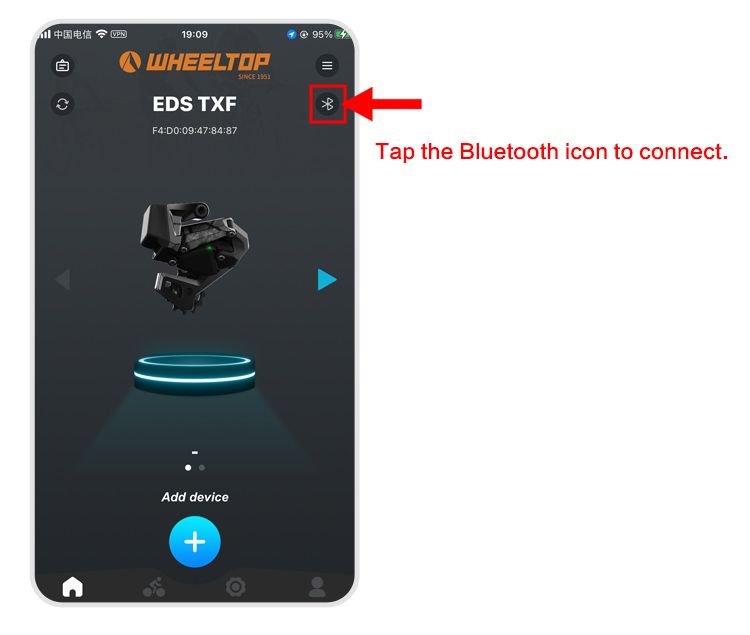
The app is simply called WHEELTOP and it's available on both the Apple App Store and Google Play Store. Search the brand name and it appears immediately — the icon uses the brand's logo on a dark background. It's a lightweight install, well under 50 MB, and loads quickly even on a patchy signal. Crucially, the 2026 version still requires no account creation. You don't hand over an email address or create a profile just to communicate with your derailleur. Open the app, grant Bluetooth permissions when prompted, and you're ready to move forward. For riders coming from Shimano's Di2 app or SRAM's AXS ecosystem, the absence of mandatory sign-in feels like a genuine breath of fresh air.
Pairing Your Derailleur via Bluetooth
Pairing is fast, but you need the derailleur powered on before the app can find it. Wake it from sleep by pressing either shift button once — the LED indicator on the derailleur body will flash to confirm it's active and broadcasting. Inside the app, tap the Bluetooth icon in the top-right corner of the home screen. The app scans and returns a short list of nearby WHEELTOP devices within a couple of seconds. Your derailleur will appear as something like 'WHEELTOP-RD' followed by a short alphanumeric identifier. Tap it, wait two or three seconds, and the connection confirms with a smooth screen transition. No PIN entry, no pairing code. It simply connects. If you run into any issues at this stage, the WHEELTOP EDS Troubleshooting: Fix Common Issues in Minutes guide covers the most common Bluetooth hiccups in detail.
The Connected Dashboard: What You're Looking At
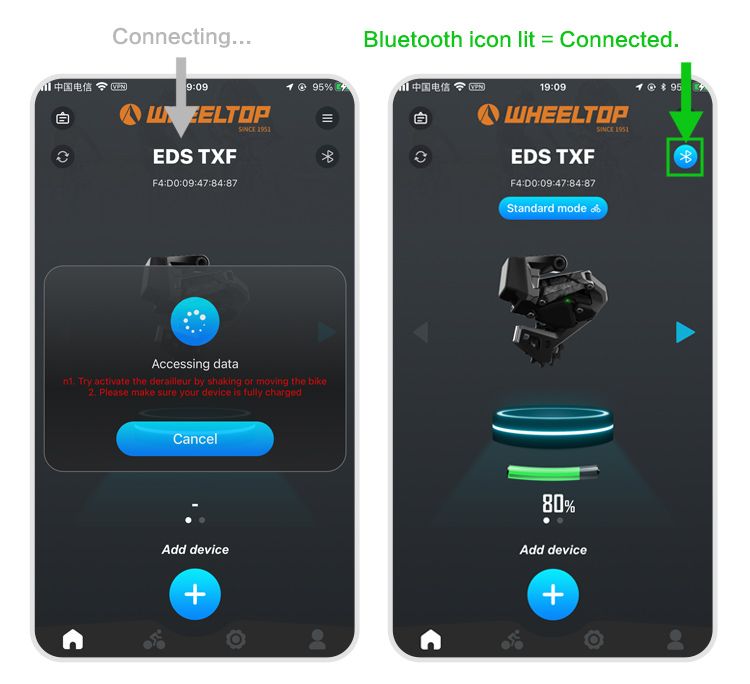
Once paired, the main dashboard loads with a clean, information-dense layout that has been refined in the 2026 app update. Here's what you'll see at a glance:
- **Battery percentage** — displayed as a clear number, not an ambiguous icon bar
- **Total shift count** — a cumulative metric that's genuinely useful to track across a season
- **Current gear position** — updates in real time as you click through the cassette manually
- **Firmware version** — shown prominently now, flagged with a notification badge if an update is available
- **Signal strength indicator** — new in 2026, shows Bluetooth connection quality at a glance
The app maintains its connection even when your phone screen is locked, so it continues logging shifts from a jersey pocket. The new signal strength indicator is a small but welcome addition — useful when diagnosing whether a dropped shift is a mechanical issue or a momentary interference problem. Speaking of firmware, keeping it current is worth making a habit of. The How to Update WHEELTOP EDS Firmware: Step-by-Step Guide walks through the process in full, but the short version is: the app now flags available updates automatically, and the installation takes under two minutes over Bluetooth.
Initial Calibration: B-Screw and Limit Adjustment
This is where most riders feel uncertain the first time, and it's also where the WHEELTOP App Setup Guide functionality earns its keep. You don't need to understand what a B-screw does before you start — the app explains every adjustment contextually as you move through it.
B-Gap Adjustment
Navigate to the Calibration menu and select 'B-Gap Adjustment.' The app automatically shifts the derailleur to the largest cog on your cassette, then displays a live animation illustrating the ideal gap between the jockey wheel and cog. Use the on-screen arrows to adjust the B-screw incrementally — the derailleur moves in response in real time, so you can dial in the gap visually without guessing. The 2026 app version now overlays a colour indicator (green when the gap is within the optimal range, amber when it needs attention) that makes this step noticeably faster than before.
Limit Screw Adjustment
After the B-gap, the app guides you through high and low limit confirmation. It shifts to each extreme of the cassette automatically and prompts you to verify the derailleur isn't overreaching. If adjustment is needed, on-screen prompts tell you exactly which direction to turn the relevant limit screw. The whole calibration sequence takes five to eight minutes and walks even a first-time user through without frustration.
Micro-Trimming and Shift Speed Customisation
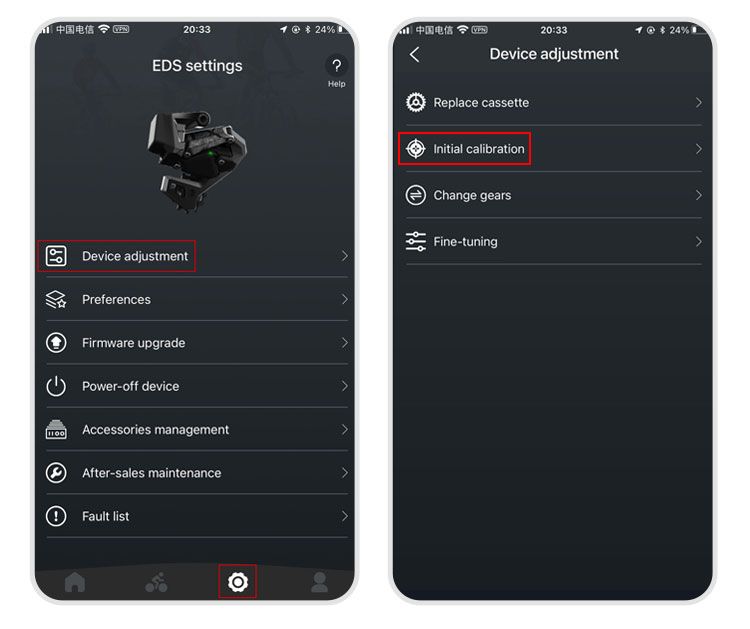
Once calibration is confirmed, the app's Trim Adjustment screen lets you fine-tune the derailleur's indexed positions across the cassette. This is the step that separates a good setup from a great one. If a specific gear position produces any rubbing or hesitation, you can nudge that position independently without affecting the rest. The 2026 firmware also expands the Shift Speed setting from two options (Standard and Fast) to three — adding a 'Sport' mode that sits between them. Sport mode is worth trying if you find Standard slightly sluggish under load but Fast a little aggressive on a quiet morning ride. Shift speed preferences are saved to the derailleur itself, not just the app, so they persist even if you pair a different phone.
New in 2026: Ride Mode Profiles and Terrain Presets
The most significant new feature in the 2026 app update is Ride Mode Profiles. You can now save distinct configuration sets — shift speed, sensitivity, and trim positions — as named profiles and switch between them in seconds. A rider who commutes on the same bike they race on can maintain separate profiles for each context. This is especially useful if you're using WHEELTOP EDS across multiple disciplines; our WHEELTOP EDS for Bikepacking: The Complete Trail Setup Guide covers how to configure a dedicated off-road profile optimised for technical terrain and mud clearance. Similarly, if your WHEELTOP build does double duty as a triathlon or time-trial machine, the WHEELTOP EDS TT Review: Electronic Shifting for Triathlon Bikes explores aero-position-specific setup considerations that pair well with a dedicated TT profile. Profiles sync to the derailleur's onboard memory, so switching between them doesn't require your phone to be present mid-ride.
Final Checks Before Your First Ride
Before you close the app and roll out, run through this short checklist:
- **Battery above 50%** — charge to full if you're heading out for anything longer than two hours
- **Firmware confirmed current** — check the dashboard badge; update if flagged
- **All gears indexed** — click through the full cassette range and listen for clean, silent shifts at each position
- **Limit positions verified** — confirm the chain doesn't overshift at either end under light pedal pressure
- **Preferred Ride Mode Profile selected** — set it before locking your phone
One final note worth mentioning: the WHEELTOP EDS system handles wet conditions well, but if you're planning to ride in sustained rain or mud, it's worth reviewing the Wireless Electronic Derailleur in Rain and Mud: Does It Hold Up? article before heading out. Connector sealing and cable routing choices can make a meaningful difference to long-term reliability in harsh conditions — and the app's signal strength indicator is a useful early warning if moisture infiltration ever becomes an issue down the line.
The WHEELTOP App Setup Guide process hasn't become complicated as the system has matured — if anything, the 2026 update has made it faster and more intuitive. The addition of Ride Mode Profiles, the expanded shift speed options, and the cleaner firmware notification system all reflect a brand paying genuine attention to how real riders use the software. Whether this is your first electronic groupset or your fifth, the app gets you riding clean in under fifteen minutes. Ready to try it? The WHEELTOP EDS lineup ships worldwide from Aoeagle's eBay store — full warranty included.


