

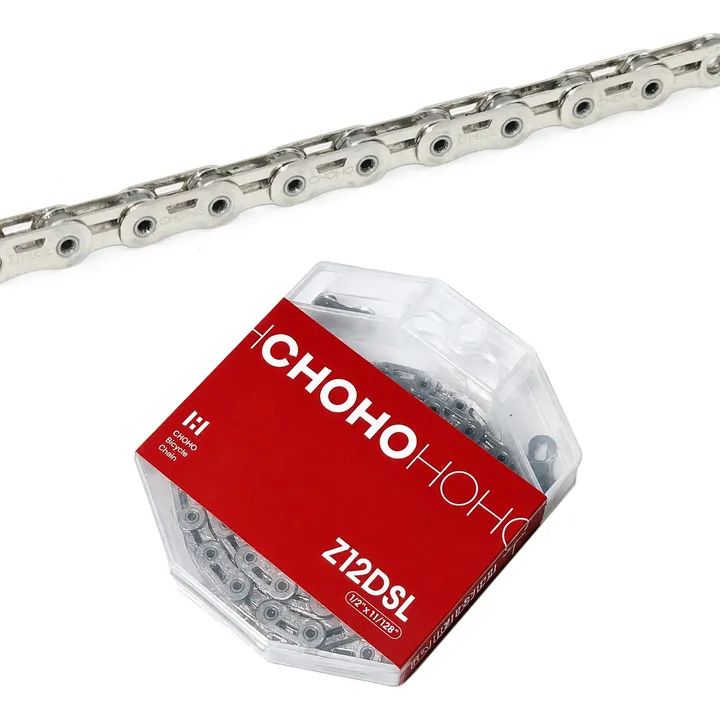
Free chain included — choose your speed
CHOHO Hollow Flat-Top ChainView details
Added at $0 when you add this kit to cart. One per order, ships with your kit. Ends Dec 1.
Free chain speed
Request a stock update
Questions before you buy? Email us · We reply within 24 hours.






eBay seller feedback (store-wide)
eBay seller feedback from buyers in our eBay store. It covers our whole store; the tabs show feedback for this item or for all items.
-
Order delivered on time with no issues
Prices, discounts or availability mentioned in creator videos may be out of date. The current price is the one shown on the product page at aoeagle.com.

Jonathan Murnieks
Is This the Future of MTB Shifting? (WHEELTOP EDS OX 2.0)
In this video, Jonathan Murnieks unboxes, installs and rides the WHEELTOP EDS OX 2.0 wireless derailleur, then shares his impressions of shifting and chain…
bici mx
▶WHEELTOP EDS-OX 2.0◀ la alternativa de SRAM AXS, transmisión inalámbrica para tu bici de MTB
In this video, bici mx unboxes and reviews the WHEELTOP EDS OX 2.0 wireless MTB groupset, looking at the design changes from the first version along with a few…
ThePersonTube
WHEELTOP PASO A PASO - EDS OX 2.0
In this video, ThePersonTube goes step by step through installing and setting up the WHEELTOP EDS OX 2.0 on a mountain bike, including mounting, chain sizing,…
TRACKMTB
Wheeltop EDS OX 2.0: ¿Realmente compite con SRAM? Mi opinión HONESTA | Prueba MTB #Ridewithwheeltop
In this video, TRACKMTB rides the WHEELTOP EDS OX 2.0 on rocky trail descents and gives his honest opinion of the shifting, the chain stabilizer and the…
MC Cycles
BETTER THAN SHIMANO AND SRAM?? | WHEELTOP EDS OX2.0 CHEAP WIRELESS GROUPSET
In this video, MC Cycles tries electronic shifting for the first time with the WHEELTOP EDS OX 2.0 on a carbon mountain bike and shares his first impressions…
Clint Gibbs
EDS OX2.0 MTB Shifter & Rear Derailleur: Affordable wireless Drivetrain!
In this video, Clint Gibbs reviews the WHEELTOP EDS OX 2.0 shifter and rear derailleur, covering installation, app tuning and trail riding.
RunBikeMike
WHEELTOP OX2.0 Review - At $399 SRAM AXS doesn't stand a chance
In this video, RunBikeMike reviews the WHEELTOP EDS OX 2.0, looking at the new design and showing how he dials it in using the app.
Alexpress83
¿ALTERNATIVA REAL A SHIMANO Y SRAM? | WHEELTOP EDS OX 2.0 MTB #Wheeltop #WheeltopEDS #EDSOX
In this video, Alexpress83 reviews the WHEELTOP EDS OX 2.0 after two months on his mountain bike, covering shifting, battery life and the shifter mounting.
Juan_Supermtb
¡INCREÍBLE! 😱 WHEELTOP EDS OX 2.0: ¿Más rápido que SRAM y SHIMANO?#Ridewithwheeltop.
In this video, Juan_Supermtb rides the WHEELTOP EDS OX 2.0 and shares his impressions of its Race Mode, the clutch and how it handled chain slap on the trail.
Café na Trilha
Câmbio eletrônico WheelTop EDS OX 2.0 | Café na Trilha
In this video, Café na Trilha installs and rides the WHEELTOP EDS OX 2.0, covering the installation, app setup, shifter feel and chain retention on the trail.
Biker Yisus MTB
😱 WHEELTOP EDS OX 2.0 Este cambio CHINO amenaza a SRAM y SHIMANO 🫢 y funciona mejorde lo esperado⚡️
In this video, Biker Yisus MTB reviews the WHEELTOP EDS OX 2.0, covering shifter feel, build quality, the app's adjustment options and the non-removable…
oz cycle
WHEELTOP OX 2.0 new version - MTB wireless gear system
In this video, oz cycle reviews the new WHEELTOP OX 2.0 MTB wireless system and walks through the installation and app calibration.
Blackwater Cyclist
How to Install and Set up Wheeltop EDS OX 2.0 Derailleur #wheeltop
In this video, Blackwater Cyclist walks through installing and setting up the WHEELTOP EDS OX 2.0 derailleur, from mounting to the B-screw, limit settings and…
Scott Hardesty
SRAM vs WheelTop EDS OX 2.0 Wireless Shifter Showdown!
In this video, Scott Hardesty rides the WHEELTOP EDS OX 2.0 and a SRAM wireless setup on the trail and shares his personal impressions of each, including…
LoveMTB
6 Tips & Fixes, Compatibility for WHEELTOP EDS OX v2 - MTB Wireless Groupset or Upgrade Kit
In this video, LoveMTB shares six installation tips and fixes for the WHEELTOP EDS OX v2, including why not to mix versions and how a washer can solve an…
The Dusty Dutchman
Can "BUDGET" Wireless Shifting Compete with SRAM AXS? Testing WheelTop EDS OX 2.0 for MTB
In this video, The Dusty Dutchman rides the WHEELTOP EDS OX 2.0 on MTB trails and shares his take on the shifting, weight and weather sealing compared with…
Which brand of cassette does it support?
The app lets you set the speed count and gear spacing: the TX supports 7–14 speed cassettes, Shimano and SRAM alike — just pick the matching speed in the app.
How to pair the app?
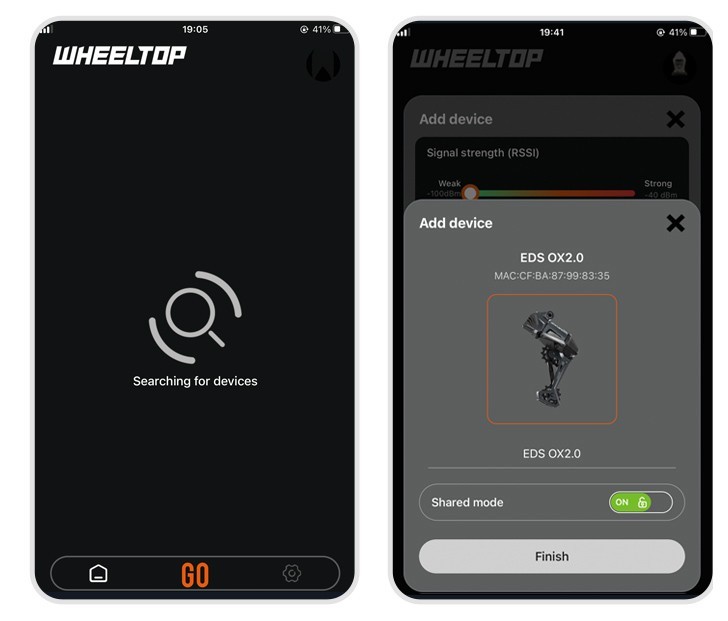
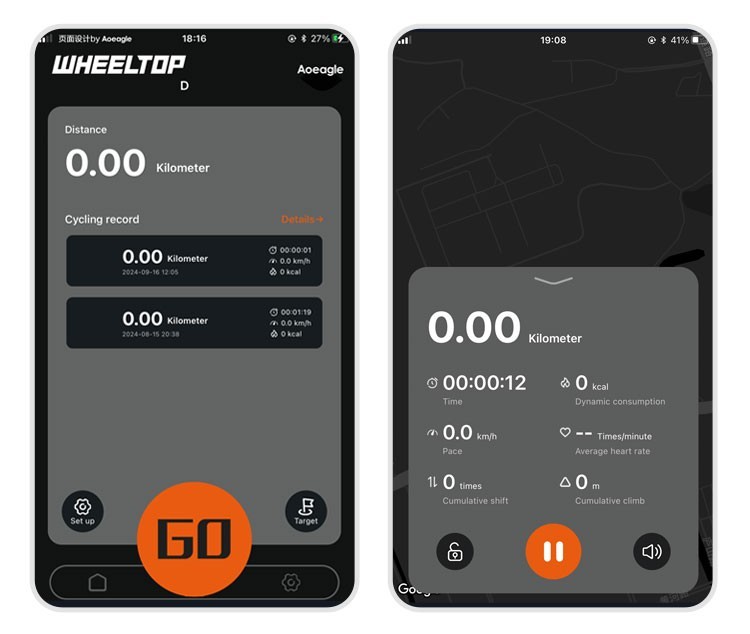
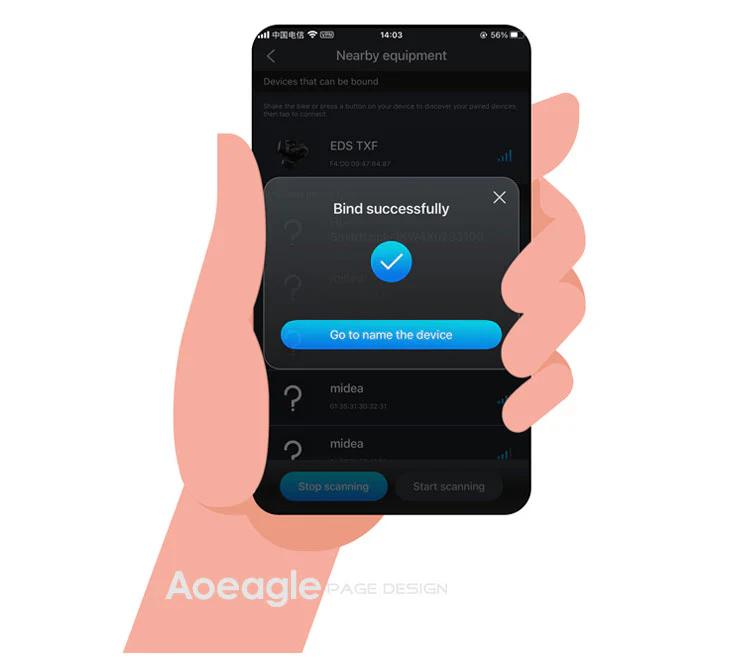
On the home page, click the [Add Device] button. The APP will automatically navigate to the nearby devices list page. Locate your device's MAC address, then click to add and bind it. After successful binding, you will need to name the device.
Step 1: Click the Add button on the home page Step 2: Turn on your phone’s Bluetooth to search for nearby devices
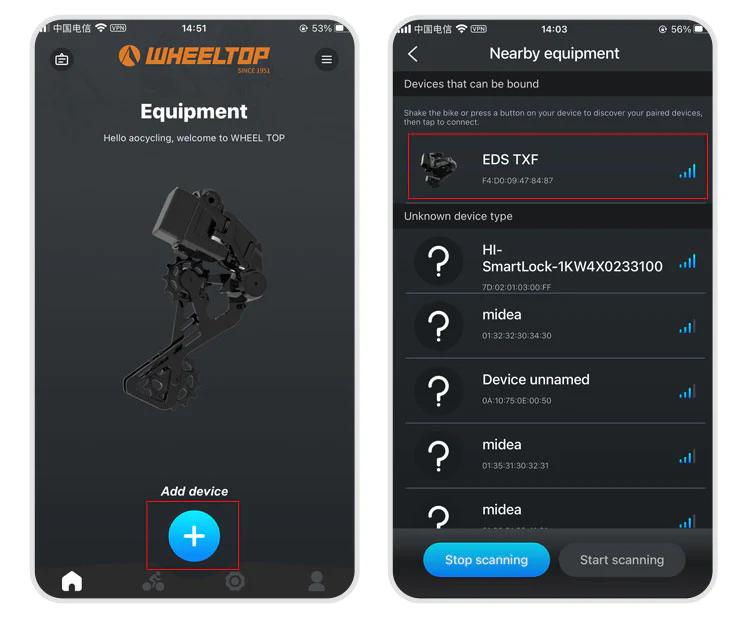
Step 3: Select nearby bindable devices to add Step 4: Name the device
One last thing — and this is where a lot of users get stuck.
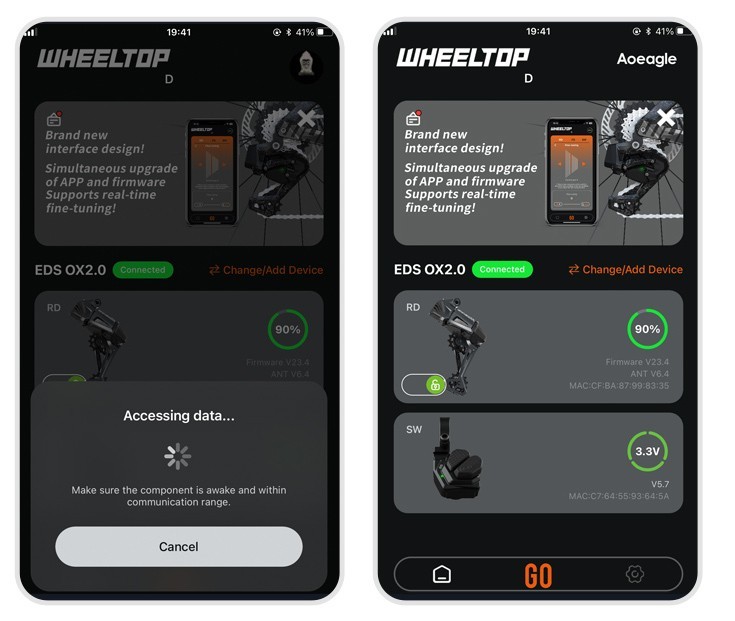
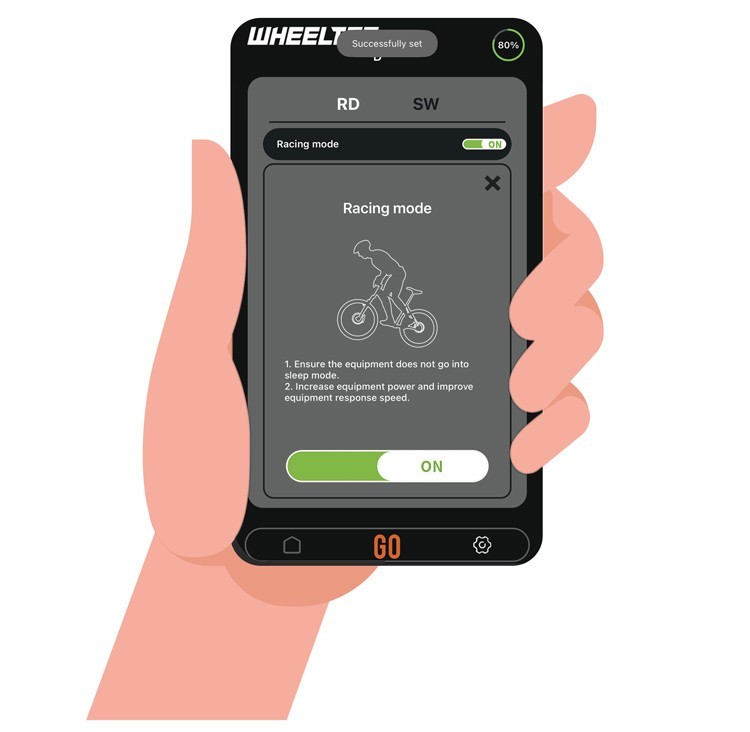
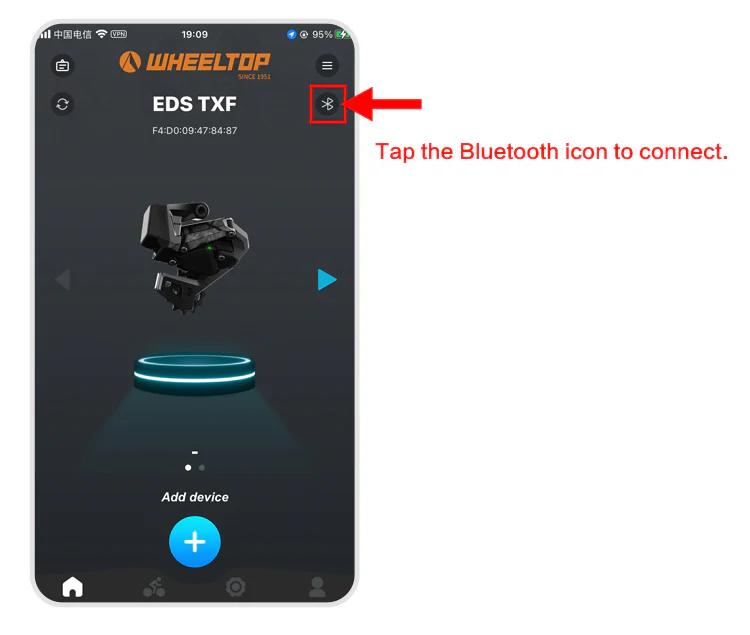
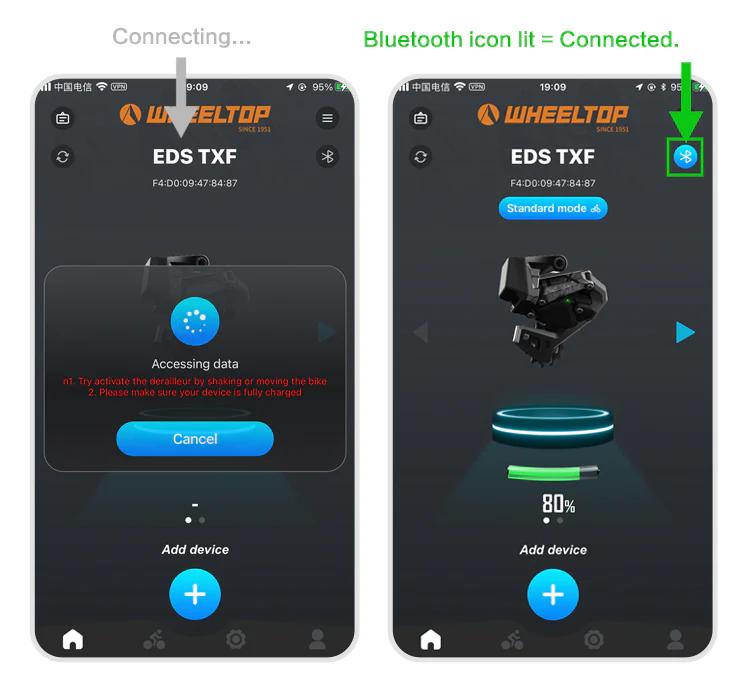
To connect, you need to tap the Bluetooth icon in the app. Before doing so, make sure the derailleur hasn't gone into sleep mode. If it has, just give the derailleur a tap or shake the bike to wake it up. Once the connection is successful, the Bluetooth icon will light up — and you're all set to start adjusting your derailleur.
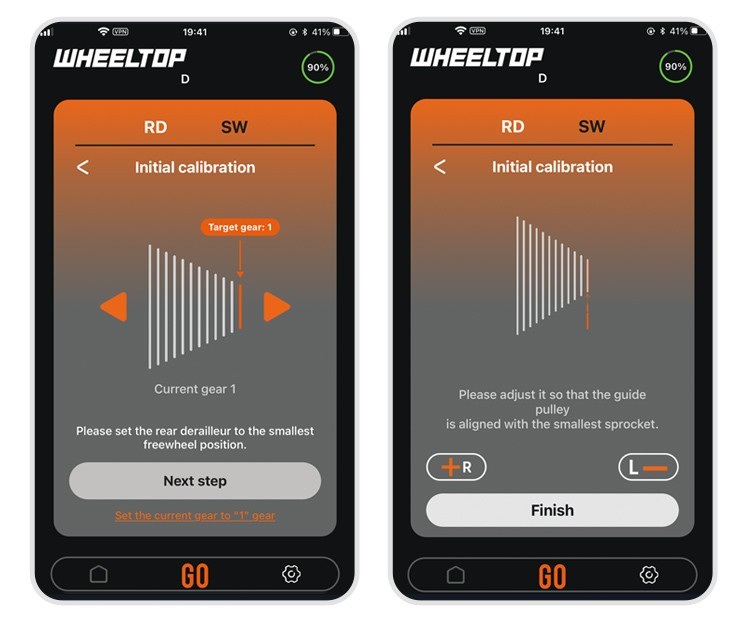
How to do the initial calibration?
For EDS TX series:
- Set the front derailleur to the largest sprocket
- Set the rear derailleur to the smallest cog position
- Open the WHEELTOP App → Initial Calibration
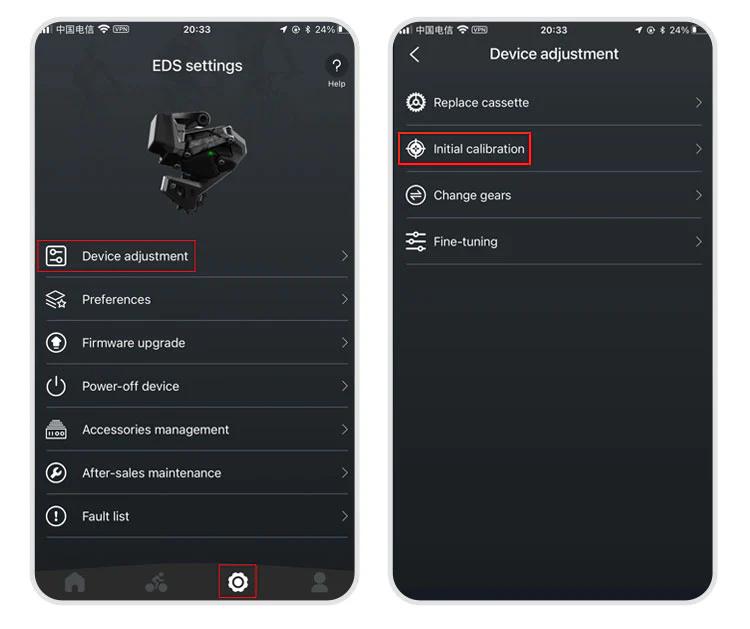
Use "<" or ">" buttons to align the RD pulley with the smallest cog
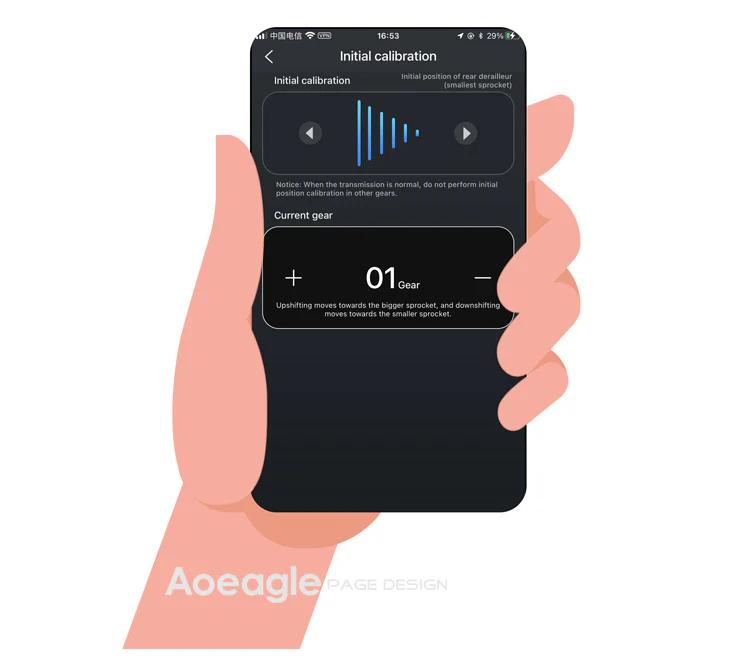
Exit the initial calibration page
For EDS GeX and OX series: Same steps but skip step 1 (no FD adjustment required).
How to download and register the WHEELTOP app?
WHEELTOP APP download:


After successful registration, log in to the app.
You can also download the APK file directly: APK Download Link
For first-time use, please register with your email.
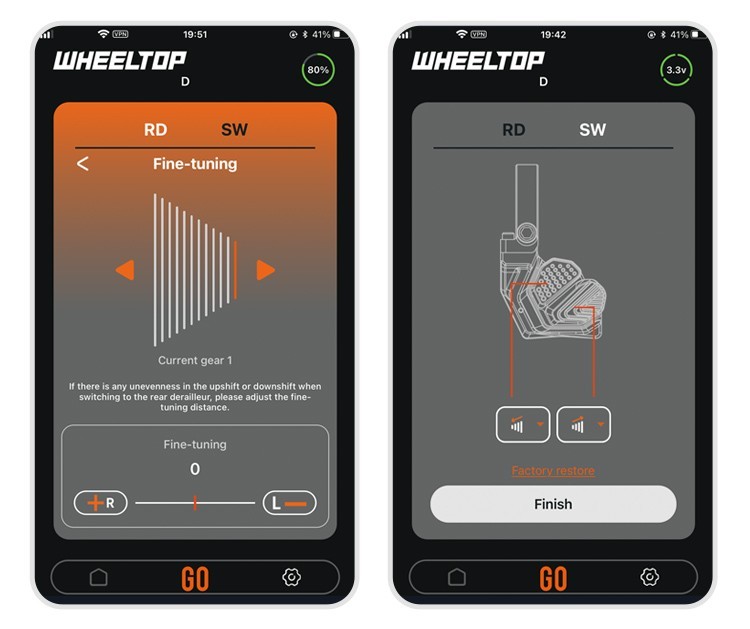
How to perform a factory restore?
It works like a factory reset for gear values. Use it when gear values have been misadjusted to restore the preset values.
Path: APP → Settings → Device-adjustment → Fine-tuning → "Factory-restore" button at the bottom.
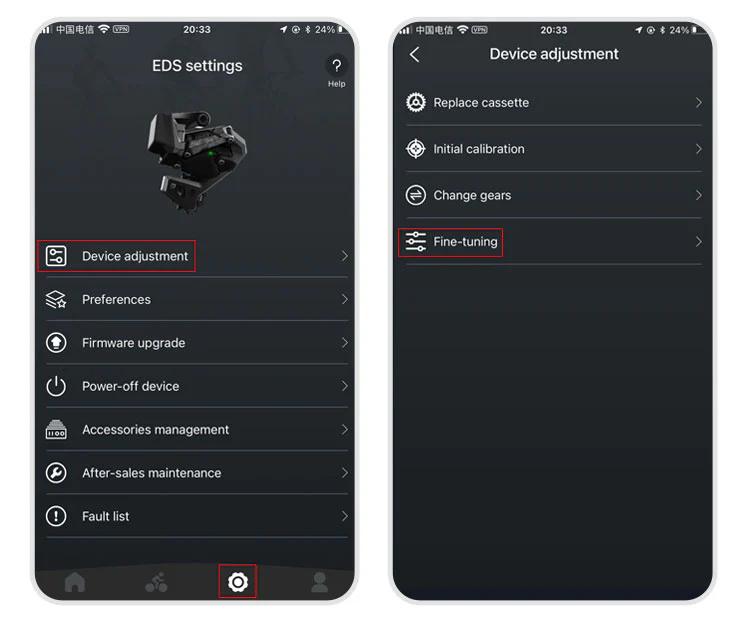
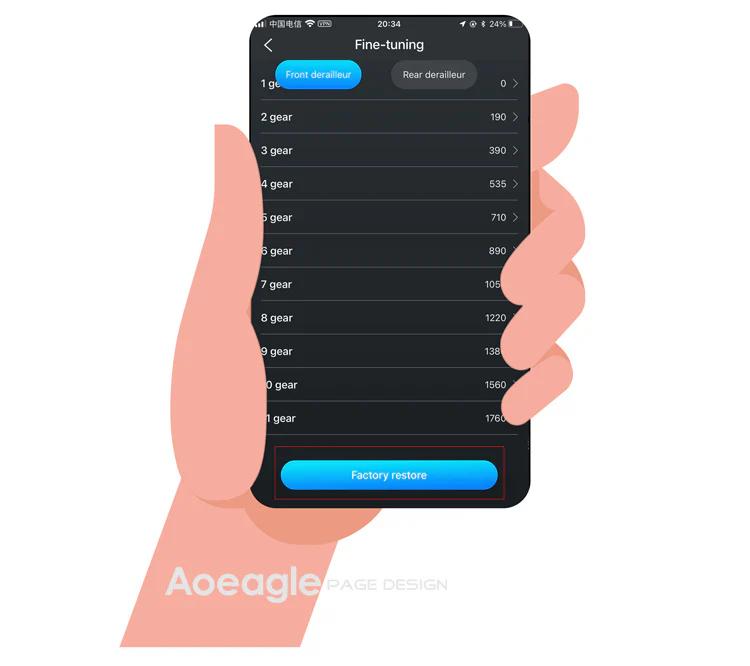
The rear derailleur position is inconsistent with the APP display
1.Go to the initial calibration page in the APP 2.Select the rear derailleur (upper section) 3.Press the right arrow (▶) and hold until the RD moves back to the smallest cassette
More questions (8)
The device cannot shift immediately after not riding for a long time
1.Charge the system — a low battery can delay activation 2.Gently shake the frame — this helps wake up the rear derailleur more quickly
Can EDS be paired with bike computers?
Yes!EDS TX, OX2.0, and GeX can all be paired with bike computers.
How do I power off and power back on my WHEELTOP EDS device?
In the latest version of the WHEELTOP app, swipe left on the rear derailleur's device card to bring up the **Disconnect / Power Off** menu, then tap **Power Off**. This is useful for shutting the system down during shipping or storage. To power the device back on, plug in the magnetic charging cable for **2-3 seconds** — once the charging indicator light turns **red**, the device powers on and reactivates.

Is it equipped with a rear derailleur clutch function?
OX2.0 and GeX are equipped with a rear derailleur clutch function.
How long does the battery last on a single charge?
A fully charged WHEELTOP EDS battery delivers 20,000+ shifts per charge, which translates to 60+ hours of typical riding before needing to recharge. This exceptional range means most cyclists can ride several days between charges, making the EDS derailleurs ideal for long tours and multi-day events.
For EDS OX, can I install a double chainring?
No. Due to its direct mount structure, the rear derailleur is only compatible with a single chainring system.
How do I pair the OX 2.0 shifter with the rear derailleur?
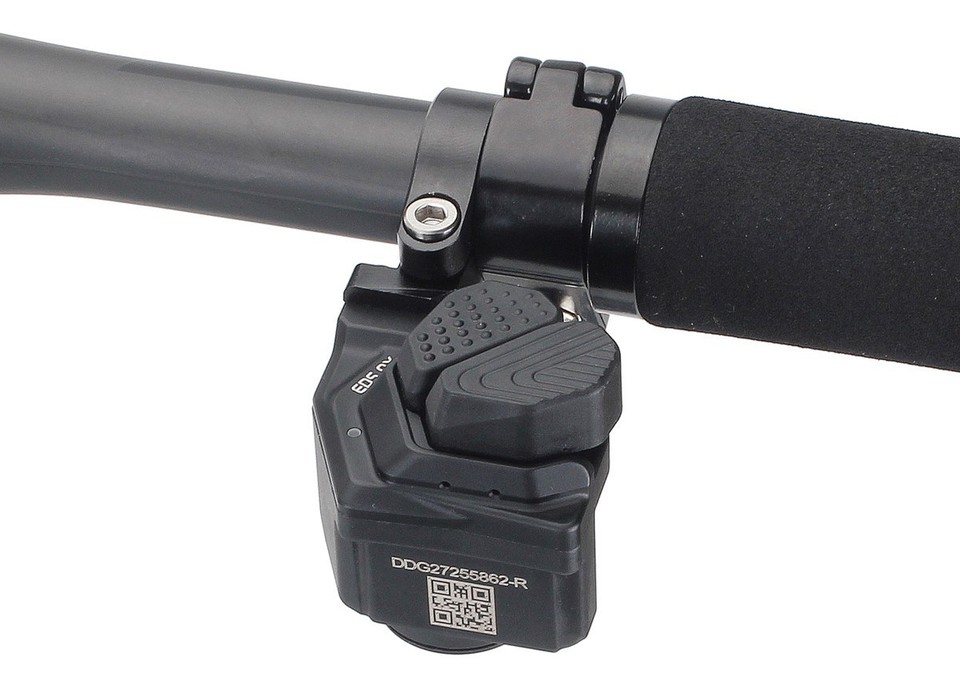
- Remove the back cover of the shifter and take out the existing CR2032 coin battery. Have a fresh coin battery (or a small metal object) ready.
- Plug the charging cable into the rear derailleur for 3–5 seconds until a red light appears, then unplug it right away. This step is critical — the derailleur only enters pairing mode once the charging cable is disconnected, so make sure it's unplugged before continuing.
- Go back to the shifter. With one hand, press and hold the large button on the shifter — don't let go. With your other hand, insert the coin battery, pressing it in with your thumb — don't let go of that either. After a few seconds the light should turn green. Press the shifter button once: if the rear derailleur moves, pairing is successful. Reattach the shifter's back cover in the correct orientation and tighten it.
After pressing the shifter lever, the rear derailleur does not shift normally
1.Check the button indicator light: If there is no light, replace the battery and test again. 2.Check the light color: If the button is lit but not green (e.g. red or yellow), the device is not paired correctly. Re-pair following the manual.


