Skip to content

Rear Derailleur Replacement Wireless Electronic MTB 3-14 Speed IP67 WHEELTOP EDS

Derailleur Cage
$237.00
In Stock

Questions before you buy? Email us · We reply within 6 hours.

WHEELTOP EDS OX 2.0 Wireless Electronic Rear Derailleur

A fully wireless electronic rear derailleur engineered for mountain bikes, flat-bar road bikes, and folding bikes. Built-in battery, IP67 weather sealing, and 3-14 speed compatibility — premium electronic shifting without the cables. Pairs with the WHEELTOP EDS OX 2.0 wireless shifter (sold separately) or your existing OX 2.0 shifter.

WHEELTOP EDS OX 2.0 Complete Kit — Derailleur + Shifter

This Listing Is the Rear Derailleur Only

Need the complete setup? Shop the OX 2.0 Complete Kit — derailleur + wireless shifter together.

New OX2.0 Electronic Rear Derailleur

Wheeltop OX2.0 rear derailleur

Zero-Lag Shifting, Trail-Tough Build

Equipped with a high-capacity battery, the OX2.0 delivers exceptional endurance — capable of executing up to 24,000 gear shifts on a single charge. The magnetic snap-on charging connector makes top-ups effortless. A windowed protective cover shields the motor from all angles, while the IP67-rated sealed housing keeps dirt and water out, ride after ride.

Adjustable Chain Stabilizer

A precision-tensioned chain stabilizer suppresses chain slap and prevents dropped chains on rough terrain. The full aluminum alloy construction keeps the body rigid under load — reliable whether you're cruising fire roads or hammering technical singletrack.

Full Control from Your Phone

Download the WHEELTOP app to pair, tune, and monitor your derailleur — all from your handlebars.

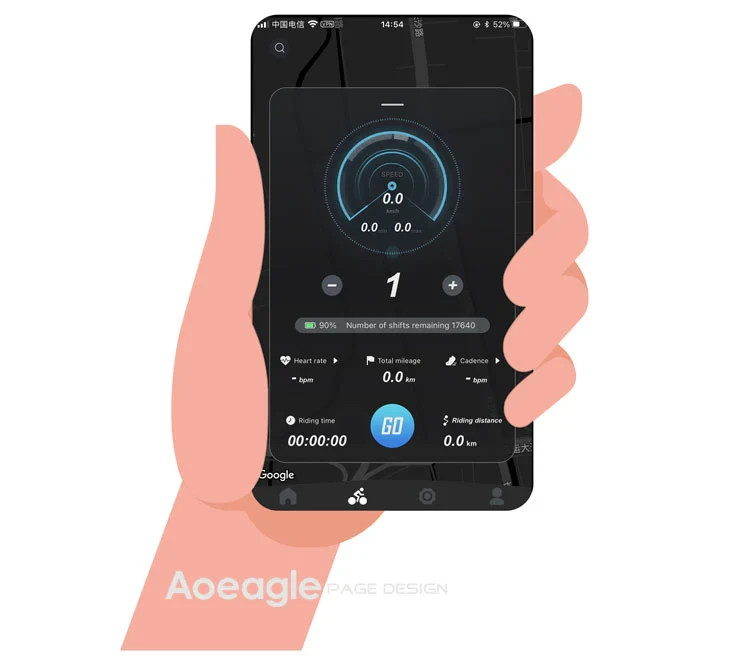
WHEELTOP app main screen

Everything You Need, Right in the App

Install the WHEELTOP app on iOS or Android. Connect over Bluetooth, and you have instant access to gear position, battery level, riding data, firmware updates, and full after-sales support — all in one place.

Live Riding Data

Speed, cadence, heart rate, mileage, and ride time displayed in real time

Battery & Shift Count

See remaining charge and total shift cycles at a glance

OTA Firmware Updates

Push updates wirelessly — performance improvements without cables or tools

WHEELTOP app Standard and Racing Mode

Two Riding Modes. One Tap to Switch.

Switch between Standard and Racing mode directly in the app. Each mode is tuned for a different riding style — no tools, no hassle.

Standard Mode

Auto-sleep when idle. Lower power draw, longer battery life. Perfect for long days in the saddle.

Racing Mode

Always-on, maximum responsiveness. Boosted signal power for noise-resistant shifting under pressure.

WHEELTOP app calibration screen

Pair, Calibrate, Fine-Tune — All in the App

Use the WHEELTOP app to pair your derailleur, run initial position calibration, and micro-adjust each individual gear. No limit screws to guess at — just tap and confirm.

Per-Gear Fine Adjustment

Dial in every sprocket individually. If one gear feels off, adjust it directly in the app without touching the bike — a precision that cable systems simply can't match.

3-14
Speed compatibility
IP67
Dust-tight · 1m submersion
24,000
Shifts per full charge
800mAh
Built-in lithium battery

Specifications

Full technical breakdown of the OX 2.0 wireless electronic rear derailleur.

Brand
WHEELTOP
Model
EDS OX 2.0 Wireless Electronic Rear Derailleur
Application
Mountain Bikes, Flat-Bar Road Bikes, Folding Bikes
Speed Range
3-14 Speed (configurable in app)
Cassette Compatibility
Long Cage 10-52T · Medium Cage 10-42T · Short Cage 10-32T
Pulley
12T positive and negative teeth
Material
Aluminum Alloy
Wireless Protocol
BLE + ANT+  pairs with cycling computers, displays gear and battery
Charging Port
Pogo-Pin Magnetic Connector
Battery
800mAh built-in lithium · 7.4V · 5.92Wh
Charge Indicator
Red: charging · Light off: fully charged
Protection Rating
IP67 - dust-tight, 1m submersion up to 30 min
Weight
397.5g
Cage Version
58mm · 75mm · 93mm (select correct version for your cassette)

Replaceable Derailleur Cage

The cage plate is secured by hex socket screws — swap it in minutes with a 3 mm hex key. Use a professional-grade precision hex key (RC / model aircraft type recommended) — a cheap or worn key will strip the small screws instantly. Change cage length, replace a damaged cage after a crash, or upgrade when new cage options become available.

OX 2.0 replaceable derailleur cage

Trail Crashworthy

Bent cage after a rock strike? Replace just the cage — not the whole derailleur. Far more cost-effective than replacing the entire unit.

Flexible Configuration

Switch between 58 mm (short), 75 mm (medium), and 93 mm (long) cages as your drivetrain changes — one derailleur body, multiple setups.

Which Cage Length is Right for You?

The OX 2.0 comes in three cage lengths, each engineered for a specific cassette range and riding style. Choosing the wrong cage will compromise shift quality and chain tension — confirm your largest sprocket before ordering.

OX 2.0 93mm Long Cage
93mm Long Cage

10 – 52T

Cassette Compatibility

Built for mountain bikes, single-chainring flat-bar road bikes, and gravel bikes. Handles wide-range cassettes up to 52T with ease.

OX 2.0 75mm Medium Cage
75mm Medium Cage

10 – 42T

Cassette Compatibility

The sweet spot for single-chainring flat-bar road bikes, folding bikes 18" and above, and urban bikes running cassettes up to 42T.

OX 2.0 58mm Short Cage
58mm Short Cage

10 – 32T

Cassette Compatibility

Designed for 16"–20" folding bikes with compact drivetrains. Pairs perfectly with cassettes up to 32T where clearance is tight.

Still not sure? Check your cassette's largest sprocket: up to 32T → Short · 34–42T → Medium · 46T and above → Long. When in doubt, send us a message before ordering — we're happy to help you pick the right one.

What's in the Box

×1

OX 2.0 Wireless Electronic Rear Derailleur

×1

Magnetic Charging Cable

×1

Type-C Adapter

×1

Special Tailhook Backup Washer

×1

Quick-Start Guide

Check Your Derailleur Hanger

Please complete these two checks before fitting the WHEELTOP rear derailleur. Only install it once both are confirmed.

Check 1

Is the Hanger Straight?

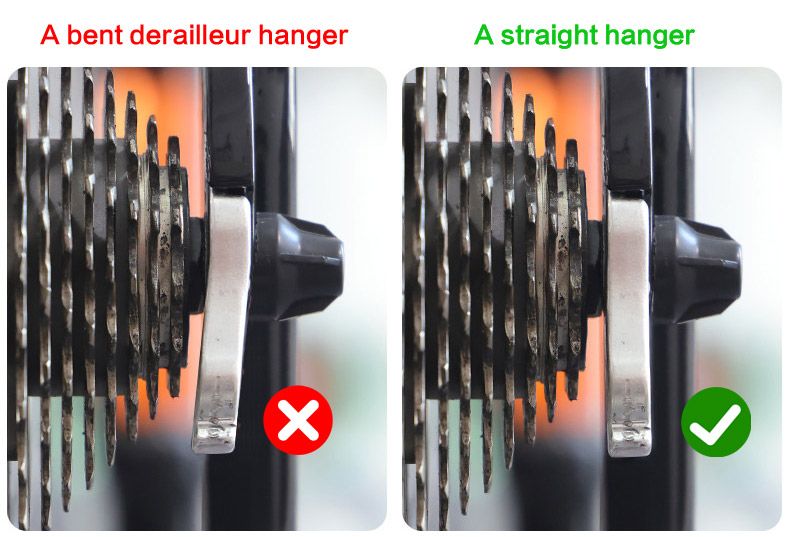
Bent derailleur hanger compared with a straight hanger

A bent hanger tilts the rear derailleur, which causes poor shifting, chain noise and difficult calibration, no matter how carefully it is set up.

How to check: look from behind the bike. The hanger should hang straight down, parallel to the cassette cogs. If it is bent, straighten it with a hanger alignment tool or fit a new hanger.

Check 2

Does the Hanger Have a Step?

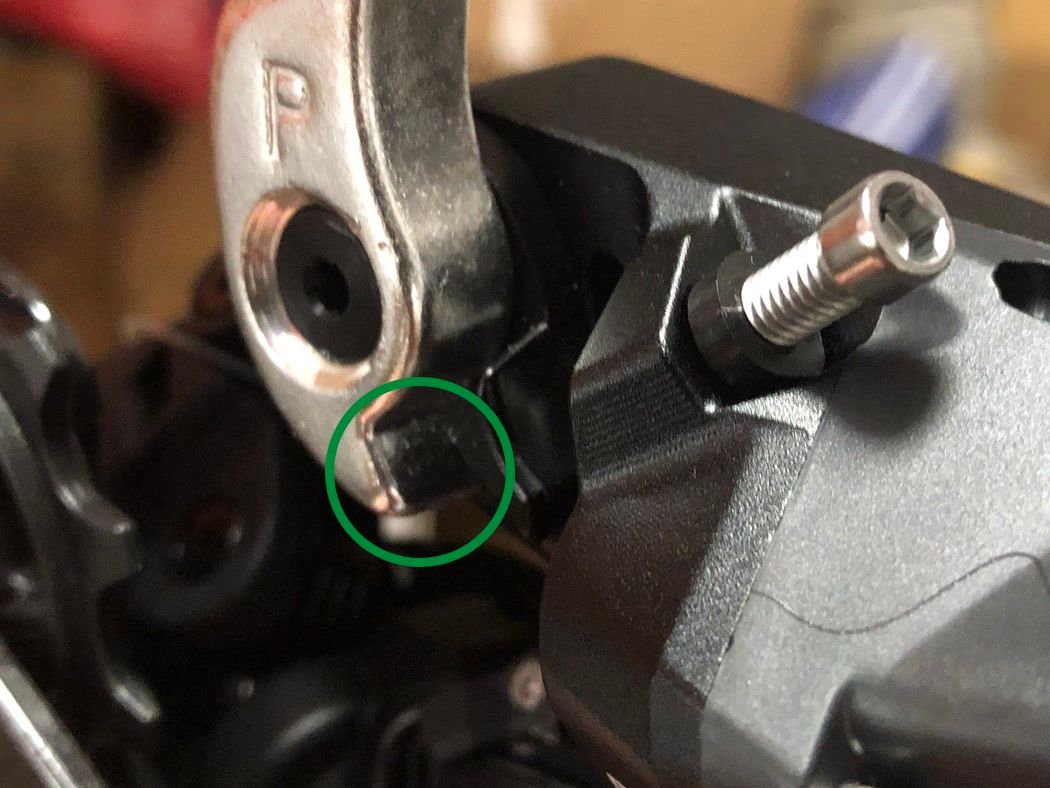
Derailleur hanger with a clear step: compatible
Compatible

Clear step at the bottom

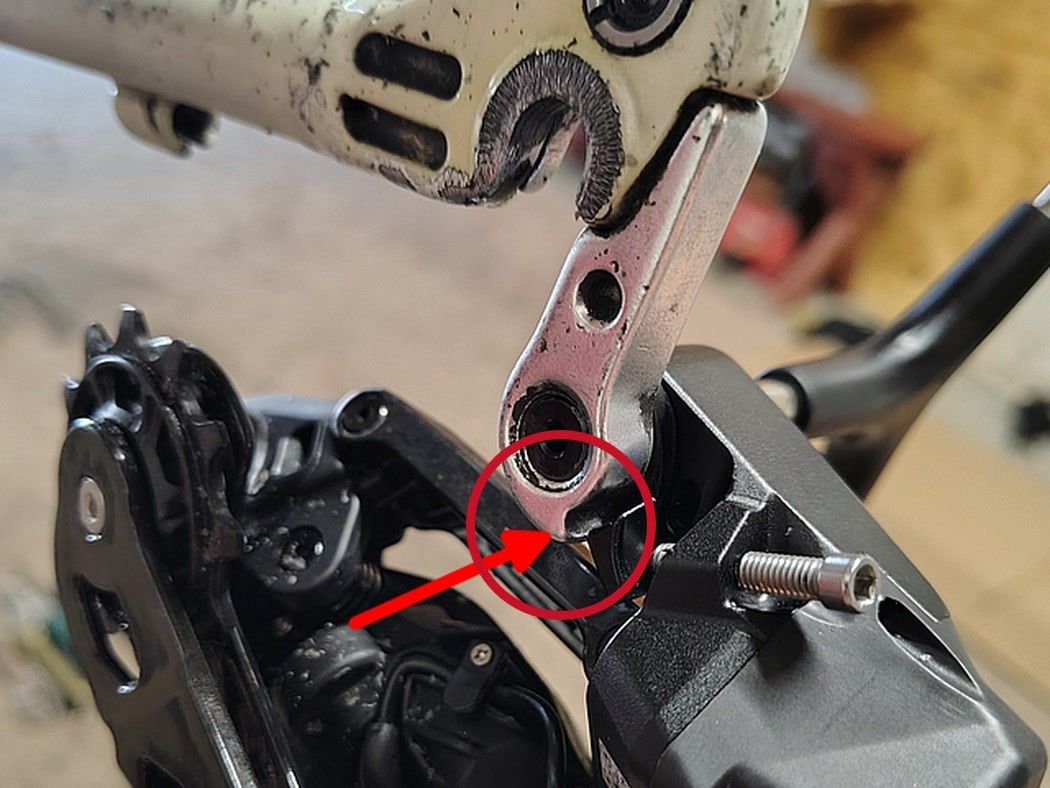
Derailleur hanger with a very small step: not compatible
Not compatible

Very small step

The small tab next to the mounting bolt must rest on the step at the bottom of the hanger, so the derailleur can swing forward and back.

Small step? Fit a hanger with a larger step, or a derailleur hanger extender. Otherwise the derailleur stays rigid and cannot be set up.

Not sure? Send us a close-up photo of your hanger through eBay messages before ordering, and we will check it for you.

Compatibility & Buyer Notes

Please review the following before purchasing to ensure correct fitment.

Requires a WHEELTOP EDS OX 2.0 Shifter

This listing is for the rear derailleur only. You'll need a WHEELTOP EDS OX 2.0 wireless shifter to control it — buy ours separately, or use one you already own.

UDH Frames: Mounts on the Existing Hanger, No Extra Parts

This is a standard hanger-mount derailleur, not a hangerless direct-mount like SRAM Transmission — so if your frame uses a UDH hanger, leave it in place and bolt the derailleur straight onto it, no adapter needed. WHEELTOP lists UDH frames as "partially compatible" because on a small number of frames, the derailleur body can lightly interfere with the frame near the smallest cog. After installing the chain, shift to the smallest cog and check by hand for any rubbing before fine-tuning limits in the app.

1x Drivetrain Only

Designed for single-chainring setups. Not compatible with double or triple chainring systems due to direct-mount structure.

Choose the Right Cage Length

Verify cassette size before selecting cage version: 58mm (10-32T) · 75mm (10-42T) · 93mm (10-52T).

App-Based Setup Required

Initial calibration must be performed via the WHEELTOP app (free on iOS and Android) after installation.

Reviews

Feedback from verified purchases in our eBay store.

  • Negative feedbackY***W (373)Verified purchasePast month

    Took my money on 10-2, did not ship until 10-13. Shipped wrong item. Still waiting on purchased item.

    Reply from Aoeagle

    Sorry! Packing error. Correct item re-sent Oct 14, tracking sent to buyer.

  • Positive feedbackj***4 (2)Verified purchasePast 3 months

    Order delivered on time with no issues

Which brand of cassette does it support?

The app allows you to customize speed and gear spacing, so in theory it supports 3–14 speed cassettes from all brands.

How to pair the app?

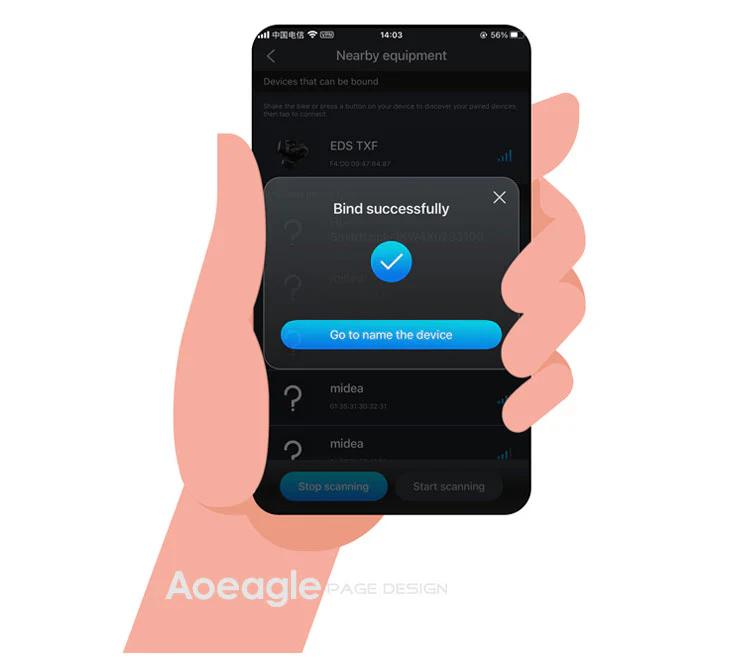
On the home page, click the [Add Device] button. The APP will automatically navigate to the nearby devices list page. Locate your device's MAC address, then click to add and bind it. After successful binding, you will need to name the device.

Step 1: Click the Add button on the home page Step 2: Turn on your phone’s Bluetooth to search for nearby devices
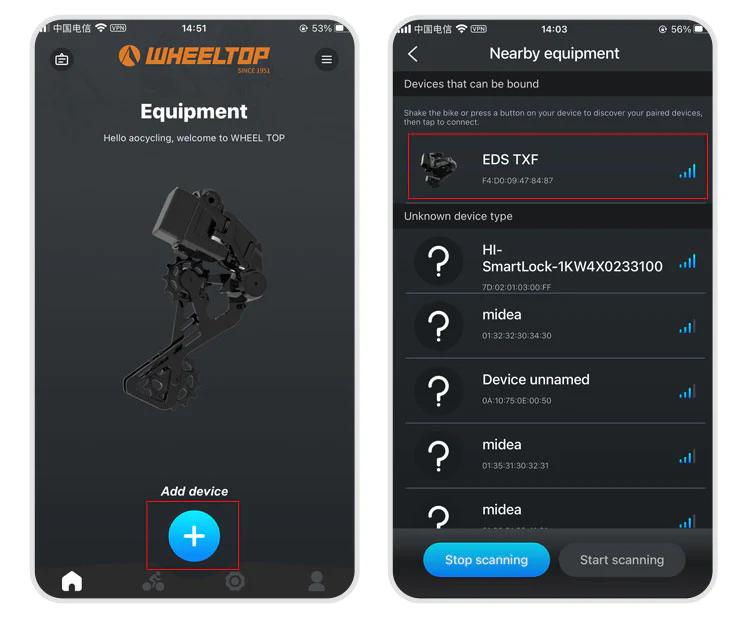
Step 3: Select nearby bindable devices to add Step 4: Name the device
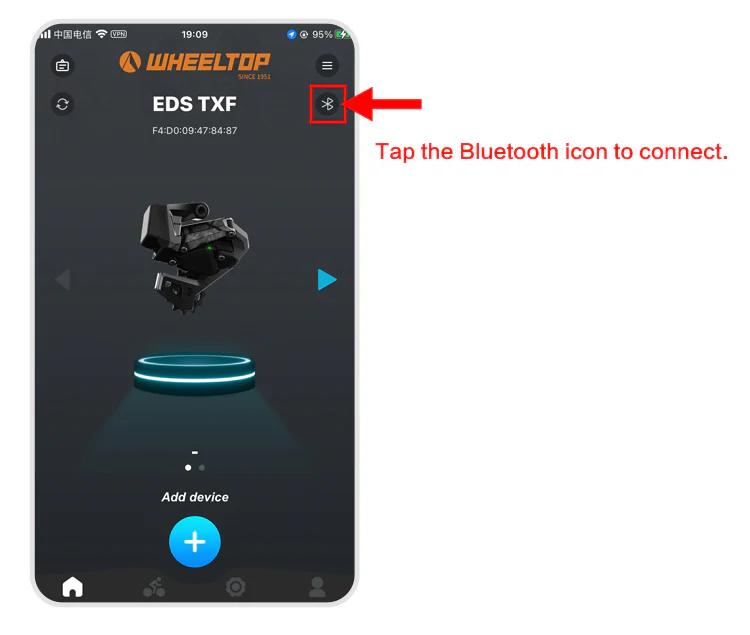
One last thing — and this is where a lot of users get stuck.

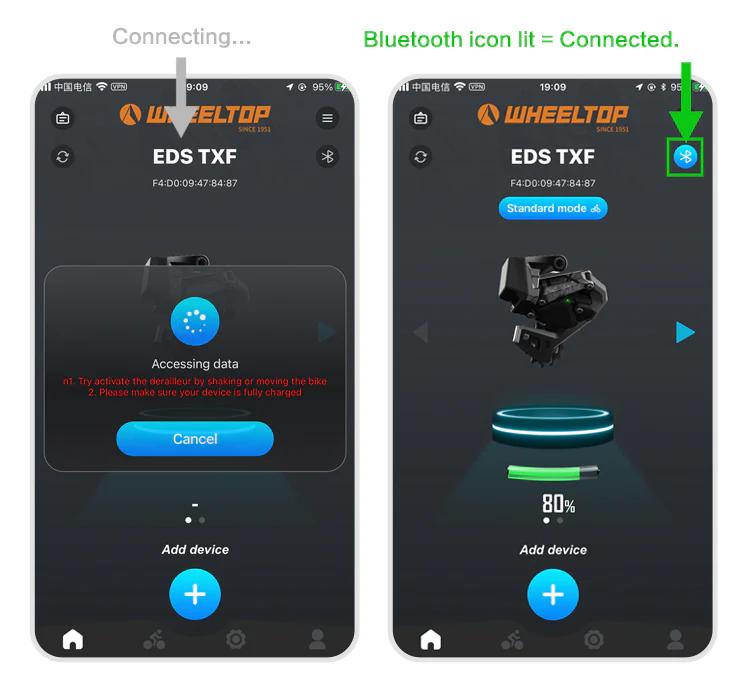
To connect, you need to tap the Bluetooth icon in the app. Before doing so, make sure the derailleur hasn't gone into sleep mode. If it has, just give the derailleur a tap or shake the bike to wake it up. Once the connection is successful, the Bluetooth icon will light up — and you're all set to start adjusting your derailleur.
How to do the initial calibration?

For EDS TX series:

  1. Set the front derailleur to the largest sprocket
  2. Set the rear derailleur to the smallest cog position
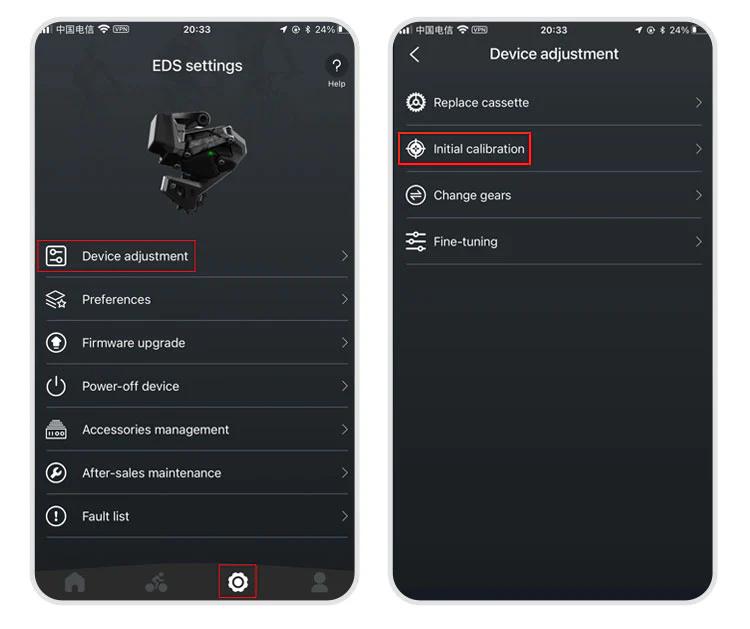
  3. Open the WHEELTOP App → Initial Calibration
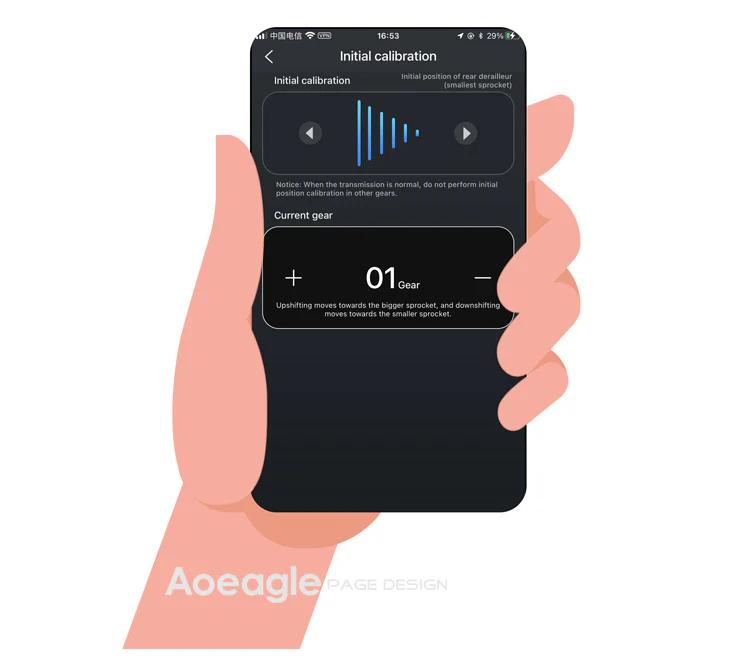
Use "<" or ">" buttons to align the RD pulley with the smallest cog
Exit the initial calibration page

For EDS GeX and OX series: Same steps but skip step 1 (no FD adjustment required).

How to download and register the WHEELTOP app?

WHEELTOP APP download:

app Store

Google Play

After successful registration, log in to the app.

You can also download the APK file directly: APK Download Link

For first-time use, please register with your email.

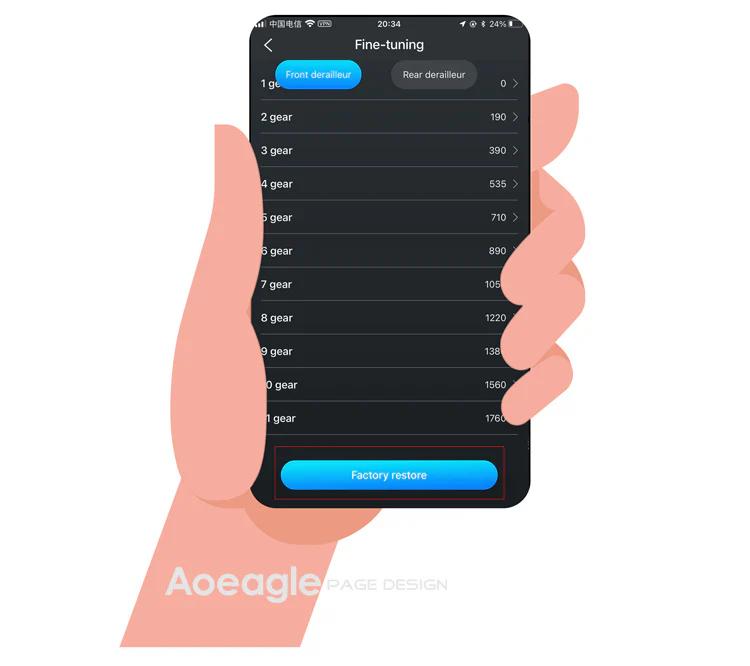
How to perform a factory restore?

It works like a factory reset for gear values. Use it when gear values have been misadjusted to restore the preset values.

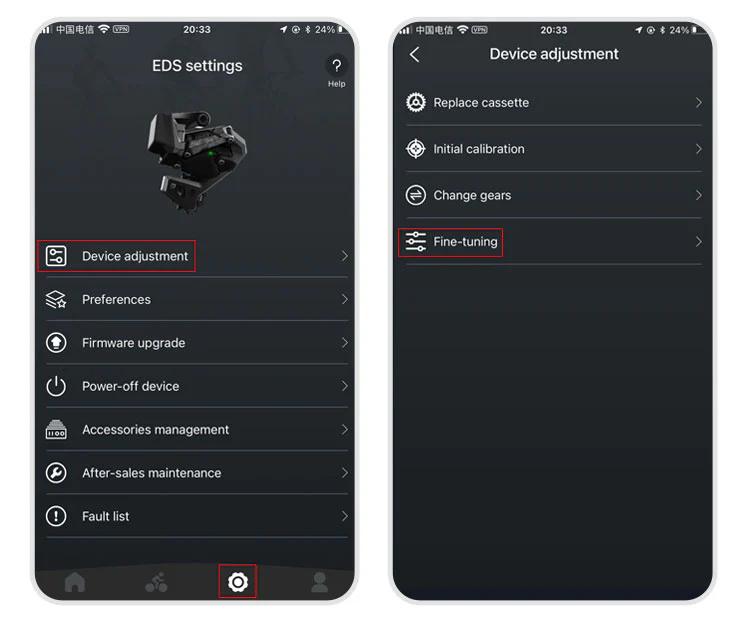
Path: APP → Settings → Device-adjustment → Fine-tuning → "Factory-restore" button at the bottom.
The rear derailleur position is inconsistent with the APP display

1.Go to the initial calibration page in the APP 2.Select the rear derailleur (upper section) 3.Press the right arrow (▶) and hold until the RD moves back to the smallest cassette

More questions (7)
The device cannot shift immediately after not riding for a long time

1.Charge the system — a low battery can delay activation 2.Gently shake the frame — this helps wake up the rear derailleur more quickly

Can EDS be paired with bike computers?

Yes!EDS TX, OX2.0, and GeX can all be paired with bike computers.

How do I power off and power back on my WHEELTOP EDS device?

In the latest version of the WHEELTOP app, swipe left on the rear derailleur's device card to bring up the **Disconnect / Power Off** menu, then tap **Power Off**. This is useful for shutting the system down during shipping or storage. To power the device back on, plug in the magnetic charging cable for **2-3 seconds** — once the charging indicator light turns **red**, the device powers on and reactivates.

WHEELTOP app screen showing the swipe-left Disconnect / Power Off menu
Is it equipped with a rear derailleur clutch function?

OX2.0 and GeX are equipped with a rear derailleur clutch function.

How long does the battery last on a single charge?

A fully charged WHEELTOP EDS battery delivers 20,000+ shifts per charge, which translates to 60+ hours of typical riding before needing to recharge. This exceptional range means most cyclists can ride several days between charges, making the EDS derailleurs ideal for long tours and multi-day events.

For EDS OX, can I install a double chainring?

No. Due to its direct mount structure, the rear derailleur is only compatible with a single chainring system.

How do I pair the OX 2.0 shifter with the rear derailleur?
  1. Remove the back cover of the shifter and take out the existing CR2032 coin battery. Have a fresh coin battery (or a small metal object) ready.
  2. Plug the charging cable into the rear derailleur for 3–5 seconds until a red light appears, then unplug it right away. This step is critical — the derailleur only enters pairing mode once the charging cable is disconnected, so make sure it's unplugged before continuing.
  3. Go back to the shifter. With one hand, press and hold the large button on the shifter — don't let go. With your other hand, insert the coin battery, pressing it in with your thumb — don't let go of that either. After a few seconds the light should turn green. Press the shifter button once: if the rear derailleur moves, pairing is successful. Reattach the shifter's back cover in the correct orientation and tighten it.