

Request a stock update
Questions before you buy? Email us · We reply within 24 hours.

eBay seller feedback (store-wide)
eBay seller feedback from buyers in our eBay store. It covers our whole store; the tabs show feedback for this item or for all items.
Photos from buyers
-
Really pleased with the item. Arrived in perfect condition and at an unbeatable price. A high quality item.
WHEELTOP EDS TX Wireless Groupset 2x7-12 Speed Rim Brake Carbon Oversized Pulley -
Very happy very simple setup all up and running the gear changes really smoothly what can I say other than I'm pleased that I chose this groupset I have put the groupset on my fort aero from 2005 .. it is really amazing..
WHEELTOP EDS TX Wireless Electronic 2x11s Groupset Full Kit Road Bike Rim Brake -
Would buy again from this seller great response and replies. Great communication!
WHEELTOP EDS OX 2.0 MTB Wireless Electronic Groupset, 93mm Long Cage, 7-13s -
Very easy transaction, quick shipping, great product. I used the GeX set to create a monster gravel bike from an old Cannondale Flash frame, with Zrace flat mount to post mount adapters. Very pleased with the result. The set came in a nice branded wooden box: nice touch. I didn't even need to bleed the brakes or calibrate the mech, just selected Shimano 11sp. All good.
WHEELTOP EDS GeX 3-14 Speed Groupset Shifter, Derailleur & Hydraulic Disc Brake -
Very quick delivery and exactly as described
WHEELTOP EDS GeX 1x12 Speed Gravel Bike Hydraulic Disc Brake Wireless Groupset -
Ero scettico riguardo questo gruppo, ma una volta regolato bene funziona alla perfezione
WHEELTOP EDS GeX Gravel Wireless Electronic Groupset 3-14s 52T Hydraulic Disc
Prices, discounts or availability mentioned in creator videos may be out of date. The current price is the one shown on the product page at aoeagle.com.

Your Favorite Cyclist
How to Replace Wheeltop EDS GeX Shifter Batteries
In this video, Your Favorite Cyclist shows how to replace the CR2032 shifter batteries on the WHEELTOP EDS GeX, from opening the hood cover to checking the LED…
How to pair the app?
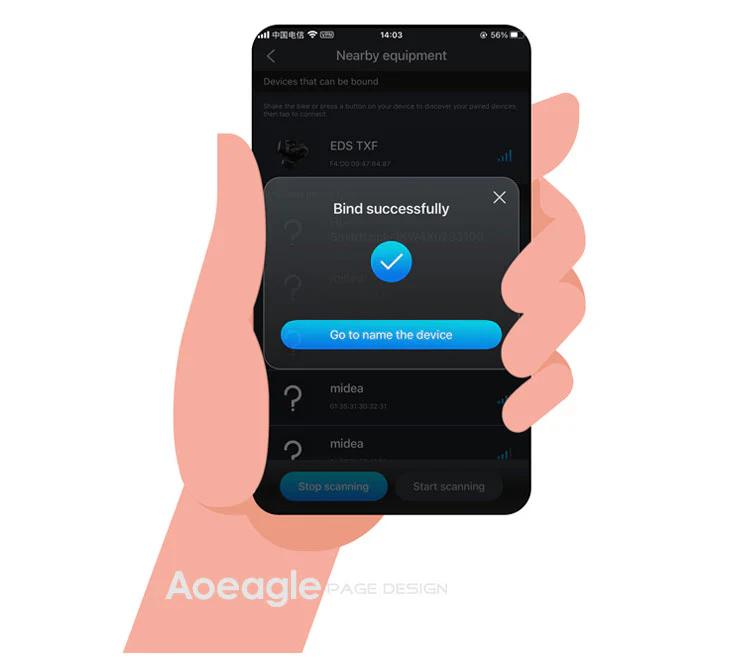
On the home page, click the [Add Device] button. The APP will automatically navigate to the nearby devices list page. Locate your device's MAC address, then click to add and bind it. After successful binding, you will need to name the device.
Step 1: Click the Add button on the home page Step 2: Turn on your phone’s Bluetooth to search for nearby devices
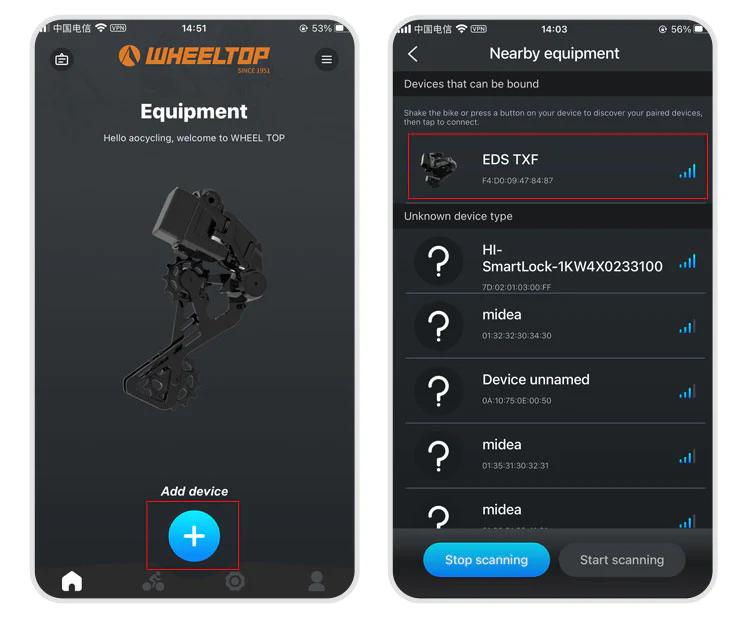
Step 3: Select nearby bindable devices to add Step 4: Name the device
One last thing — and this is where a lot of users get stuck.
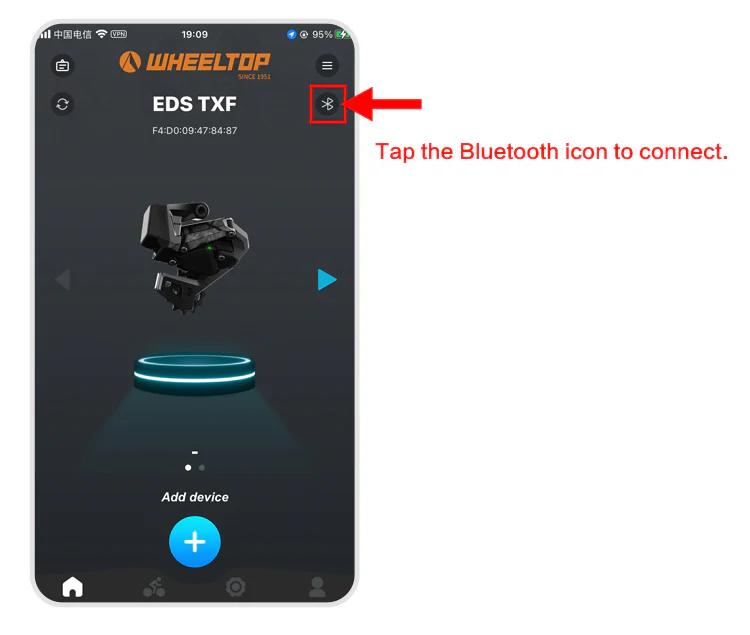
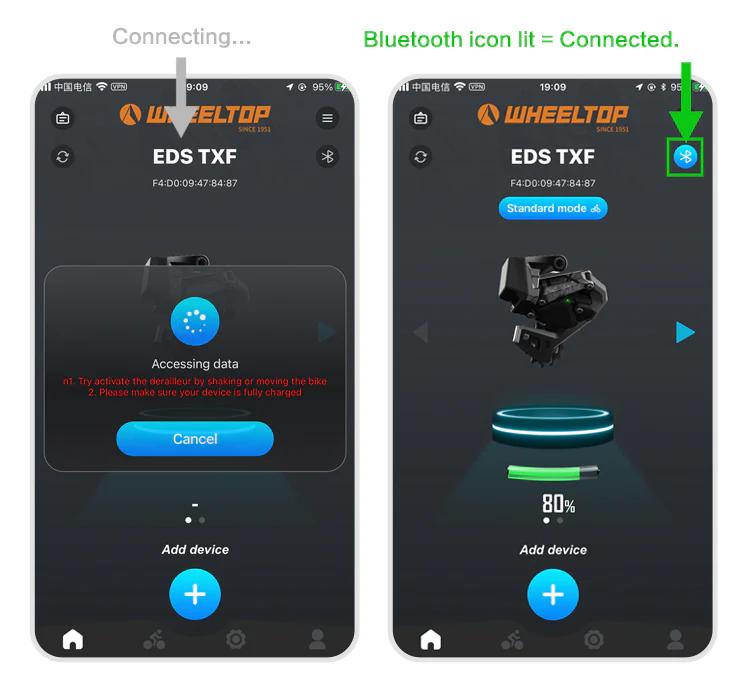
To connect, you need to tap the Bluetooth icon in the app. Before doing so, make sure the derailleur hasn't gone into sleep mode. If it has, just give the derailleur a tap or shake the bike to wake it up. Once the connection is successful, the Bluetooth icon will light up — and you're all set to start adjusting your derailleur.
How to download and register the WHEELTOP app?
WHEELTOP APP download:

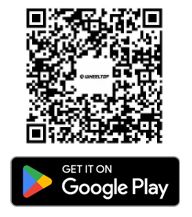
After successful registration, log in to the app.
You can also download the APK file directly: APK Download Link
For first-time use, please register with your email.
After pressing the shifter lever, the rear derailleur does not shift normally
1.Check the button indicator light: If there is no light, replace the battery and test again. 2.Check the light color: If the button is lit but not green (e.g. red or yellow), the device is not paired correctly. Re-pair following the manual.
What brake systems are compatible with EDS TX?
Cable Brake Groupsets are compatible with rim brakes, V-brakes, U-clamps, and pull-cable disc brakes.
Hydraulic Disc Brake Groupset uses mineral oil, designed for Shimano's hydraulic brake system, compatible with L04C, L05A, and L04A brake pads.
What is the length of brake cables? Are they standard mechanical brake lines?
Our EDS TX/GEX Cable Brake Groupsets use standard mechanical disc brake cables, widely available in the market. Each set includes two brake cables. The length should be sufficient for most bikes.


