Skip to content

WHEELTOP EDS TX Wireless Electronic Groupset 2x3-14 Speed Road Bike Rim Brake

$459.00 $799.00 Save 43%
In Stock

Questions before you buy? Email us · We reply within 6 hours.

CHOHO hollow flat-top chain

Recommended pairing

WHEELTOP × CHOHO Hollow Flat-Top Chain

Pairs perfectly with WHEELTOP EDS — officially recommended. Fully hollow, flat-top plates keep the drivetrain smooth and quiet while cutting weight.

11-speed for Shimano 11s cassettes  ·  12-speed for Shimano and SRAM AXS 12s

View the CHOHO chain ›

WHEELTOP EDS TX — Rim Brake, Carbon Fiber Pulley Cage

A fully wireless electronic shifting kit purpose-built for road bikes and drop-bar bicycles. Front and rear derailleurs shift on a button press — no cables, no housing, no barrel adjusters. Speed count isn't fixed by the hardware — you set it yourself in the WHEELTOP app, fully configurable via BLE/ANT+. Supports cassettes up to 36T. 2X (double chainring, front derailleur included) configuration. The rear derailleur ships with a standard carbon fiber pulley cage, and the shift levers are carbon fiber, pairing with your existing rim brake calipers — no hydraulic lines, no caliper changes required.

Before you order, please check

Brake type

This is the rim brake version. Please make sure it matches your bike's brakes.

Front derailleur

Braze-on mount. If your frame has no braze-on tab, a clamp-on adapter can be used on a round seat tube. We can supply one, just message us.

WHEELTOP EDS TX rim brake wireless electronic groupset — rear derailleur, front derailleur, and carbon fiber shift levers

The Complete Shift Kit

Electronic Rear Derailleur — Carbon Fiber Pulley Cage
Electronic Front Derailleur
Carbon Fiber Left Rim Brake Lever
Carbon Fiber Right Rim Brake Lever

Electronic Rear Derailleur — 3-14 Speed, App-Configurable

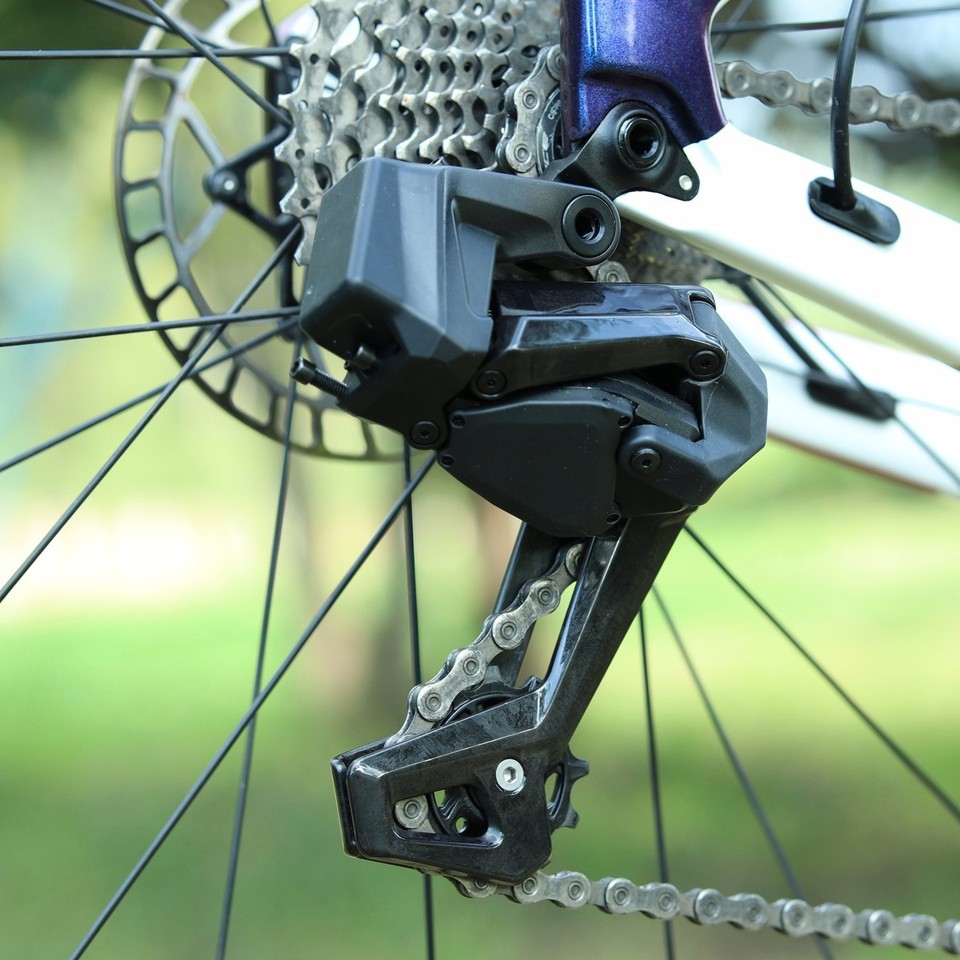
EDS TX rear derailleur with carbon fiber pulley cage

EDS TX Electronic Rear Derailleur

Driven by a built-in 800mAh rechargeable battery at 8.4V, the EDS TX rear derailleur shifts instantly on a button press — zero cable lag, zero stretch over time. The exact speed count is configured through the WHEELTOP app — supports cassettes up to 36T. The standard carbon fiber pulley cage uses a 12-tooth positive/negative tooth profile for quieter, more secure chain engagement. Charges through a magnetic Pogopin connector — snap it on, no port covers, no corrosion.

3-14 Speed, Set in the App

Unlike mechanical derailleurs locked to a fixed speed count, the EDS TX lets you define your speed range and per-gear position through the WHEELTOP app.

Electronic Front Derailleur — Complete 2× Groupset

Ships with both the front derailleur and rear derailleur — a complete 2× drivetrain groupset, ready to install.

EDS TX front derailleur

Precise Front Shifting on Demand

The EDS TX front derailleur runs on its own built-in 600mAh rechargeable battery and shares the same 8.4V system, magnetic Pogopin charging, and BLE/ANT+ wireless link as the rear unit. Pair both derailleurs to the WHEELTOP app for synchronized setup, gear mapping, and live status — front and rear shift in concert with a single button press from the lever.

FD Battery

600mAh / 8.4V

Built-in rechargeable lithium

Charging

Pogopin Magnetic

Red = charging, green = full

Wireless

BLE / ANT+

Pairs with cycling computers

Weight

191.3g

Included

Rim Brake — Carbon Fiber Lever

The EDS TX Rim Brake build pairs a carbon fiber lever body with your existing rim brake calipers — electronic shifting precision, zero cable clutter, zero changes to your braking setup.

EDS TX rim brake carbon fiber shift lever on road bike drop bar

Carbon Fiber Body. Rim Brake Compatible.

The carbon fiber lever body is lightweight, rigid, and built to pair with your existing rim brake cable. Shift electronically on a button press while braking through the lever in the same motion you already know. No new calipers, no hydraulic lines — just cleaner cockpit routing and instant gear response.

Left Lever

202.3g

Right Lever

214.6g

Material

Carbon Fiber

Battery

CR2032

Full Control from Your Phone

Download the WHEELTOP app to pair, tune, and monitor your drivetrain — all from your handlebars.

4 Steps to Get Riding

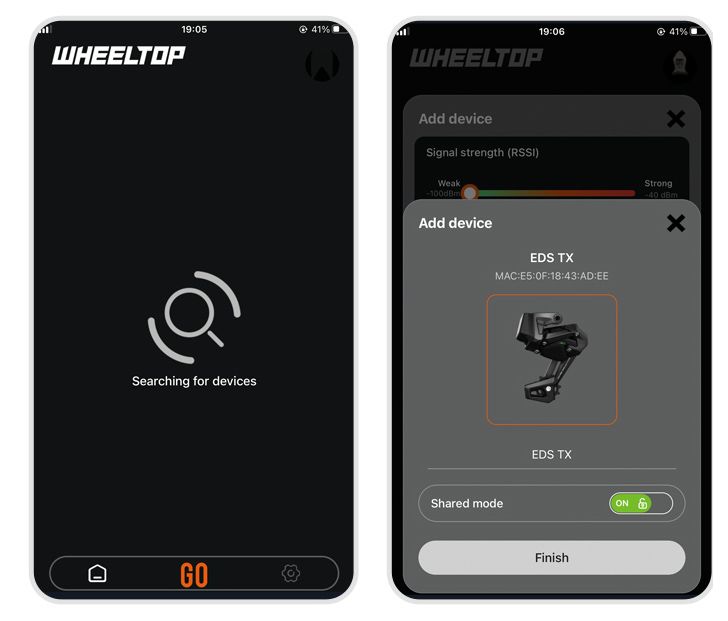
WHEELTOP app searching for and selecting the EDS TX device
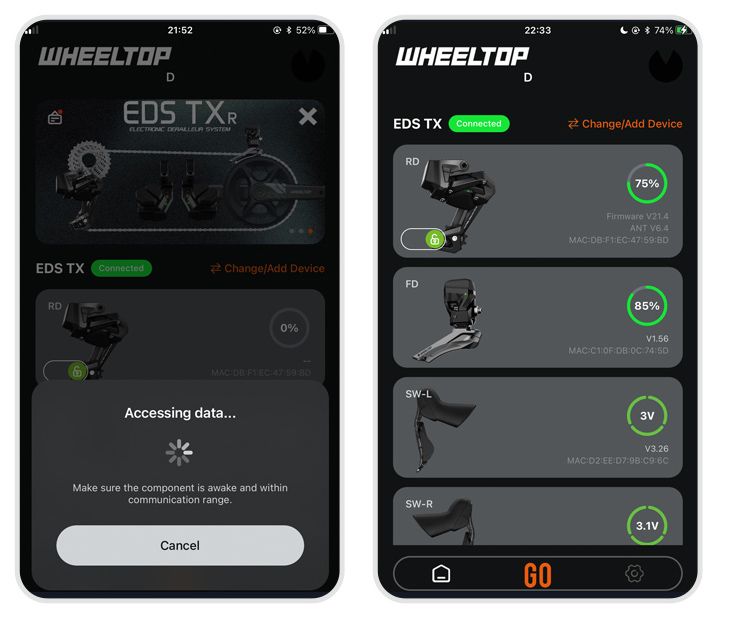
WHEELTOP app connecting and showing all four components with battery levels

Step 1

Pair Your Components

Open the WHEELTOP app and tap + Start Using. It searches for nearby EDS TX components over Bluetooth, showing a Searching for devices screen. Once your derailleur turns up, select it and name it yourself, then tap Finish — the app connects automatically, showing an Accessing data… prompt while it pairs — just keep the derailleur powered on and within range. When it's done, the screen switches to Connected, and the home screen lists all four components — rear derailleur, front derailleur, and both shift levers — each showing its live battery reading, with the rear and front derailleur cards also listing firmware version and MAC address.

All Four Components, One Screen

The Connected view puts the rear derailleur, front derailleur, and both shift levers on one screen, so you can check every component's charge level at a glance before a ride.

WHEELTOP app flywheel settings screen

Step 2

Set Your Cassette Speed

Tap the settings icon in the bottom corner, then open Flywheel Settings and select your cassette's brand and speed so the derailleur knows exactly how many gears to index across.

Not Locked to One Speed Count

Unlike a mechanical derailleur built for one fixed speed, EDS TX is fully configurable — set whatever speed count you're running, directly in the app.

WHEELTOP app initial calibration screen

Step 3

Run Initial Calibration

Shift the rear derailleur onto the smallest cog and the front derailleur onto the largest chainring, then start calibration in the app.

Guided On-Screen Alignment

No guesswork — use the on-screen +R / −L controls to nudge the guide pulley until it sits precisely under the smallest sprocket, then tap Finish.

WHEELTOP app gear fine-tuning screen

Step 4

Fine-Tune Every Gear

If you notice any chain rub when shifting between chainrings, dial in each gear individually on the Fine-Tuning screen.

Need to Go Further?

Open Rear Derailleur Gear Parameters to view or manually edit the exact position value for any gear, then save — a level of precision cable systems simply can't match.

Other Settings

WHEELTOP app shift button customization screen

Customize Your Shift Buttons

Assign what each button on the left and right shift levers does — no two riders shift the same way.

Set It Once, Ride Your Way

Reassign the SW-L and SW-R paddles to trigger whichever shift function feels natural, or tap Factory Restore to reset instantly.

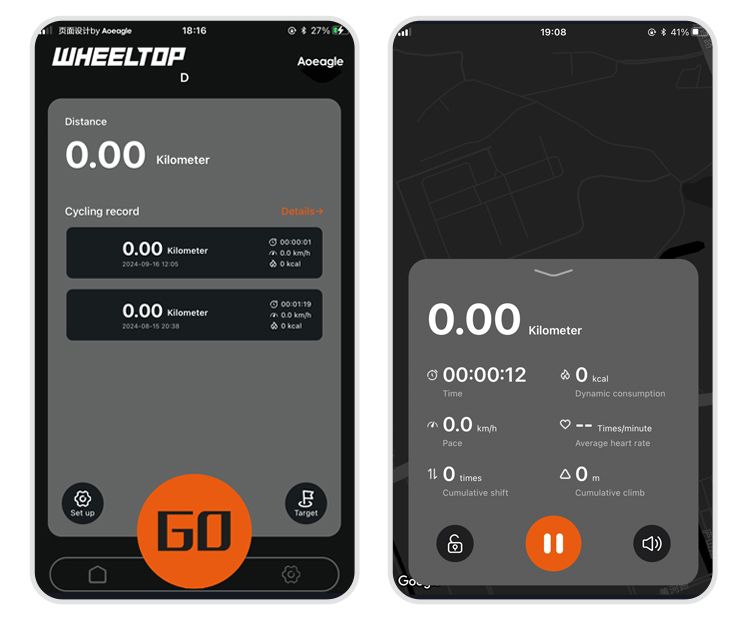
WHEELTOP app home screen and ride computer

Ride Data and Turn-by-Turn Navigation

Switch to the ride screen for distance tracking and a full history of past rides — each entry logged with duration, average speed, and calories burned.

Live Stats While You Ride

Tap GO in the bottom bar to switch into the ride screen, where elapsed time, calories, pace, average heart rate, cumulative shifts, and climb update in real time alongside turn-by-turn map navigation.

WHEELTOP app firmware update screen

One-Tap Firmware Updates

When a new firmware version is available, the app flags it right on the home screen for the affected component.

Stay Current, Wirelessly

Tap to review what's new, then update over the air — just make sure the component has enough charge before you start.

Two Riding Modes. One Tap to Switch.

WHEELTOP app Standard and Racing mode switch screen

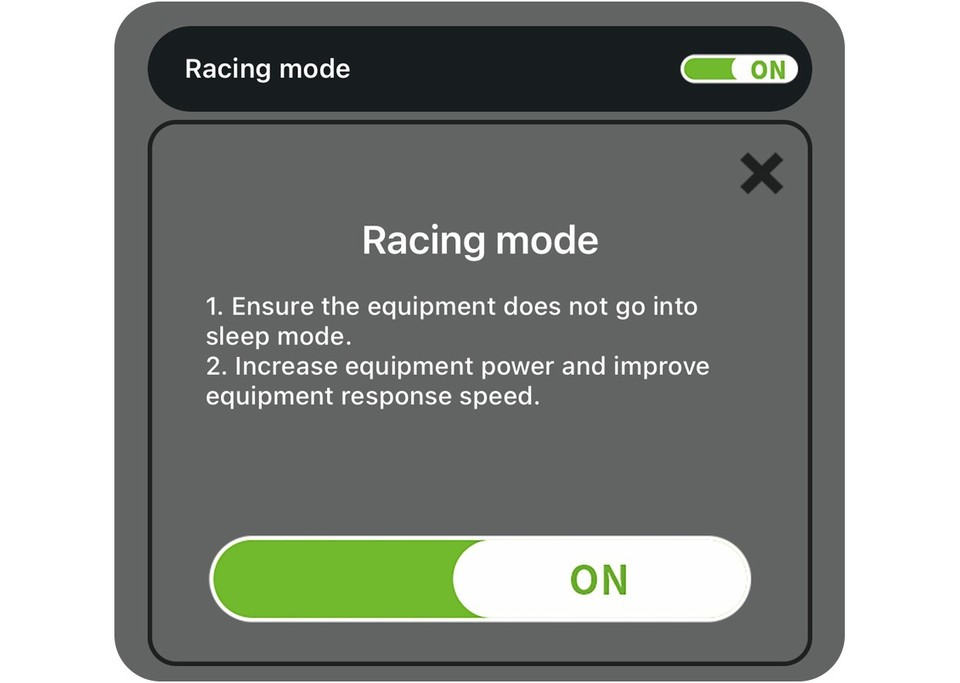
Switch between Standard and Racing mode directly in the app. Each mode is tuned for a different riding style — no tools, no hassle.

Standard Mode

Auto-sleep when idle. Lower power draw, longer battery life. Perfect for long days in the saddle.

Racing Mode

Always-on, maximum responsiveness. Boosted signal power for noise-resistant shifting under pressure.

36T
Max cassette size
20,000+
Shifts per RD charge
BLE+ANT+
Dual-protocol wireless

Specifications

Full technical breakdown of the EDS TX wireless electronic shifter/derailleur kit.

Brand
WHEELTOP
Model
EDS TX Wireless Electronic Shifter / Derailleur Kit — Rim Brake, Standard Carbon Cage
Suitable For
Road bikes, gravel bikes, cyclocross bikes — drop-bar bicycles with front derailleur mount, rim brake calipers
Speed Range
3-14 Speed (customizable via WHEELTOP app)
Cassette Compatibility
Up to 36T max
Rear Derailleur Pulley
Standard carbon fiber pulley cage, 12-tooth positive/negative tooth profile
Wireless Protocol
BLE / ANT+ — pairs with cycling computers, displays current gear position and battery level
Charging Port
Pogopin magnetic connector · Red light = charging, green light = charge complete
Battery Capacity
Rear derailleur 800mAh · Front derailleur 600mAh · System voltage 8.4V
Shifter Battery
CR2032 button cell (tool-free replacement)
Lever Material
Carbon Fiber
Weight
Front derailleur 191.3g · Rear derailleur 336.6g · Left lever 202.3g · Right lever 214.6g

What's in the Box

Complete kit — everything needed to install and pair the electronic drivetrain.

×1

EDS TX Electronic Rear Derailleur — Standard Carbon Cage

×1

EDS TX Electronic Front Derailleur

×2

Integrated Rim Brake Shift Levers — Carbon Fiber (Left + Right)

×1

Pogopin Magnetic Charging Cable

×2

CR2032 Button Batteries (pre-installed in shifters)

×1

Quick-Start Guide (scan QR code for installation video & instructions)

Quality Check & Return Inspection

Every order is checked, photographed, filmed and weighed before it ships, and every return is checked against those records.

Inspected and Tested Before Dispatch

Every groupset is brand new, and each one is inspected, paired and tested before it leaves us. That's why it reaches you new, fully working and free of marks, ready to fit.

Photographed, Filmed and Weighed

Each order is photographed and filmed when packed, and the parcel weight is recorded at dispatch.

Gift Box and Wooden Box

Ships in a printed "HELLO!" gift box with a zip tear strip. Inside, every electronic part is bubble-wrapped, sealed in a white frosted bag and packed in a wooden box: a free upgrade for 360° protection against crush damage in transit.

Returns Checked on Arrival

Every return is photographed and filmed when it's opened, and compared with our dispatch photos and video. It must be the item we sent, complete. Please return it in the original wooden box. Missing or different items are handled under eBay's returns policy.

Having trouble with setup? Message us first. Most issues are fixed in a few minutes.

Check Your Derailleur Hanger

Please complete these two checks before fitting the WHEELTOP rear derailleur. Only install it once both are confirmed.

Check 1

Is the Hanger Straight?

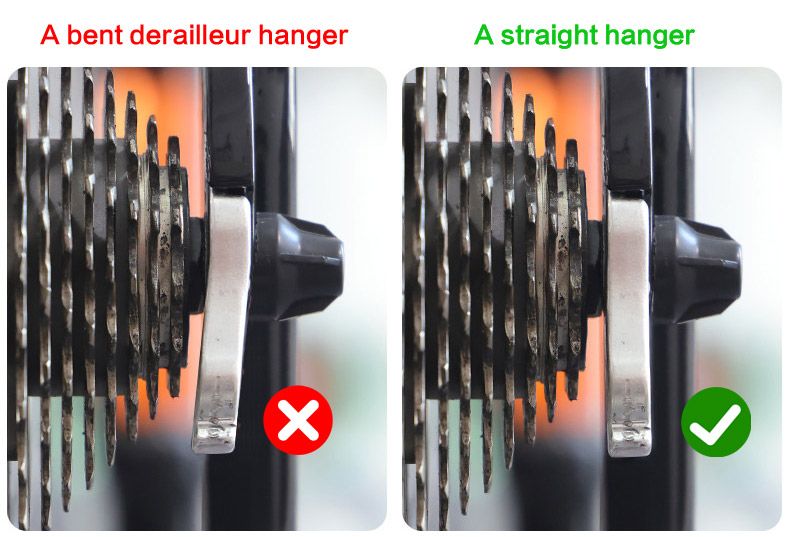
Bent derailleur hanger compared with a straight hanger

A bent hanger tilts the rear derailleur, which causes poor shifting, chain noise and difficult calibration, no matter how carefully it is set up.

How to check: look from behind the bike. The hanger should hang straight down, parallel to the cassette cogs. If it is bent, straighten it with a hanger alignment tool or fit a new hanger.

Check 2

Does the Hanger Have a Step?

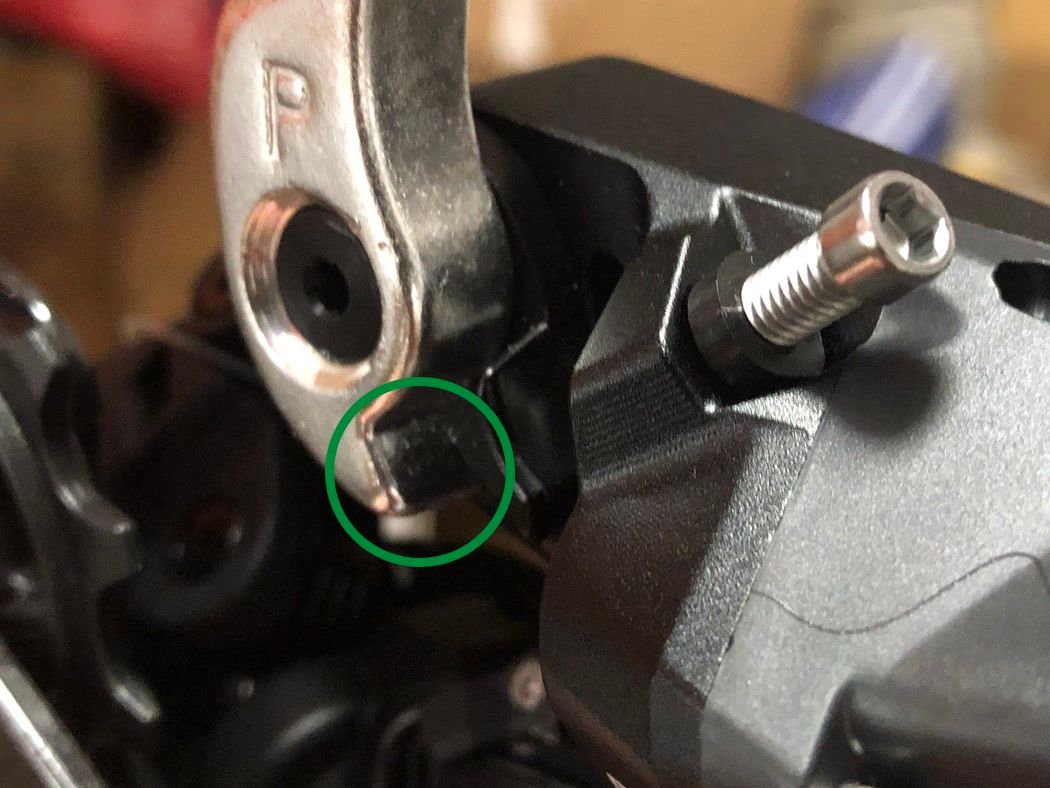
Derailleur hanger with a clear step: compatible
Compatible

Clear step at the bottom

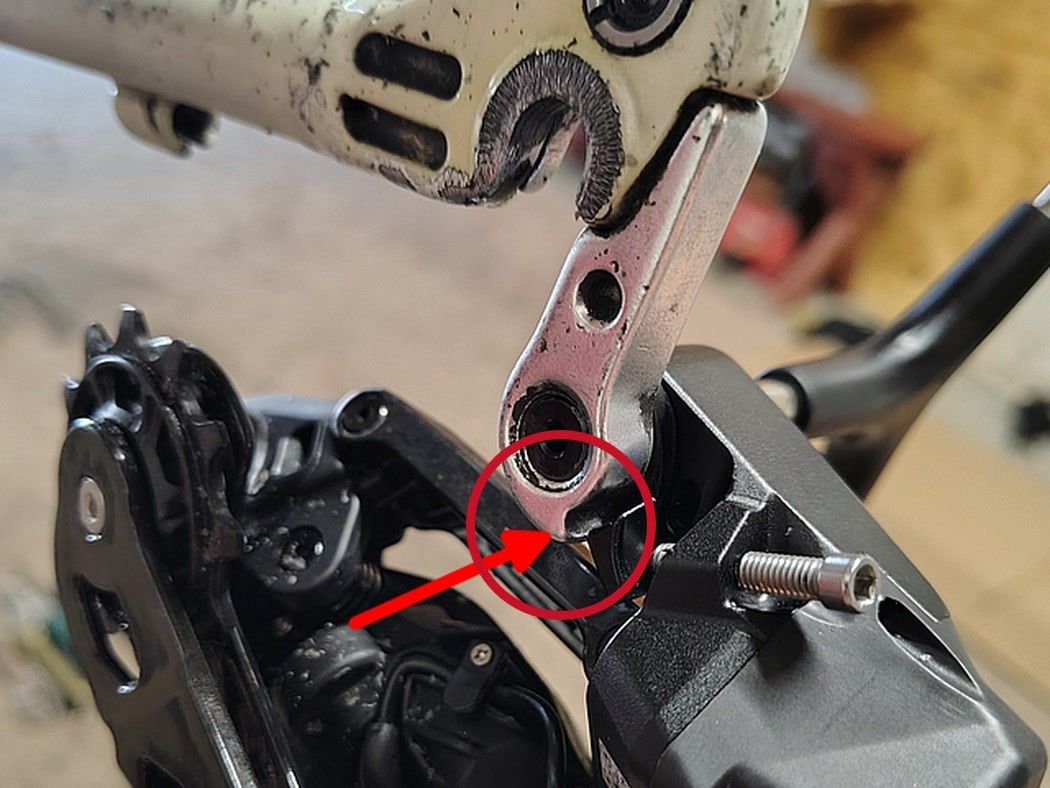
Derailleur hanger with a very small step: not compatible
Not compatible

Very small step

The small tab next to the mounting bolt must rest on the step at the bottom of the hanger, so the derailleur can swing forward and back.

Small step? Fit a hanger with a larger step, or a derailleur hanger extender. Otherwise the derailleur stays rigid and cannot be set up.

Not sure? Send us a close-up photo of your hanger through eBay messages before ordering, and we will check it for you.

Compatibility & Buyer Notes

Please review the following before purchasing to ensure correct fitment.

This Listing is for Rim Brake Only

The levers included are rim brake levers — compatible with standard caliper brake cable pull. If you ride a disc-brake frame, please see our separate disc brake listing. Rim and disc brake levers are not interchangeable.

Speed Count Fully Configurable in the App

Speed count isn't fixed by the hardware — set anywhere from 3-speed to 14-speed directly in the WHEELTOP app to match your cassette. Verify your current cassette is 36T or smaller before ordering.

App Pairing Required Before First Ride

After installation, pair both derailleurs to the WHEELTOP app over BLE, set your speed range, and run gear calibration. The app is free on iOS and Android.

Reviews

Feedback from verified purchases in our eBay store.

  • Positive feedback7***k (1184)Verified purchasePast month

    Exactly as described

  • Positive feedbackb***0 (33)Verified purchasePast month

    Great item in perfect condition. The wooden box it was delivered in was a quality addition, it all looks amazing. Had a little discount offered to me which was amazing. I couldn't recommend the sellers anymore. Delivered really fast too.

  • Positive feedbacks***z (94)Verified purchasePast month

    Order delivered on time with no issues

  • Positive feedbackb***4 (12)Verified purchasePast month

    Order delivered on time with no issues

  • Positive feedbackg***0 (1)Verified purchasePast month

    Order delivered on time with no issues

  • Positive feedbackx***u (30)Verified purchasePast month

    Order delivered on time with no issues

Which brand of cassette does it support?

The app allows you to customize speed and gear spacing, so in theory it supports 3–14 speed cassettes from all brands.

How to pair the app?

On the home page, click the [Add Device] button. The APP will automatically navigate to the nearby devices list page. Locate your device's MAC address, then click to add and bind it. After successful binding, you will need to name the device.

Step 1: Click the Add button on the home page Step 2: Turn on your phone’s Bluetooth to search for nearby devices
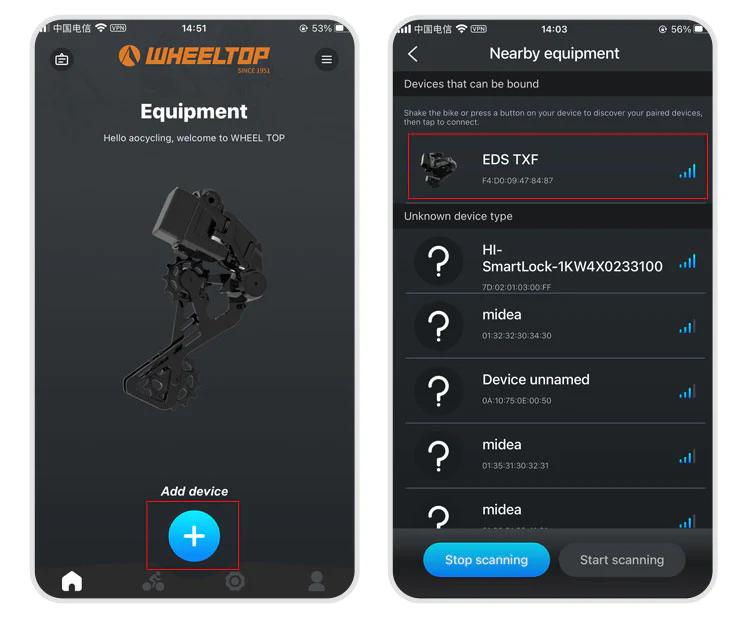
Step 3: Select nearby bindable devices to add Step 4: Name the device
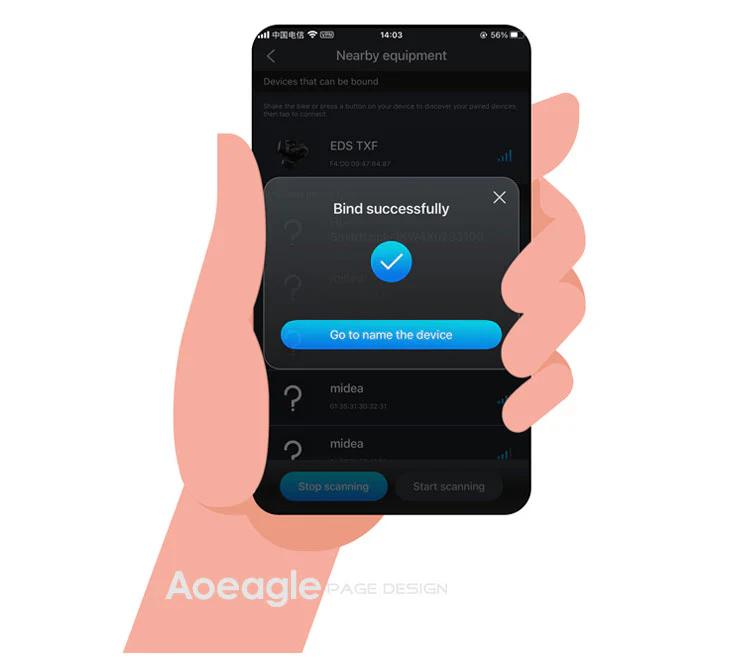
One last thing — and this is where a lot of users get stuck.

To connect, you need to tap the Bluetooth icon in the app. Before doing so, make sure the derailleur hasn't gone into sleep mode. If it has, just give the derailleur a tap or shake the bike to wake it up. Once the connection is successful, the Bluetooth icon will light up — and you're all set to start adjusting your derailleur.
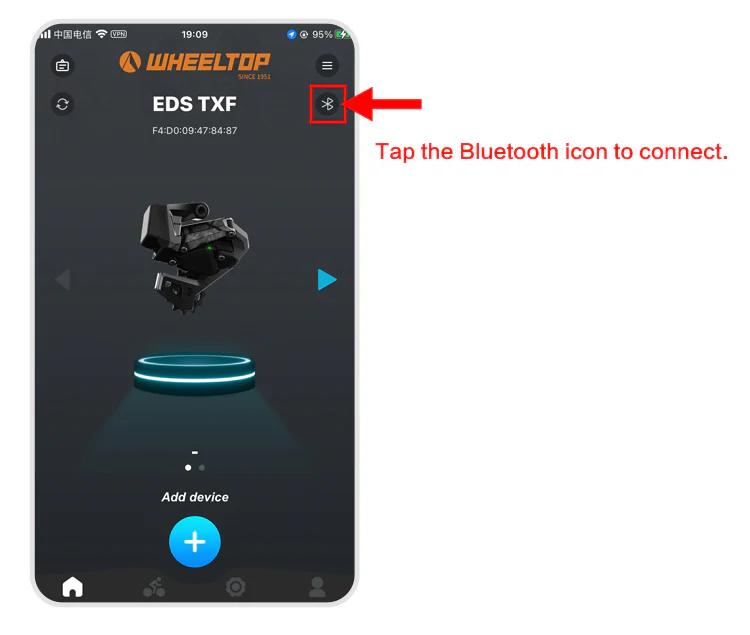
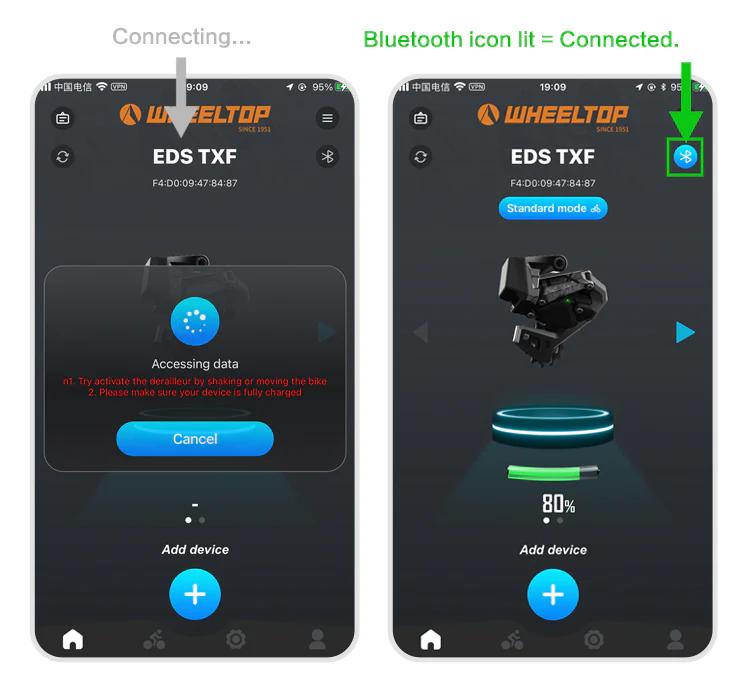
How to do the initial calibration?

For EDS TX series:

  1. Set the front derailleur to the largest sprocket
  2. Set the rear derailleur to the smallest cog position
  3. Open the WHEELTOP App → Initial Calibration
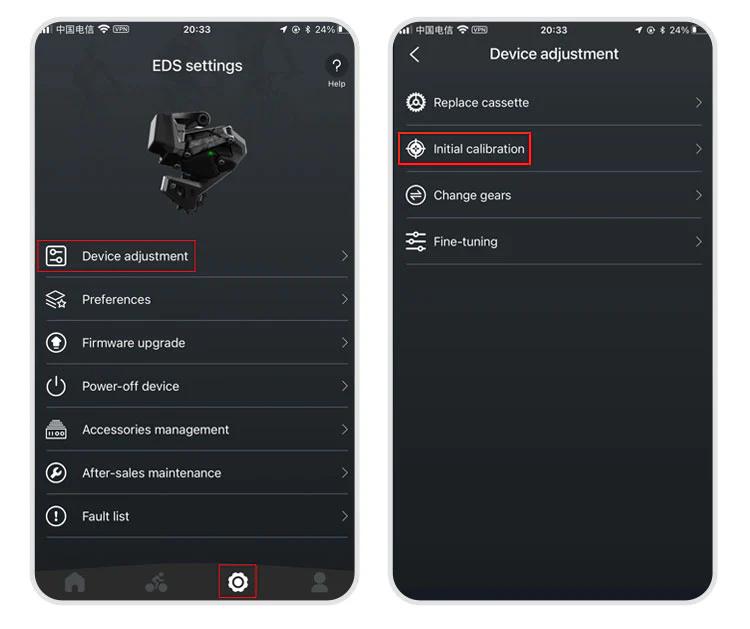
Use "<" or ">" buttons to align the RD pulley with the smallest cog
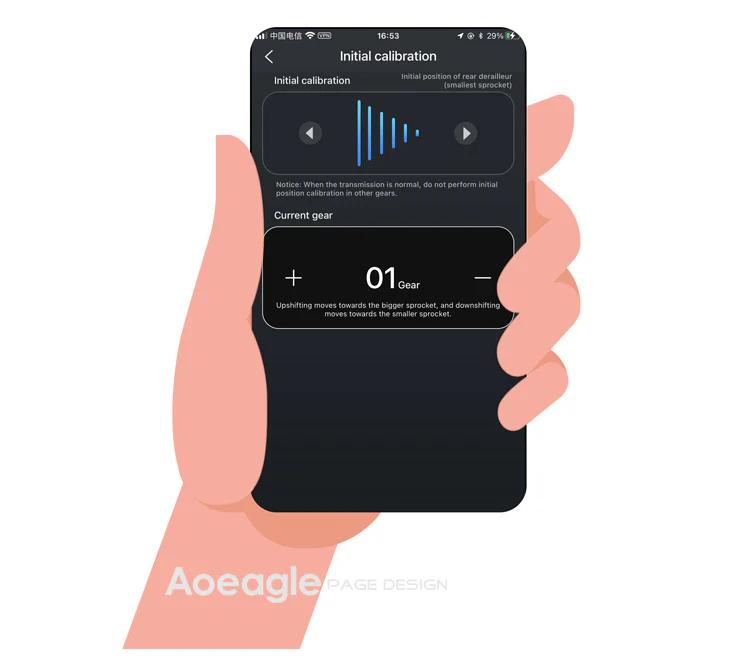
Exit the initial calibration page

For EDS GeX and OX series: Same steps but skip step 1 (no FD adjustment required).

How to download and register the WHEELTOP app?

WHEELTOP APP download:
app Store

Google Play

After successful registration, log in to the app.

You can also download the APK file directly: APK Download Link

For first-time use, please register with your email.

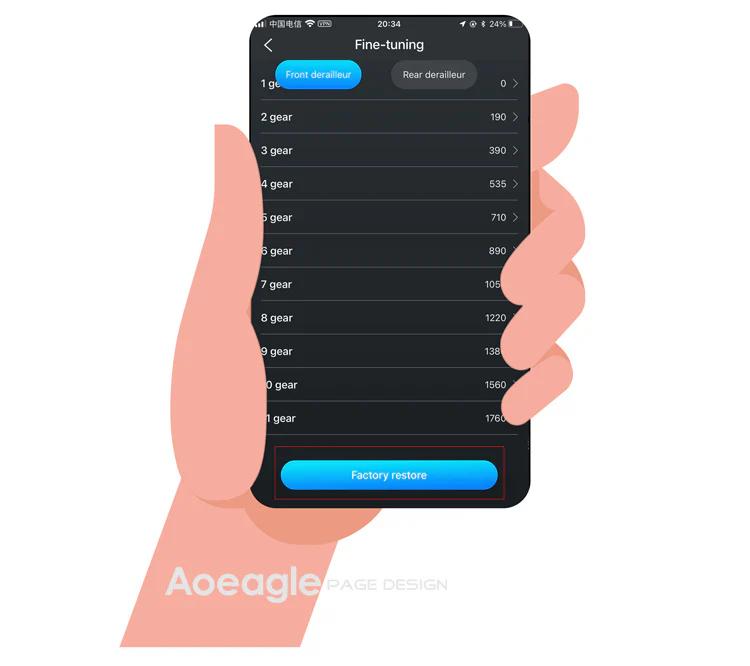
How to perform a factory restore?

It works like a factory reset for gear values. Use it when gear values have been misadjusted to restore the preset values.

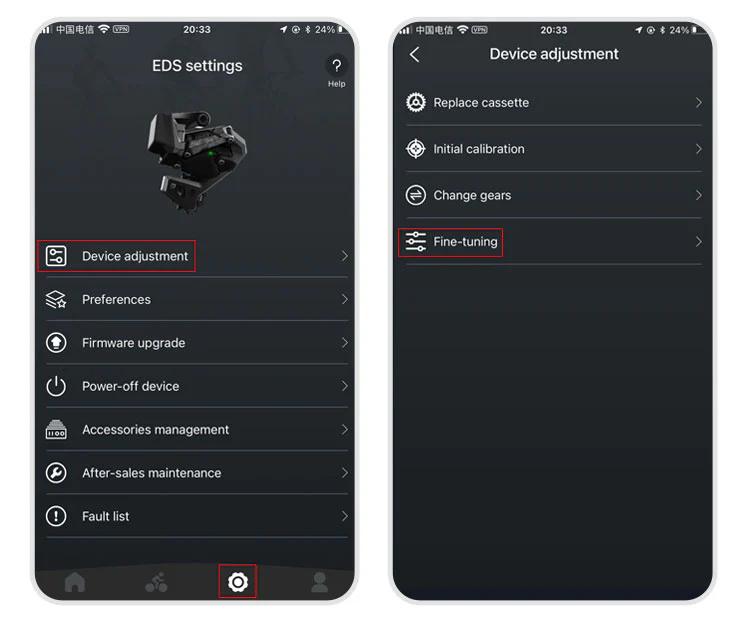
Path: APP → Settings → Device-adjustment → Fine-tuning → "Factory-restore" button at the bottom.
The rear derailleur position is inconsistent with the APP display

1.Go to the initial calibration page in the APP 2.Select the rear derailleur (upper section) 3.Press the right arrow (▶) and hold until the RD moves back to the smallest cassette

More questions (9)
The device cannot shift immediately after not riding for a long time

1.Charge the system — a low battery can delay activation 2.Gently shake the frame — this helps wake up the rear derailleur more quickly

Can EDS be paired with bike computers?

Yes!EDS TX, OX2.0, and GeX can all be paired with bike computers.

How do I power off and power back on my WHEELTOP EDS device?

In the latest version of the WHEELTOP app, swipe left on the rear derailleur's device card to bring up the **Disconnect / Power Off** menu, then tap **Power Off**. This is useful for shutting the system down during shipping or storage. To power the device back on, plug in the magnetic charging cable for **2-3 seconds** — once the charging indicator light turns **red**, the device powers on and reactivates.

WHEELTOP app screen showing the swipe-left Disconnect / Power Off menu
Why are there 6 gear values for FD fine-tuning? What do they mean?
  1. Gear 1st: Press and hold left shifter — FD moves from small to large chainring.
  2. Gear 2nd: FD on large chainring, RD on smallest 6 cogs — fine position value.
  3. Gear 3rd: FD on large chainring, RD on largest 6 cogs — fine position value.
  4. Gear 4th: FD on small chainring, RD on smallest 6 cogs — fine position value.
  5. Gear 5th: FD on small chainring, RD on largest 6 cogs — fine position value.
  6. Gear 6th: Press and hold left shifter — FD moves from large to small chainring.
What should I do if the derailleurs are stuck or can't shift?

Use the "Initial Calibration" function in the WHEELTOP app to adjust the front derailleur. Adjustment must always start from the default position.

Correct default position:

  • Set the FD at the largest chainring position
  • Set the RD at the smallest cog position
  • Use the initial calibration function in the app to adjust the FD towards the largest chainring position

Steps in the APP:

  1. Open the WHEELTOP app → Equipment Debugging → Initial Calibration
  2. Use the '<' or '>' buttons to adjust the FD guide plate position until correct
How does the rear derailleur linkage function work with limit function enabled?

When the FD is on the large chainring, RD is below 3rd gear, and limit is enabled:

  • RD Upshift: System executes an RD upshift once every 0.5 seconds.
  • RD Reaches 3rd Gear: The RD upshifts until reaching 3rd gear.
  • FD Downshift: Once RD reaches 3rd gear, system waits 2 seconds before executing the FD downshift.
After pressing the shifter lever, the rear derailleur does not shift normally

1.Check the button indicator light: If there is no light, replace the battery and test again. 2.Check the light color: If the button is lit but not green (e.g. red or yellow), the device is not paired correctly. Re-pair following the manual.

What brake systems are compatible with EDS TX?

Cable Brake Groupsets are compatible with rim brakes, V-brakes, U-clamps, and pull-cable disc brakes.

Hydraulic Disc Brake Groupset uses mineral oil, designed for Shimano's hydraulic brake system, compatible with L04C, L05A, and L04A brake pads.

What is the length of brake cables? Are they standard mechanical brake lines?

Our EDS TX/GEX Cable Brake Groupsets use standard mechanical disc brake cables, widely available in the market. Each set includes two brake cables. The length should be sufficient for most bikes.