Skip to content
Free chain with selected WHEELTOP kits · Ends Dec 1

WHEELTOP EDS TX Wireless Electronic Road Rear Derailleur for 10–36T Cassettes

Derailleur Cage Type
$229.00
In Stock

Questions before you buy? Email us · We reply within 24 hours.
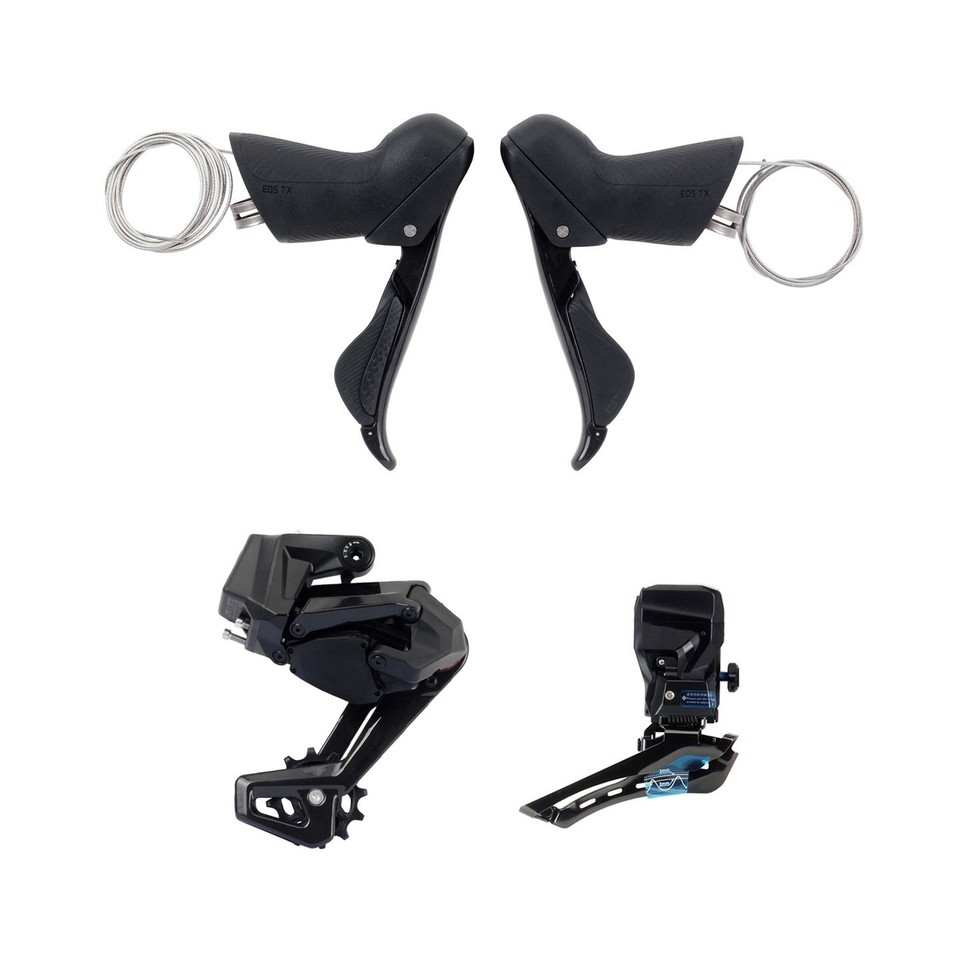
WHEELTOP EDS TX Wireless Electronic Rear Derailleur

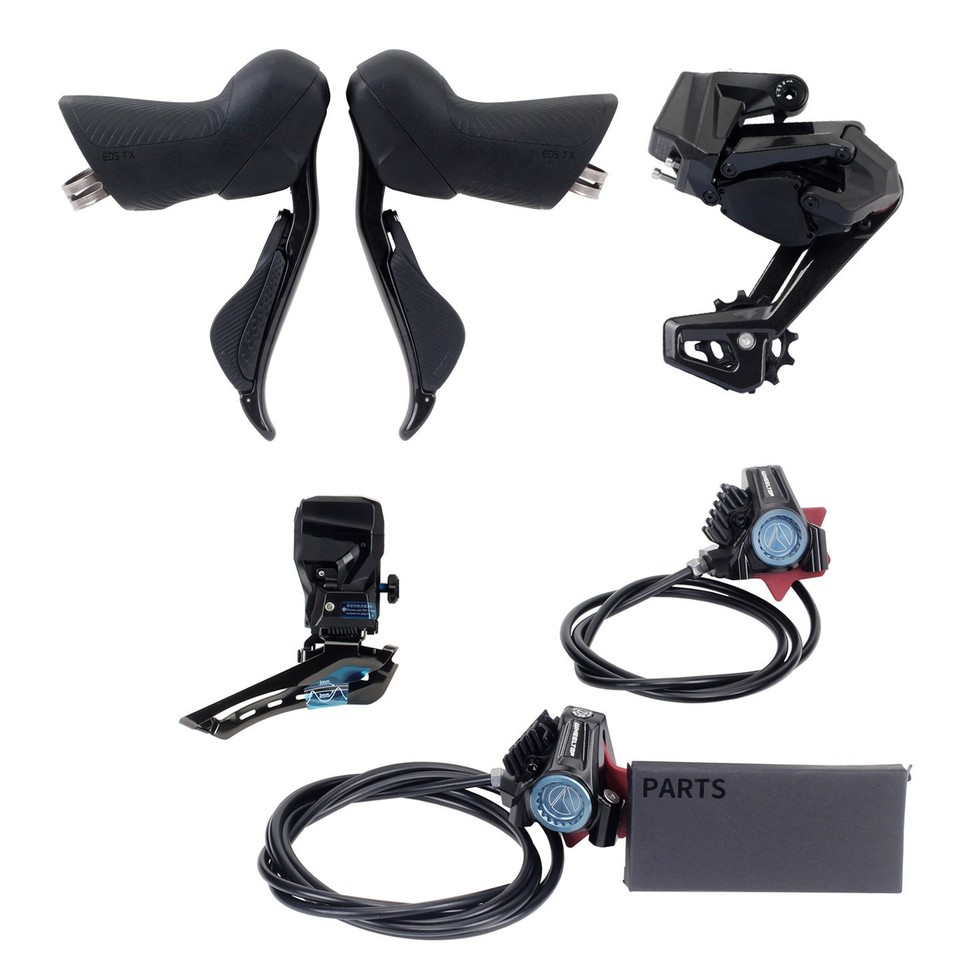
A fully wireless electronic rear derailleur engineered for road bikes, gravel bikes, and cyclocross bikes — any drop-bar bicycle with a front derailleur mount. Shifts on a button press, no cables, no housing, no barrel adjusters. Compatible with 7-14 speed, 10-36T cassettes, fully customizable through the WHEELTOP app via BLE/ANT+. Available in three versions — Standard Carbon Cage, Ceramic Oversized Pulley Cage, and Standard Aluminum Cage — matching whichever WHEELTOP EDS TX kit build you own. Pairs with a WHEELTOP EDS TX shift lever (sold separately or as part of a complete kit).

EDS TX Electronic Rear Derailleur — 7-14 Speed, App-Configurable

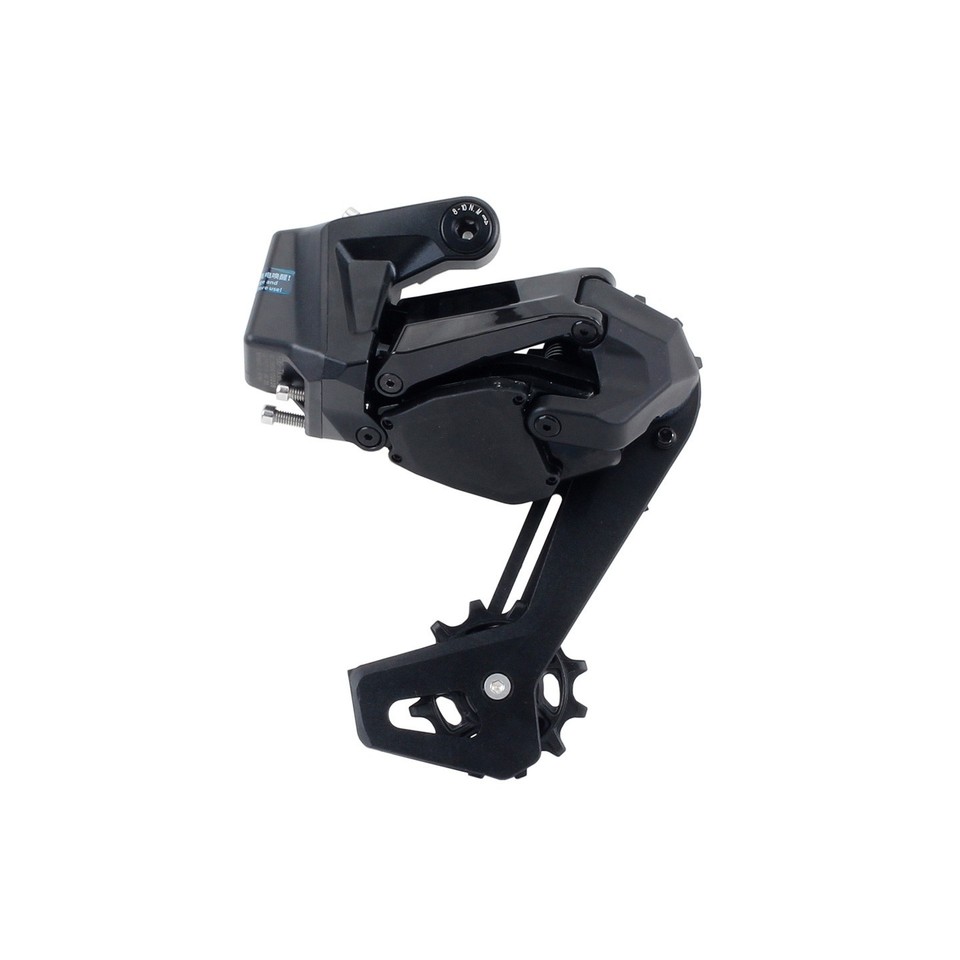
WHEELTOP EDS TX rear derailleur

Instant Shifting, No Cable Stretch

Driven by a built-in rechargeable battery at 7.4V, the EDS TX rear derailleur shifts instantly on a button press — zero cable lag, zero stretch over time. Compatible with 7 to 14-speed cassettes from 10T to 36T, speed configuration set entirely through the WHEELTOP app. The standard pulley wheel uses a 12-tooth positive/negative tooth profile for quieter, more secure chain engagement, mounted on a carbon fiber derailleur cage. Charges through a magnetic Pogopin connector — snap it on, no port covers, no corrosion.

7-14 Speed, Set in the App

Unlike mechanical derailleurs locked to a fixed speed count, the EDS TX lets you define your speed range and per-gear position through the WHEELTOP app — matching it precisely to whatever 7-14 speed, 10-36T cassette you're running.

Three Cage Options — Match It to Your Build

All three versions share the same electronic platform, battery, Pogopin charging, and app control — only the derailleur cage material and pulley wheels differ. Pick the version that matches the kit build you own.

WHEELTOP EDS TX aluminum cage rear derailleur

Standard

Standard Aluminum Cage

Rugged aluminum alloy derailleur cage with standard 12-tooth pulleys — a tougher, value-oriented option. Matches our Disc Brake Aluminum kit build.

Cage materialAluminum Alloy
PulleyStandard 12T
Weight354.2g
MatchesDisc Brake Aluminum kit build
WHEELTOP EDS TX standard carbon cage rear derailleur

Standard

Standard Carbon Cage

Carbon fiber derailleur cage with standard 12-tooth pulleys. Matches our Rim Brake and Disc Brake Carbon Fiber kit builds.

Cage materialCarbon Fiber
PulleyStandard 12T
Weight336.6g
MatchesCarbon Fiber kit builds
WHEELTOP EDS TX ceramic oversized pulley cage rear derailleur

Upgrade

Ceramic Oversized Pulley Cage

Same carbon fiber cage, upgraded with ceramic bearing oversized pulley wheels for measurably lower drivetrain friction. Matches our Rim Brake and Disc Brake Carbon Fiber kit builds.

Cage materialCarbon Fiber
PulleyCeramic Oversized 12T
ElectronicsIdentical to Standard
MatchesCarbon Fiber kit builds
WHEELTOP EDS TX ceramic bearing oversized pulley close-up

Why Oversized? The Chain Wrap Angle Difference.

At 12 teeth, the oversized pulleys are physically larger than a conventional jockey wheel — letting the chain bend through a gentler arc at each engagement. Less arc per revolution means less per-link articulation friction across every pedal stroke. Swapping in ceramic bearings cuts rolling resistance further versus standard steel bearings, keeping the drivetrain quieter and more responsive under load.

Pulley Size

12T Oversized

Bearing Type

Ceramic

Chain Arc

Gentler per Rev

Drivetrain Feel

Quieter · Smoother

Full Control from Your Phone

Download the WHEELTOP app to pair, tune, and monitor your derailleur — all from your handlebars.

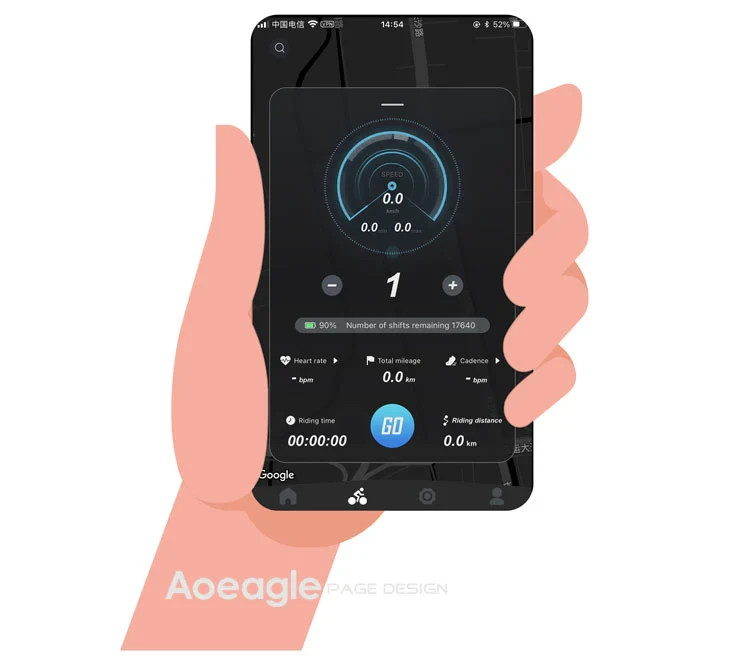
WHEELTOP app main screen

Everything You Need, Right in the App

Install the WHEELTOP app on iOS or Android. Connect over Bluetooth, and you have instant access to gear position, battery level, riding data, firmware updates, and full after-sales support — all in one place.

Live Riding Data

Speed, cadence, heart rate, mileage, and ride time displayed in real time

Battery & Shift Count

See remaining charge and total shift cycles at a glance

OTA Firmware Updates

Push updates wirelessly — performance improvements without cables or tools

WHEELTOP app Standard and Racing Mode

Two Riding Modes. One Tap to Switch.

Switch between Standard and Racing mode directly in the app. Each mode is tuned for a different riding style — no tools, no hassle.

Standard Mode

Auto-sleep when idle. Lower power draw, longer battery life. Perfect for long days in the saddle.

Racing Mode

Always-on, maximum responsiveness. Boosted signal power for noise-resistant shifting under pressure.

WHEELTOP app calibration screen

Pair, Calibrate, Fine-Tune — All in the App

Use the WHEELTOP app to pair your derailleur, run initial position calibration, and micro-adjust each individual gear. No limit screws to guess at — just tap and confirm.

Per-Gear Fine Adjustment

Dial in every sprocket individually. If one gear feels off, adjust it directly in the app without touching the bike — a precision that cable systems simply can't match.

7-14
Speed, app-configurable
10-36T
Cassette compatibility
20,000+
Shifts per full charge
800mAh
Built-in lithium battery

Specifications

Full technical breakdown of the EDS TX wireless electronic rear derailleur.

Brand
WHEELTOP
Model
EDS TX Wireless Electronic Rear Derailleur
Application
Road bikes, gravel bikes, cyclocross bikes — drop-bar bicycles with front derailleur mount
Speed Range
7-14 Speed (customizable via WHEELTOP app)
Cassette Compatibility
10T - 36T
Pulley
Standard: 12-tooth positive/negative tooth profile · Ceramic Oversized Pulley Cage option: ceramic bearing oversized pulley wheels
Cage Material
Aluminum Alloy (Standard Aluminum Cage) · Carbon Fiber (Standard Carbon Cage / Ceramic Oversized Pulley Cage)
Wireless Protocol
BLE / ANT+ — pairs with cycling computers, displays gear position and battery level
Charging Port
Pogopin magnetic connector
Battery
800mAh built-in lithium · 7.4V
Weight
354.2g (Standard Aluminum Cage) · 336.6g (Standard Carbon Cage) · 340g (Ceramic Oversized Pulley Cage)

What's in the Box

×1

EDS TX Electronic Rear Derailleur

Varies

Carbon Fiber or Aluminum Alloy Cage, Standard or Ceramic Oversized Pulleys (per selected version)

×1

Pogopin Magnetic Charging Cable

×1

Quick-Start Guide

Check Your Derailleur Hanger

Please complete these two checks before fitting the WHEELTOP rear derailleur. Only install it once both are confirmed.

Check 1

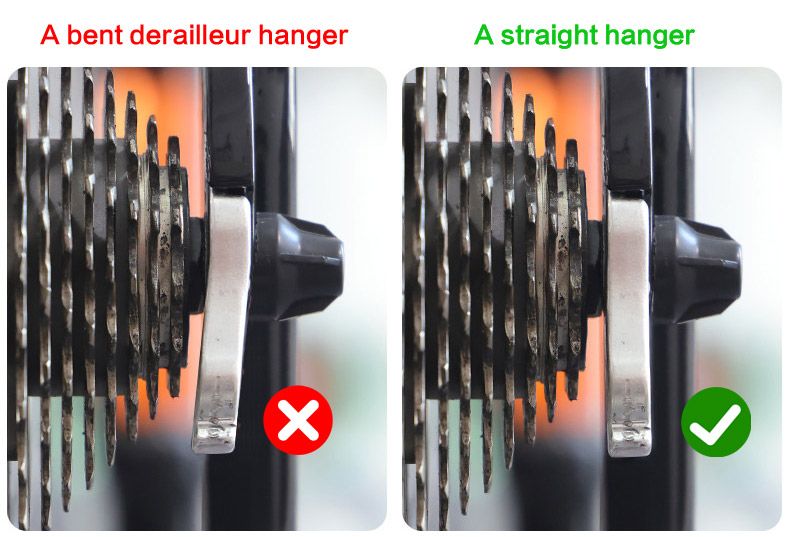
Is the Hanger Straight?

Bent derailleur hanger compared with a straight hanger

A bent hanger tilts the rear derailleur, which causes poor shifting, chain noise and difficult calibration, no matter how carefully it is set up.

How to check: look from behind the bike. The hanger should hang straight down, parallel to the cassette cogs. If it is bent, straighten it with a hanger alignment tool or fit a new hanger.

Check 2

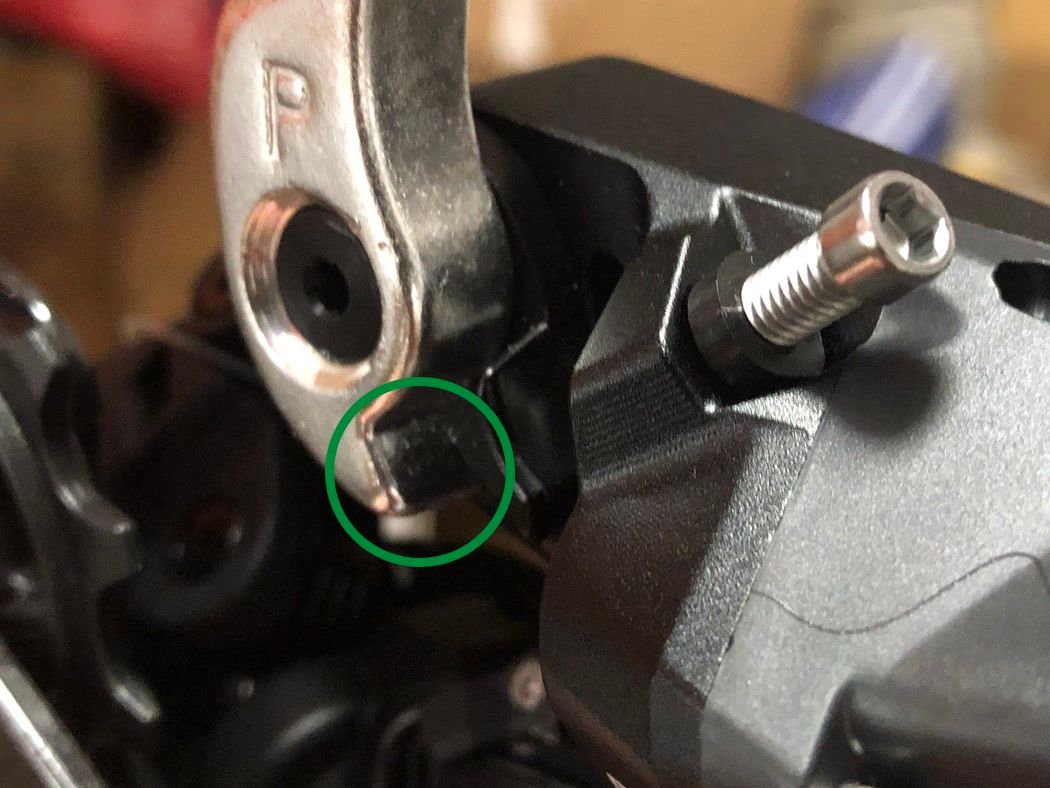
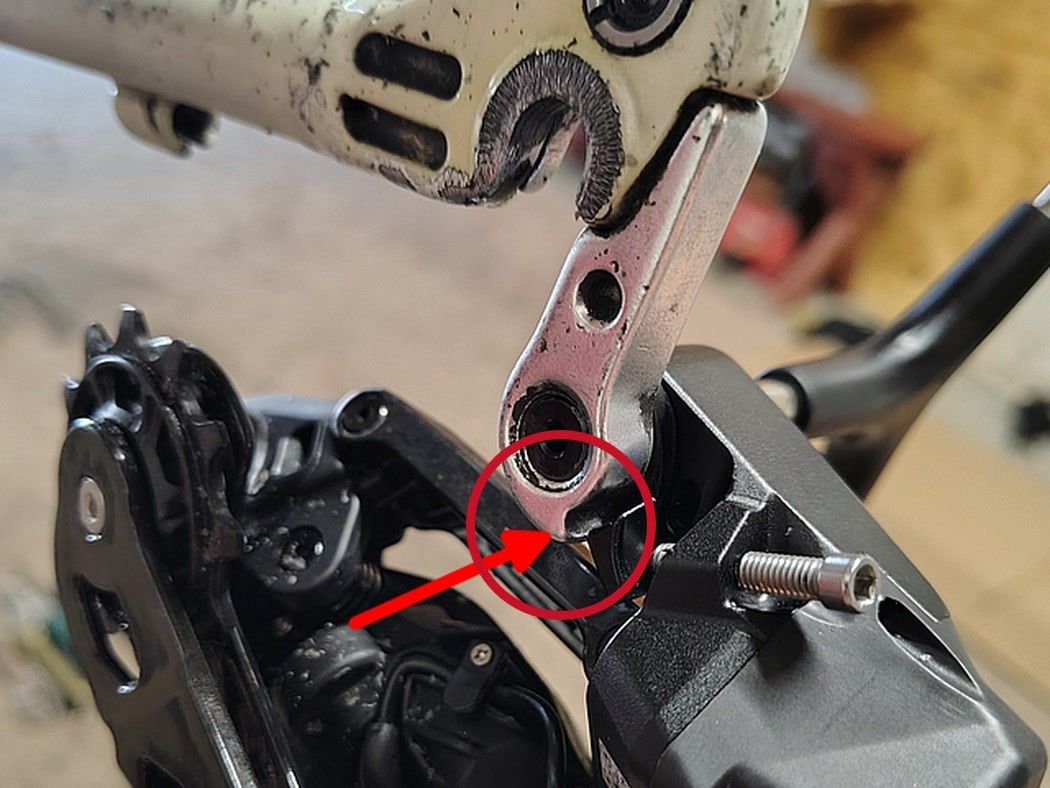
Does the Hanger Have a Step?

Derailleur hanger with a clear step: compatible
Compatible

Clear step at the bottom

Derailleur hanger with a very small step: not compatible
Not compatible

Very small step

The small tab next to the mounting bolt must rest on the step at the bottom of the hanger, so the derailleur can swing forward and back.

Small step? Fit a hanger with a larger step, or a derailleur hanger extender. Otherwise the derailleur stays rigid and cannot be set up.

Not sure? Send us a close-up photo of your hanger to support@aoeagle.com before ordering, and we will check it for you.

Compatibility & Buyer Notes

Please review the following before purchasing to ensure correct fitment.

Requires a WHEELTOP EDS TX Shift Lever

This listing is for the rear derailleur only. You'll need a WHEELTOP EDS TX shift lever to control it — buy ours separately or as part of a complete kit, or use one you already own.

Confirm Your Cassette Falls Within Range

The EDS TX supports 7-14 speed cassettes from 10T to 36T, with the exact speed count set in the WHEELTOP app. Verify your cassette falls within this range before ordering.

Pick the Cage Material That Matches Your Kit

Choose Standard Aluminum Cage if you're running our Disc Brake Aluminum kit build. Choose Standard Carbon Cage or Ceramic Oversized Pulley Cage if you're running our Rim Brake or Disc Brake Carbon Fiber kit build. The cage material affects fit and weight — select the version that matches your build.

App-Based Setup Required

Initial calibration must be performed via the WHEELTOP app (free on iOS and Android) after installation.

eBay seller feedback (store-wide)

eBay seller feedback from buyers in our eBay store. It covers our whole store; the tabs show feedback for this item or for all items.

Prices, discounts or availability mentioned in creator videos may be out of date. The current price is the one shown on the product page at aoeagle.com.

Which brand of cassette does it support?

The app lets you set the speed count and gear spacing: the TX supports 7–14 speed cassettes, Shimano and SRAM alike — just pick the matching speed in the app.

How to pair the app?

On the home page, click the [Add Device] button. The APP will automatically navigate to the nearby devices list page. Locate your device's MAC address, then click to add and bind it. After successful binding, you will need to name the device.

Step 1: Click the Add button on the home page Step 2: Turn on your phone’s Bluetooth to search for nearby devices
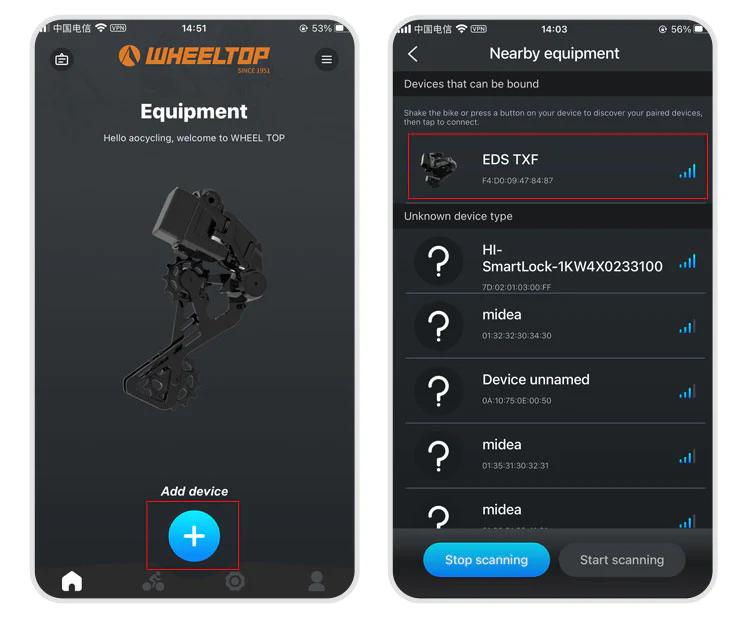
How to pair the app? illustration

Step 3: Select nearby bindable devices to add Step 4: Name the device
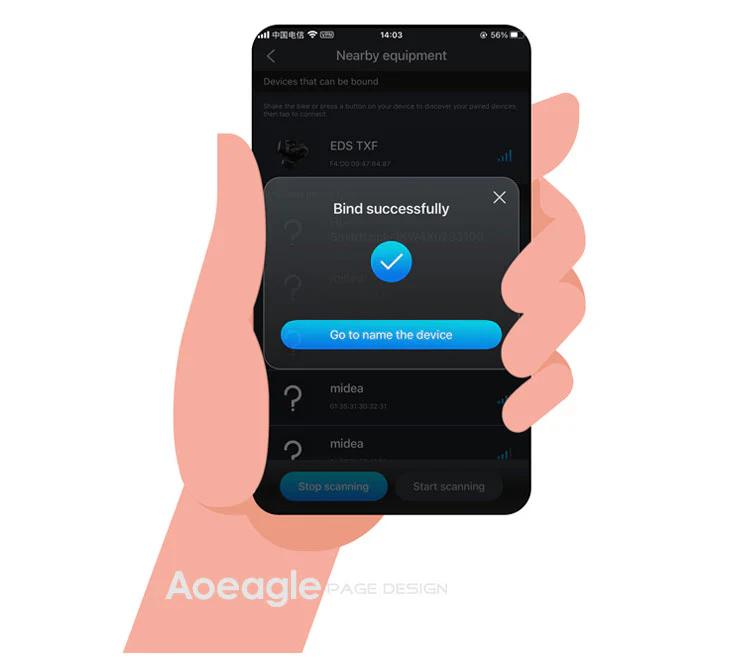
How to pair the app? illustration

One last thing — and this is where a lot of users get stuck.

To connect, you need to tap the Bluetooth icon in the app. Before doing so, make sure the derailleur hasn't gone into sleep mode. If it has, just give the derailleur a tap or shake the bike to wake it up. Once the connection is successful, the Bluetooth icon will light up — and you're all set to start adjusting your derailleur.
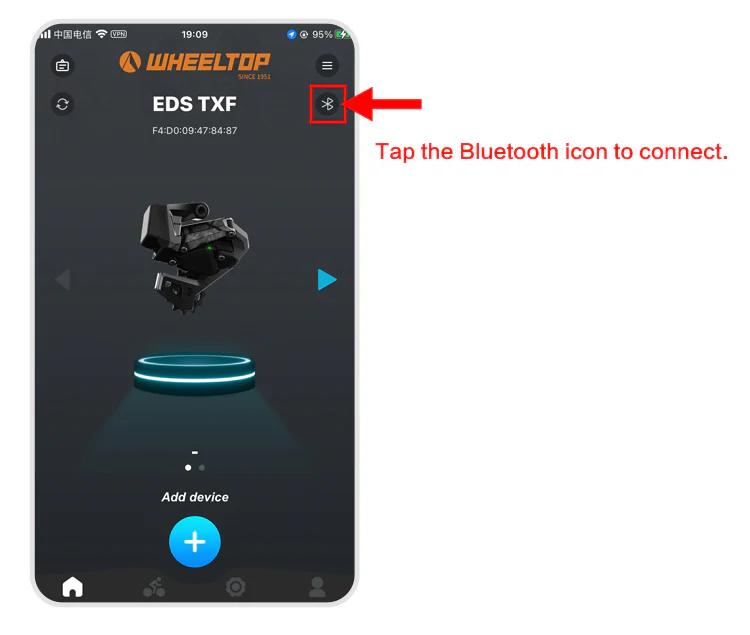
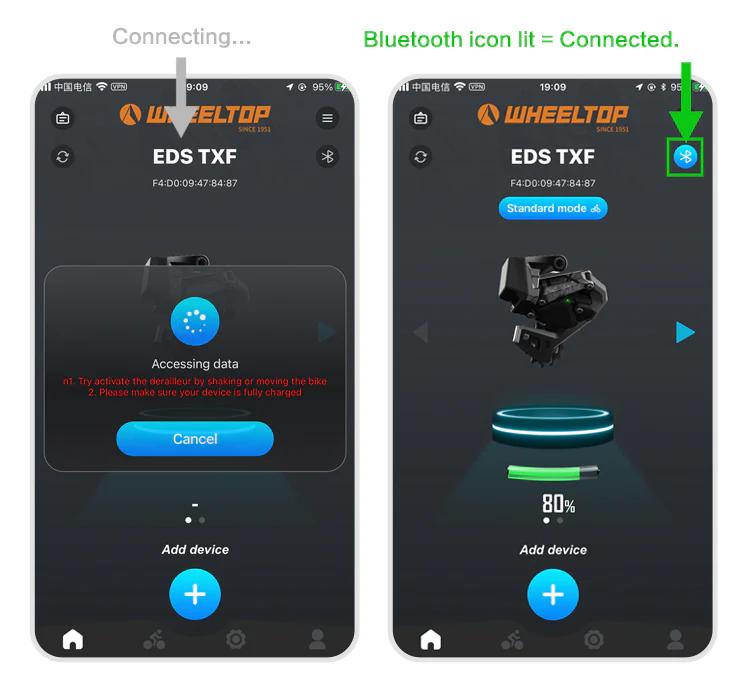
How to pair the app? illustration How to pair the app? illustration
How to do the initial calibration?

For EDS TX series:

  1. Set the front derailleur to the largest sprocket
  2. Set the rear derailleur to the smallest cog position
  3. Open the WHEELTOP App → Initial Calibration
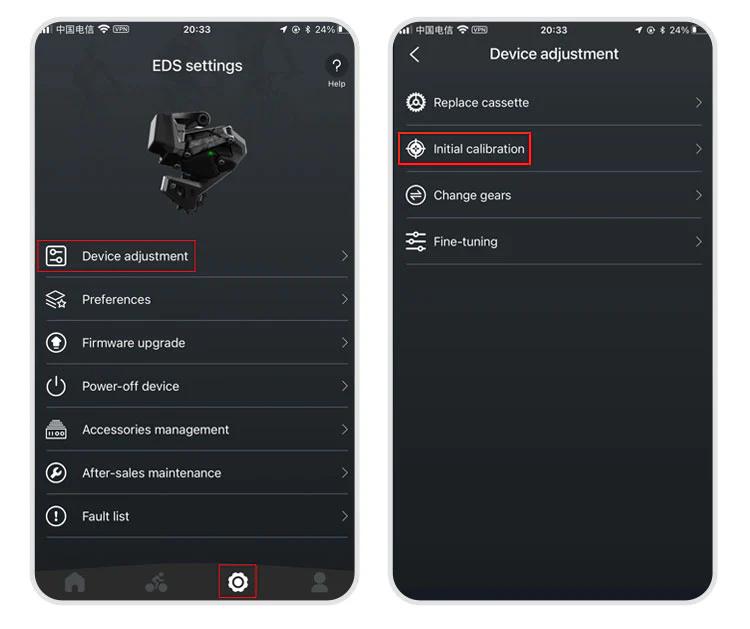
How to do the initial calibration? illustration

Use "<" or ">" buttons to align the RD pulley with the smallest cog
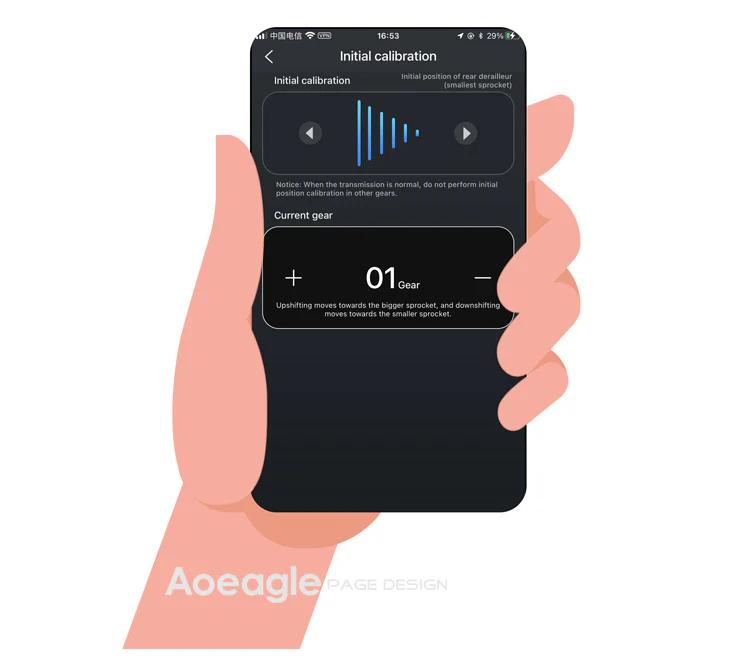
How to do the initial calibration? illustration

Exit the initial calibration page

For EDS GeX and OX series: Same steps but skip step 1 (no FD adjustment required).

How to download and register the WHEELTOP app?

WHEELTOP APP download:

How to download and register the WHEELTOP app? illustration

app Store

How to download and register the WHEELTOP app? illustration

Google Play

After successful registration, log in to the app.

You can also download the APK file directly: APK Download Link

For first-time use, please register with your email.

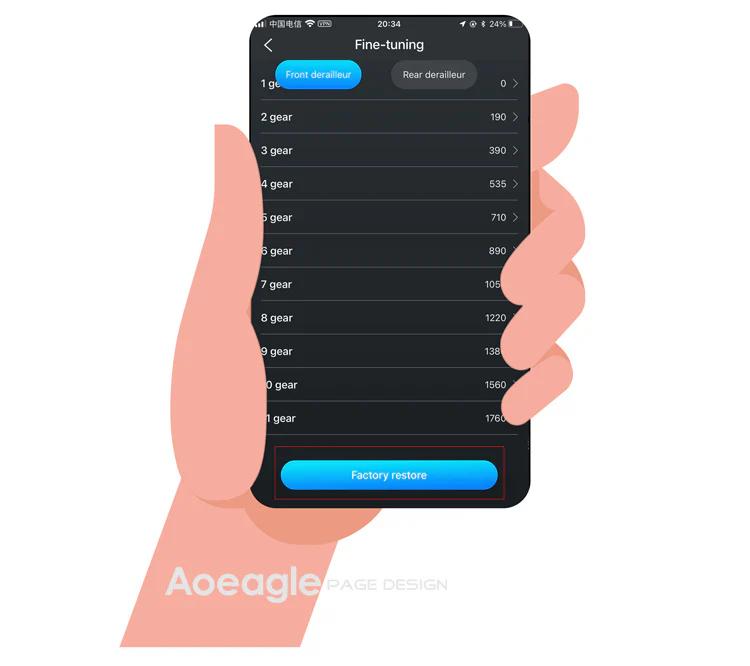
How to perform a factory restore?

It works like a factory reset for gear values. Use it when gear values have been misadjusted to restore the preset values.

Path: APP → Settings → Device-adjustment → Fine-tuning → "Factory-restore" button at the bottom.
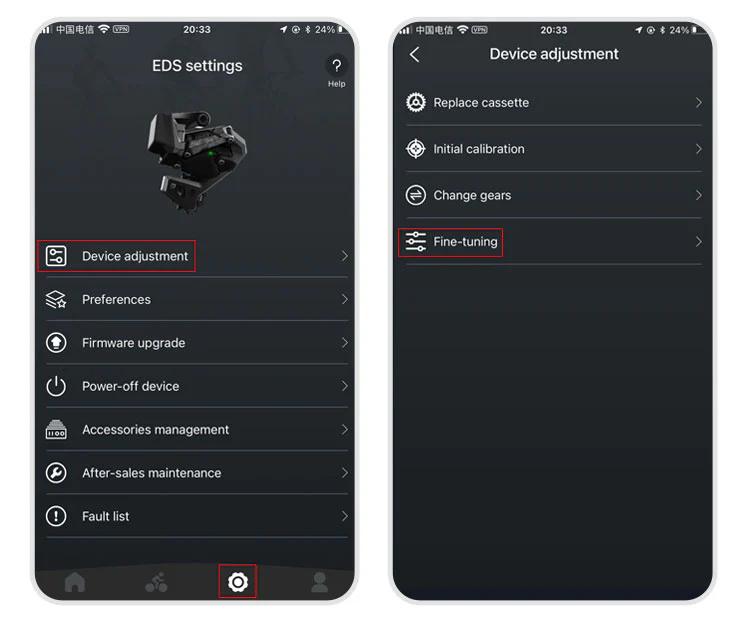
How to perform a factory restore? illustration How to perform a factory restore? illustration
The rear derailleur position is inconsistent with the APP display

1.Go to the initial calibration page in the APP 2.Select the rear derailleur (upper section) 3.Press the right arrow (▶) and hold until the RD moves back to the smallest cassette

More questions (3)
The device cannot shift immediately after not riding for a long time

1.Charge the system — a low battery can delay activation 2.Gently shake the frame — this helps wake up the rear derailleur more quickly

Can EDS be paired with bike computers?

Yes!EDS TX, OX2.0, and GeX can all be paired with bike computers.

How do I power off and power back on my WHEELTOP EDS device?

In the latest version of the WHEELTOP app, swipe left on the rear derailleur's device card to bring up the **Disconnect / Power Off** menu, then tap **Power Off**. This is useful for shutting the system down during shipping or storage. To power the device back on, plug in the magnetic charging cable for **2-3 seconds** — once the charging indicator light turns **red**, the device powers on and reactivates.

WHEELTOP app screen showing the swipe-left Disconnect / Power Off menu