Skip to content
Black Friday · $25 off orders $300+ with code SAVE25 · Free chain with selected kits › $25 off orders $300+ with code SAVE25 ›
Free chain with selected WHEELTOP kits · Ends Dec 1

WHEELTOP EDS TXR Wireless 2x Groupset Shifter Front Rear Derailleur Flat Bar

Free chain included — choose your speed

Added at $0 when you add this kit to cart. One per order, ships with your kit. Ends Dec 1.

Free chain speed

Rear Derailleur Cage
$429.00
Black Friday · Save $25 at checkout SAVE25

Enter code SAVE25 in your cart or at checkout to take $25 off (orders $300+, 1 use per customer).

In Stock

Questions before you buy? Email us · We reply within 24 hours.
WHEELTOP EDS TXR

A fully wireless electronic shifting kit built for flat-bar road and dual-chainring gear bikes. Front and rear derailleurs shift on a button press — no cables, no housing, no barrel adjusters. Compatible with 7–14 speed, 10–36T cassettes, fully configurable through the WHEELTOP app via BLE/ANT+. The rear derailleur is available with two cage options — the Alloy Cage (aluminum alloy, standard 12T pulleys) and the Carbon Ceramic OSPW (carbon fiber hollow cage, 12-tooth ceramic bearing oversized pulley wheels) for reduced drivetrain friction.

Before you order, please check

Handlebar

Flat bar only. For drop bars, see the EDS TX listing.

Cassette

7–14 speed cassettes, 10–36T.

Brakes

Shifting kit only. You keep your own rim or disc brakes.

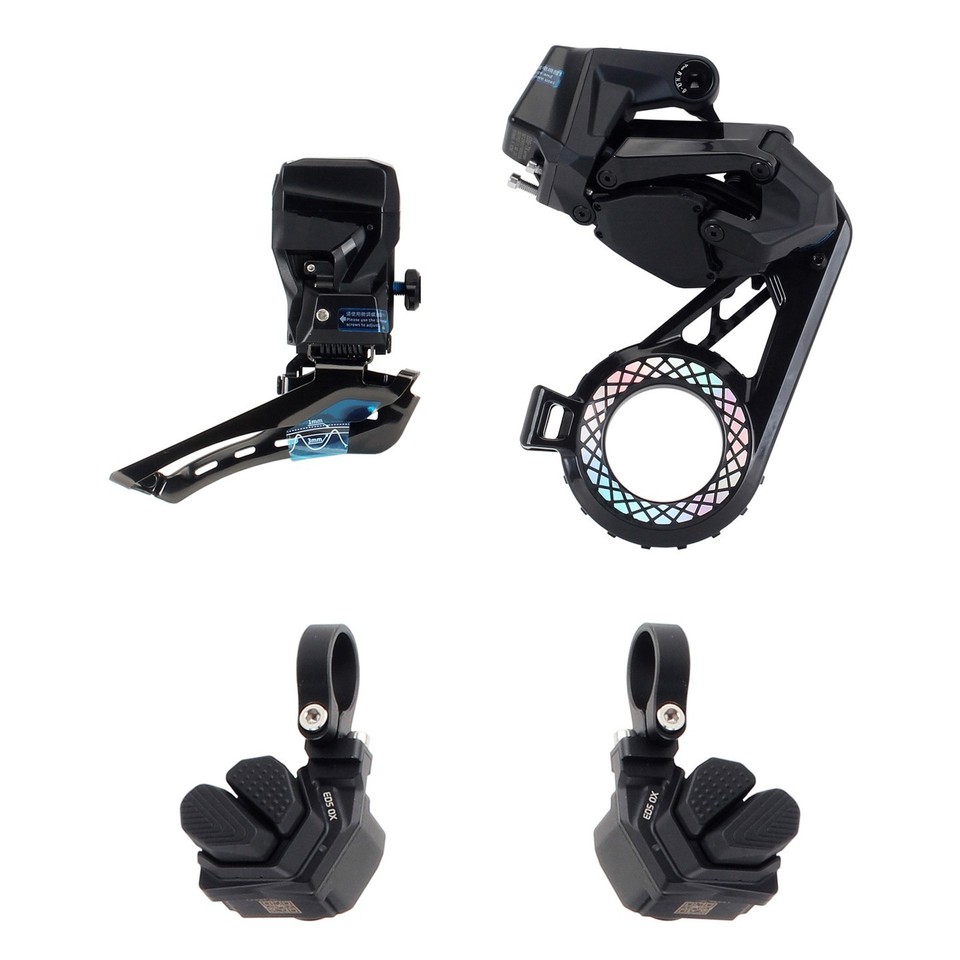
WHEELTOP EDS TXR wireless 2x groupset — front and rear derailleurs with left and right trigger shifters

The Complete Shift Kit

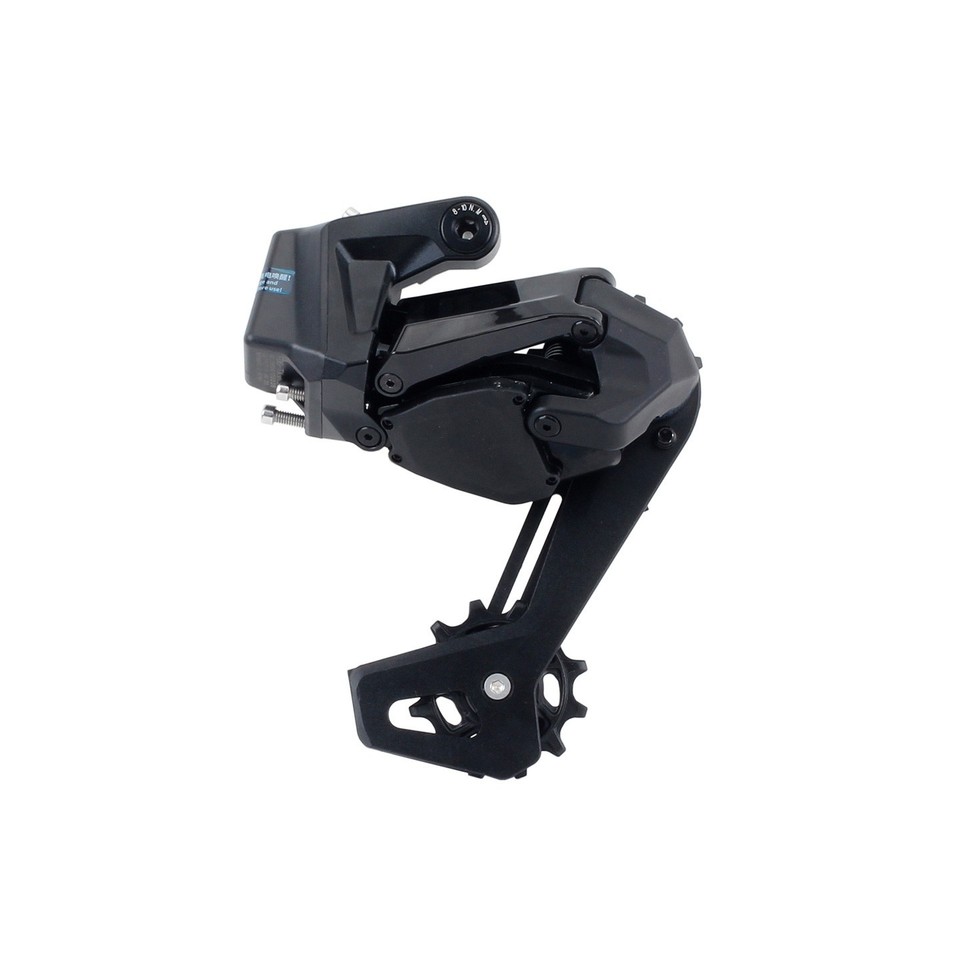
EDS TXR Electronic Rear Derailleur — Alloy Cage or Carbon Ceramic OSPW
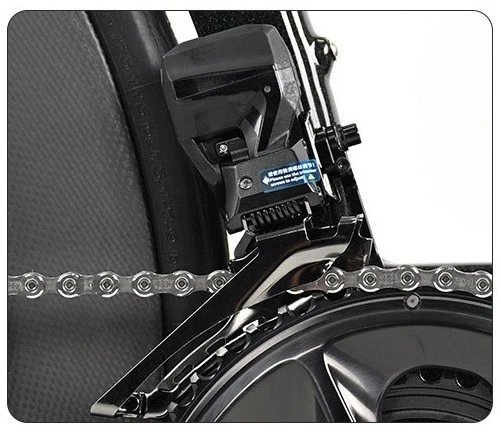
EDS TXR Electronic Front Derailleur
Wireless Trigger Shifters — Left + Right
Pogopin Magnetic Charging Cables — Front + Rear

Electronic Rear Derailleur — Choose Your Cage

Both versions share the same rear derailleur platform — 800mAh built-in battery at 7.4V, carbon fiber linkage, instant button-press shifting, Pogopin magnetic charging, 7–14 speed / 10–36T cassette range set through the WHEELTOP app. Only the cage material and pulleys differ.

WHEELTOP EDS TXR aluminium alloy cage rear derailleur

Standard

Alloy Cage

Rugged aluminum alloy derailleur cage with standard 12-tooth pulleys — a tougher, value-oriented option.

Cage materialAluminum Alloy
PulleyStandard 12T
Weight354.2g
WHEELTOP EDS TXR carbon ceramic OSPW rear derailleur

Upgrade

Carbon Ceramic OSPW

Hollow carbon fiber cage upgraded with 12-tooth ceramic bearing oversized pulley wheels (OSPW). The oversized pulleys let the chain bend through a gentler arc at each jockey engagement, reducing per-link articulation losses — the same oversized pulley cage found on the EDS TT triathlon groupset.

Cage materialCarbon Fiber
PulleyCeramic Oversized 12T
Weight340g

Electronic Front Derailleur

Wireless electronic actuation for the front shift — the half of the drivetrain cable systems compromise on most.

WHEELTOP EDS TXR wireless electronic front derailleur

Precise Front Shifting on Demand

The EDS TXR front derailleur runs on its own built-in 500mAh 7.4V rechargeable battery and shares the same magnetic Pogopin charging, and BLE/ANT+ wireless link as the rear unit. Pair both derailleurs to the WHEELTOP app for synchronized setup, gear mapping, and live status — front and rear shift in concert with a single press of the trigger.

FD Battery

500mAh / 7.4V

Built-in rechargeable lithium

Charging

Pogopin Magnetic

Red = charging, light off = full

Wireless

BLE / ANT+

Pairs with cycling computers

Weight

188.4g

Front derailleur, both builds

Wireless Electronic Trigger Shifters — Left & Right

Flat-bar trigger shifters that send gear commands wirelessly — no cable routing, no housing, nothing to stretch or corrode.

WHEELTOP EDS TXR wireless electronic flat-bar trigger shifters

Shift with a Thumb. No Cables Required.

A press of the trigger sends the shift command wirelessly straight to the derailleur — no cable pull, no mechanical play to wear in. The same trigger shifters used on the EDS OX 2.0 MTB groupset, fitted here for flat-bar road and urban bikes. Each shifter runs on a single CR2032 coin cell; open the battery cover with a coin to swap it.

Shifting

Wireless Electronic

Trigger press, no cable lag

Mount

Flat Bar

Left + right pair included

Battery

CR2032

Battery cover opens with a coin

Weight (pair)

134.2g

67.1g per shifter

Full Control from Your Phone

Download the WHEELTOP app to pair, tune, and monitor your drivetrain — all from your handlebars.

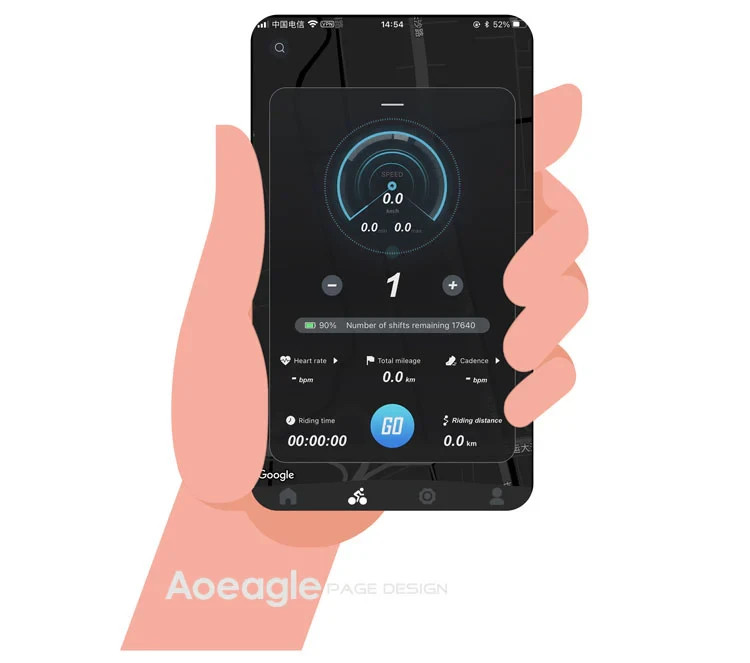
WHEELTOP app main screen

Everything You Need, Right in the App

Install the WHEELTOP app on iOS or Android. Connect over Bluetooth, and you have instant access to gear position, battery level, riding data, firmware updates, and full after-sales support — all in one place.

Live Riding Data

Speed, cadence, heart rate, mileage, and ride time displayed in real time

Battery & Shift Count

See remaining charge and total shift cycles at a glance

OTA Firmware Updates

Push updates wirelessly — performance improvements without cables or tools

WHEELTOP app Standard and Racing Mode

Two Riding Modes. One Tap to Switch.

Switch between Standard and Racing mode directly in the app. Each mode is tuned for a different riding style — no tools, no hassle.

Standard Mode

Auto-sleep when idle. Lower power draw, longer battery life. Perfect for long days in the saddle.

Racing Mode

Always-on, maximum responsiveness. Boosted signal power for noise-resistant shifting under pressure.

WHEELTOP app calibration screen

Pair, Calibrate, Fine-Tune — All in the App

Use the WHEELTOP app to pair your derailleur, run initial position calibration, and micro-adjust each individual gear.

Per-Gear Fine Adjustment

Dial in every sprocket individually. If one gear feels off, adjust it directly in the app without touching the bike — a precision that cable systems simply can't match.

Specifications

Full technical breakdown of the EDS TXR wireless electronic shifter/derailleur kit.

Brand WHEELTOP
Model EDS TXR Wireless Electronic Shifter / Derailleur Kit
Suitable For Flat-bar road bicycles, dual-chainring flat-bar gear bikes
Speed Range 2×7–14 Speed (customizable via WHEELTOP app)
Cassette Compatibility 10–36T
RD Pulley Wheels Standard 12T (Alloy Cage) · 12-tooth ceramic bearing oversized pulley wheels (Carbon Ceramic OSPW)
RD Material Carbon fiber linkage (both) · Aluminum alloy pulley cage (Alloy Cage) or carbon fiber cage plate with ceramic-bearing oversized pulleys (Carbon Ceramic OSPW)
Shifter Type Flat-bar wireless electronic trigger shifters — left + right pair
Wireless Protocol BLE / ANT+ — pairs with cycling computers, displays current gear position and battery level
Charging Port Pogopin magnetic connector · Red light = charging, light turns off when fully charged
Battery Capacity Rear derailleur 800mAh · Front derailleur 500mAh · System voltage 7.4V
Shifter Battery CR2032 coin cell (battery cover opens with a coin)
Brake Calipers Not included — TXR is a drivetrain-only kit
Weight Rear derailleur 354.2g (Alloy Cage) / 340g (Carbon Ceramic OSPW) · Front derailleur 188.4g · Trigger shifters ×2: 134.2g (67.1g each)
Warranty 1-Year Warranty

What's in the Box

×1

EDS TXR Electronic Rear Derailleur (Alloy Cage or Carbon Ceramic OSPW, per selected variant)

×1

EDS TXR Electronic Front Derailleur

×2

Wireless Electronic Trigger Shifters (Left + Right)

×2

Pogopin Magnetic Charging Cables (Front + Rear)

×1

Spare Parts Kit + Quick-Start Guide (scan QR code for installation video & instructions)

Quality Check & Return Inspection

Every order is checked, photographed, filmed and weighed before it ships, and every return is checked against those records.

Inspected and Tested Before Dispatch

Every groupset is brand new, and each one is inspected, paired and tested before it leaves us. That's why it reaches you new, fully working and free of marks, ready to fit.

Photographed, Filmed and Weighed

Each order is photographed and filmed when packed, and the parcel weight is recorded at dispatch.

Gift Box and Wooden Box

Ships in a printed "HELLO!" gift box with a zip tear strip. Inside, every electronic part is bubble-wrapped, sealed in a white frosted bag and packed in a wooden box: a free upgrade for 360° protection against crush damage in transit.

Returns Checked on Arrival

Every return is photographed and filmed when it's opened, and compared with our dispatch photos and video. It must be the item we sent, complete. Please return it in the original wooden box. Missing or different items are handled under our returns policy.

Having trouble with setup? Email us at support@aoeagle.com first. Most issues are fixed in a few minutes.

Check Your Derailleur Hanger

Please complete these two checks before fitting the WHEELTOP rear derailleur. Only install it once both are confirmed.

Check 1

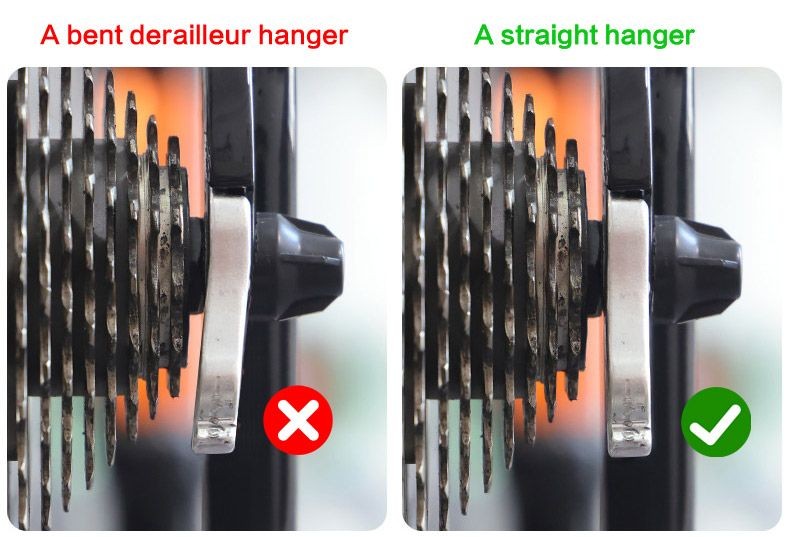
Is the Hanger Straight?

Bent derailleur hanger compared with a straight hanger

A bent hanger tilts the rear derailleur, which causes poor shifting, chain noise and difficult calibration, no matter how carefully it is set up.

How to check: look from behind the bike. The hanger should hang straight down, parallel to the cassette cogs. If it is bent, straighten it with a hanger alignment tool or fit a new hanger.

Check 2

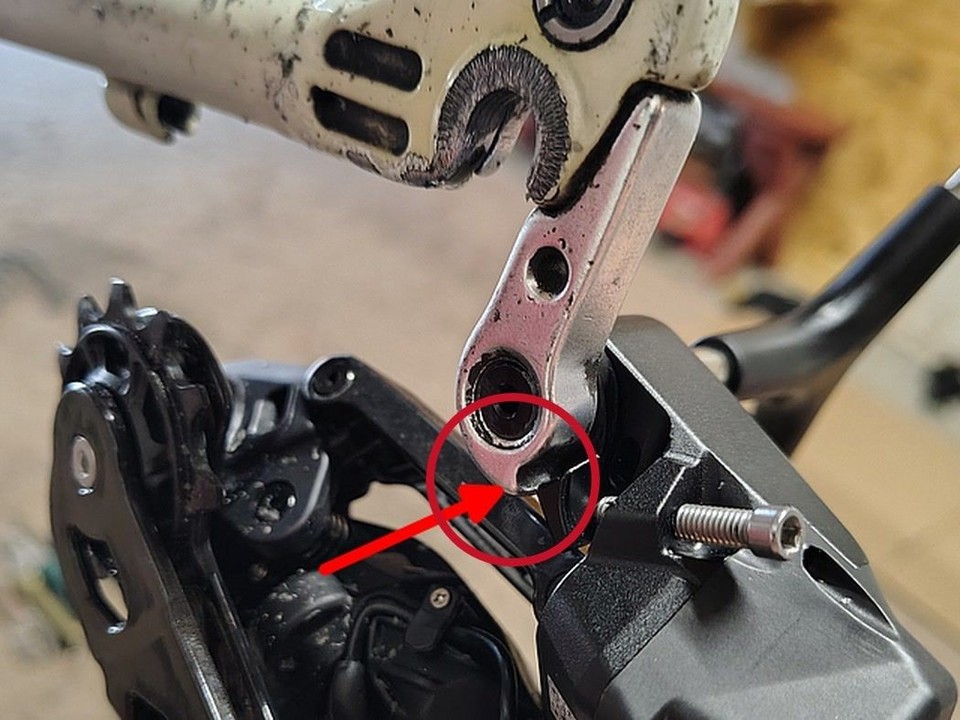
Does the Hanger Have a Step?

Derailleur hanger with a clear step: compatible
Compatible

Clear step at the bottom

Derailleur hanger with a very small step: not compatible
Not compatible

Very small step

The small tab next to the mounting bolt must rest on the step at the bottom of the hanger, so the derailleur can swing forward and back.

Small step? Fit a hanger with a larger step, or a derailleur hanger extender. Otherwise the derailleur stays rigid and cannot be set up.

Not sure? Send us a close-up photo of your hanger by email to support@aoeagle.com before ordering, and we will check it for you.

Compatibility & Buyer Notes

Please review the following before purchasing to ensure correct fitment.

App Pairing Required Before First Ride

After installation, pair both derailleurs to the WHEELTOP app over BLE, set your speed range, and run gear calibration. The app is free on iOS and Android.

Reviews

Reviews from our eBay store (aoeagle).

Feedback from buyers in our eBay store. It covers our whole store; the tabs show feedback for this item or for all items.

  • Positive feedbacka***4 (2387)Verified purchasePast 3 months

    Arrived quickly, thanks.

  • Positive feedbacke***n (63)Verified purchasePast 3 months

    Wheeltop eds txr groupset received as expected

  • Positive feedbackw***e (210)Verified purchasePast month

    Order delivered on time with no issues

How to pair the app?

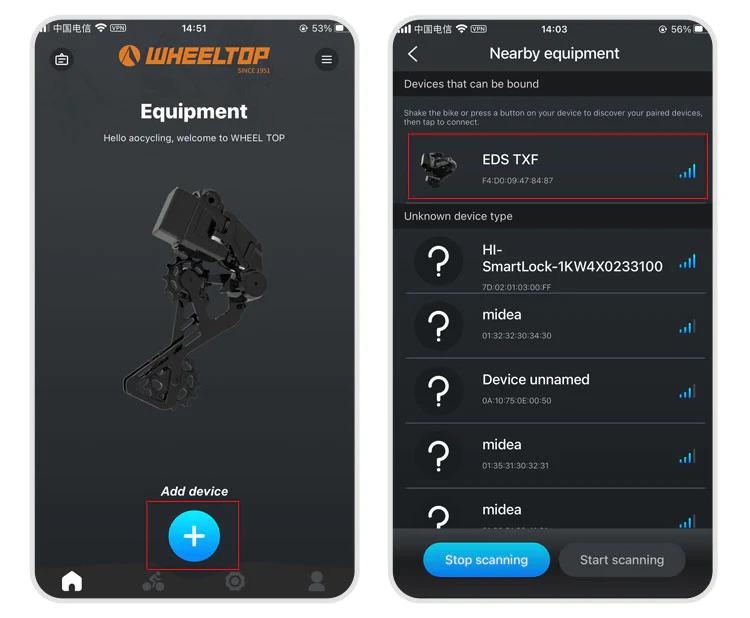
On the home page, click the [Add Device] button. The APP will automatically navigate to the nearby devices list page. Locate your device's MAC address, then click to add and bind it. After successful binding, you will need to name the device.

Step 1: Click the Add button on the home page Step 2: Turn on your phone’s Bluetooth to search for nearby devices
How to pair the app? illustration

Step 3: Select nearby bindable devices to add Step 4: Name the device
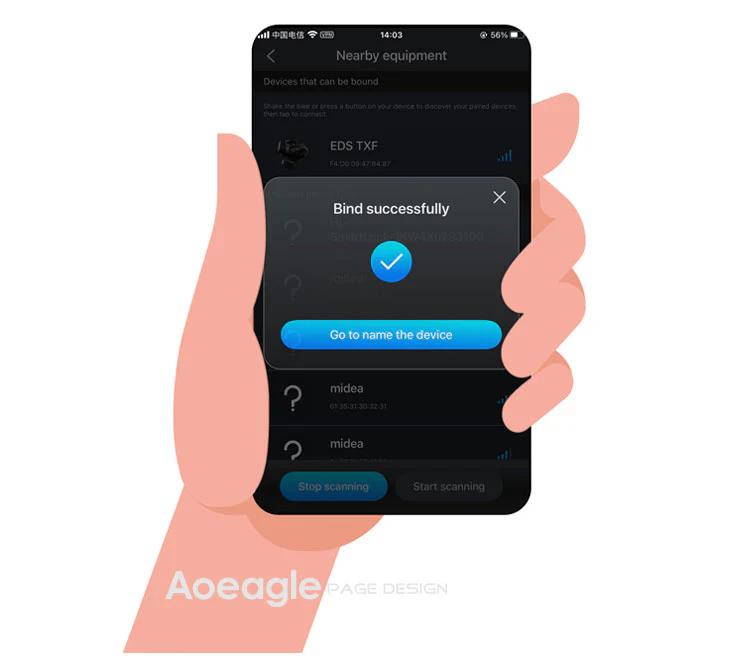
How to pair the app? illustration

One last thing — and this is where a lot of users get stuck.

To connect, you need to tap the Bluetooth icon in the app. Before doing so, make sure the derailleur hasn't gone into sleep mode. If it has, just give the derailleur a tap or shake the bike to wake it up. Once the connection is successful, the Bluetooth icon will light up — and you're all set to start adjusting your derailleur.
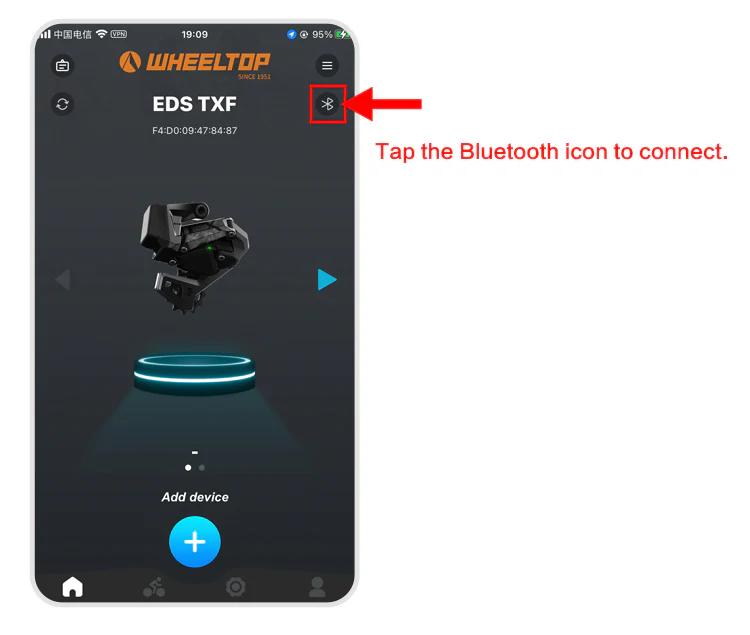
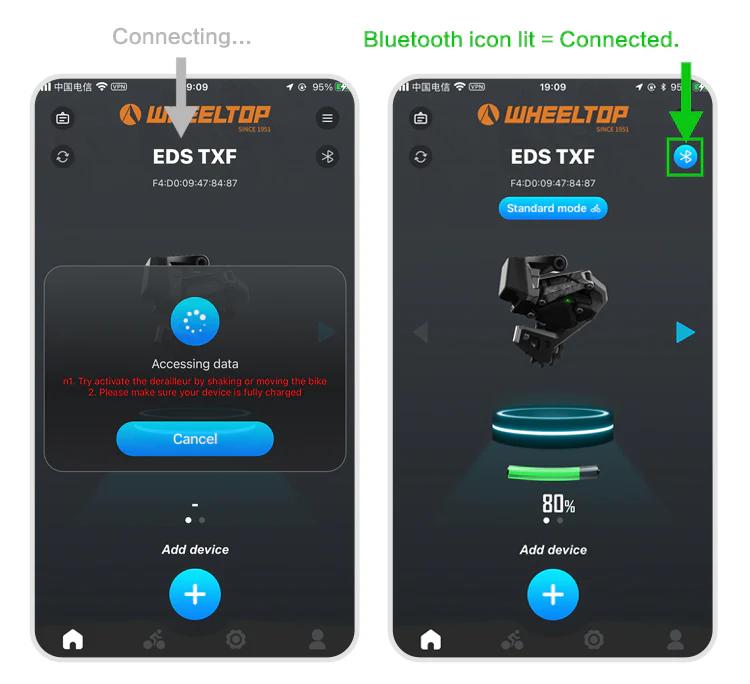
How to pair the app? illustration How to pair the app? illustration
How to download and register the WHEELTOP app?

WHEELTOP APP download:

How to download and register the WHEELTOP app? illustration

app Store

How to download and register the WHEELTOP app? illustration

Google Play

After successful registration, log in to the app.

You can also download the APK file directly: APK Download Link

For first-time use, please register with your email.

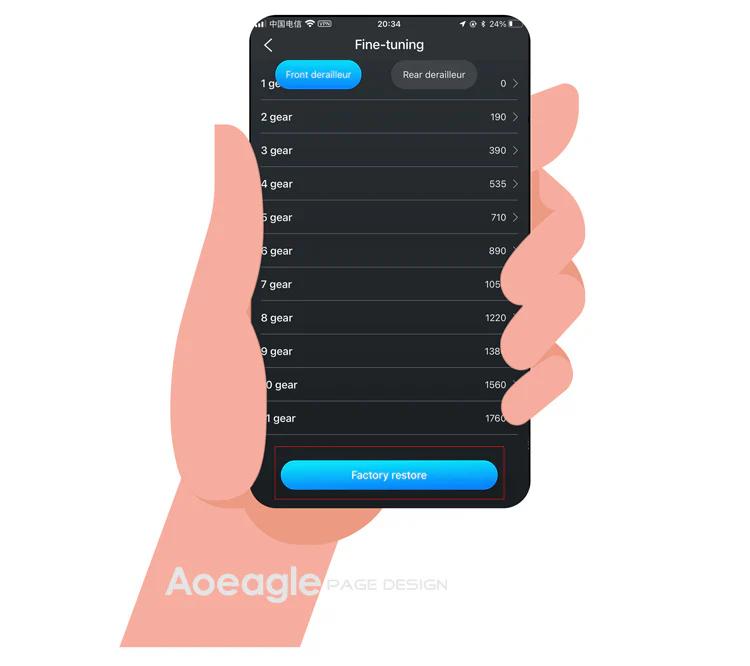
How to perform a factory restore?

It works like a factory reset for gear values. Use it when gear values have been misadjusted to restore the preset values.

Path: APP → Settings → Device-adjustment → Fine-tuning → "Factory-restore" button at the bottom.
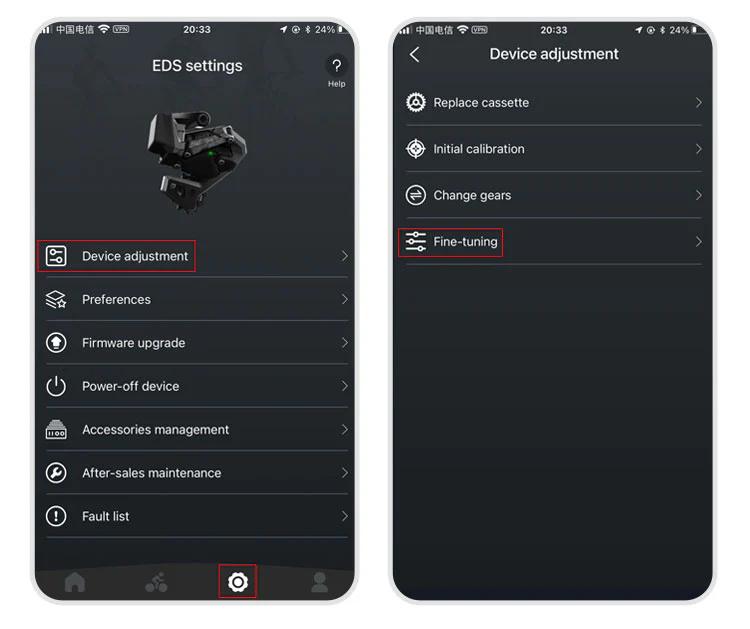
How to perform a factory restore? illustration How to perform a factory restore? illustration